

Teslita
Casora GmbH Utilities iPhoneiPadiPod touch
Teslita is a free Utilities app for iPhone and iPad by Casora GmbH. Requires iOS 15.1. Updated September 29, 2026.
- Price
- Free
- on the App Store
- Size
- 33 MB
- Age 4+
- Updated
- Sep 29
- 2026 · v1.5.7
Screenshots


About Teslita
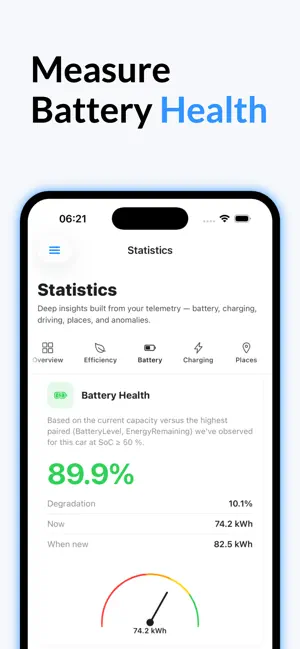
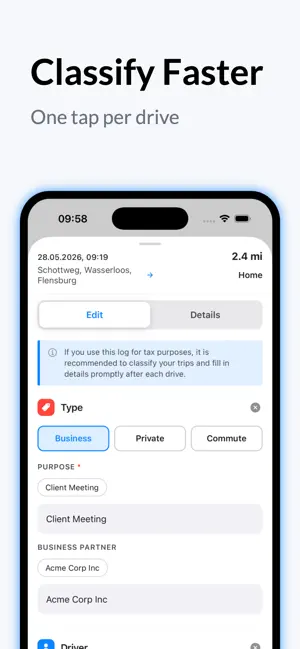
Your cars logbook, on autopilot. Every drive your car makes is captured automatically — start address, end address, route, distance, timestamp. Tap once to mark a trip Business, Private or Commute, or let your saved Places handle the daily commute on its own. At month-end, export a cryptographically signed PDF your accountant or a tax auditor can verify in any PDF reader. No card on file. No app to open to "start" a trip. No logbook to fill in. — AUTOMATIC DRIVER'S LOGBOOK — • Every trip captured from the car itself — addresses, route, distance, duration, driver, license plate • One-tap classification: Business / Private / Commute • Saved Places ("Home", "Office", "Acme Corp") auto-tag your repeat routes, so the daily commute fills itself in • Per-trip notes, purpose and business partner, all editable inline • Round-trips and multi-leg journeys group into a single line item • Cryptographically signed monthly PDF export, verifiable in any standard PDF reader — built for tax filings, employer reimbursements and audits — THE MAP YOU ACTUALLY WANT — • Full route drawn on the map with per-minute waypoints • Speed and altitude charts under every drive • Heatmap of every road you've ever driven • A tiny route-shape thumbnail next to every trip in the list — CHARGING, PROPERLY ACCOUNTED FOR — • Every charging session logged — home, public, Supercharger • Per-Place rate rules, so home electricity, work and that one cheap fast-charger each cost what they actually cost • Supercharger invoices emailed to you (and your accountant) — flip a switch once, never think about it again • Bulk ZIP download of every invoice for any period • True charging efficiency: how much grid energy actually made it into the battery • Charging curves, so you can see exactly how each session ramped — HEALTH & DIAGNOSTICS — • Battery health tracked over time, with clear degradation trends • Phantom drain analysis — where your range really goes when parked • Tire pressure history per wheel • FSD and Autopilot mileage statistics — BUILT FOR HOW YOU ACTUALLY LIVE — • 14 languages, with locale-aware numbers, currencies and dates • Light, dark and automatic themes that follow your device • Multi-vehicle households — every car on one account • The same data on iPhone, iPad and any browser, with one login
What’s new
Version 1.5.7 · Updated September 29, 2026
See how far you can really go. The dashboard now leads with your range at your own consumption, worked out from your recent drives, with Tesla's figure beside it for comparison. Until there is enough driving to go on — about 100 km (60 miles) — it shows Tesla's estimate and says so. Tap it to open the range map. On the Find chargers map, Range shades the area your Tesla can reach on its current charge, estimated from the terrain along the way: climbs shrink it, descents stretch it. Choose a reserve of 0, 10 or 20% to arrive with, or Round trip to see how far you can go and still make it back. The chargers stay on the map, so you can see which ones are within reach, and if your Tesla has moved since, one tap brings the area up to date. The dashboard card is tidier too: one status instead of three, "Asleep" up next to the time since the last signal, and a background map without street names running through the text. Four new automations. Charge level tells you when your Tesla has charged to your level. Plug-in reminder tells you when it has been parked at home for 30 minutes without being plugged in — if you like, only below a level you choose. Tire pressure warns you when a tire is losing air, measured against your Tesla's own target pressure. Sentry alarm tells you when Sentry Mode sounds the alarm, and if you like when someone comes close. And a new geofence now opens where your Tesla is. Fixed: times in automations were shown hours early, so a run could look older than it was. Health now checks each tire against your Tesla's target pressure rather than the other tire on its axle, so two equally soft tires no longer both show green.
App privacy
The developer, Casora GmbH, reported these privacy practices to Apple.
Data Linked to You
The following data, which may be collected and linked to your identity, may be used for the following purposes:
- Contact Info: Name, Physical Address, Email Address
- Location: Precise Location
- Identifiers: User ID
Used for: Product Personalization, App Functionality
Alternatives to Teslita
Looking for apps like Teslita? Here are 6 similar apps on the App Store. The highest rated is Handlefree: Skip the Handle (5.0/5), and all 6 are free to download.
-
 MateDrive: TeslaMate Client
-
 Tesatlas
3.7
Tesatlas
3.7
-
 Handlefree: Skip the Handle
5.0
Handlefree: Skip the Handle
5.0
-
 Teslog - TeslaMate Mobile App
2.3
Teslog - TeslaMate Mobile App
2.3
-
 T4U for Tesla
-
 HedgieMate: For your Tesla
4.9
HedgieMate: For your Tesla
4.9
| App | Rating | Price | Last updated | Compare |
|---|---|---|---|---|
| Teslita | – | Free | September 29, 2026 | |
| MateDrive: TeslaMate Client | – | Free | Aug 3, 2026 | Compare |
| Tesatlas | 3.7 / 5 (3) | Free | Oct 17, 2026 | Compare |
| Handlefree: Skip the Handle | 5.0 / 5 (3) | Free | Oct 11, 2026 | Compare |
| Teslog - TeslaMate Mobile App | 2.3 / 5 (3) | Free | Aug 21, 2026 | Compare |
| T4U for Tesla | – | Free | Oct 10, 2026 | Compare |
| HedgieMate: For your Tesla | 4.9 / 5 (16) | Free | Oct 13, 2026 | Compare |
Compare Teslita with the top alternatives: ratings, updates, ASO score and keyword gaps →