

Roomy Clock - Timer & Alarm
Takeshi Tokumura Utilities iPhoneiPadiPod touch
Roomy Clock - Timer & Alarm is a free Utilities app for iPhone and iPad by Takeshi Tokumura. Requires iOS 17.6. Updated October 18, 2026.
- Price
- Free
- on the App Store
- Size
- 12 MB
- Age 4+
- Updated
- Oct 18
- 2026 · v1.4.2
Screenshots

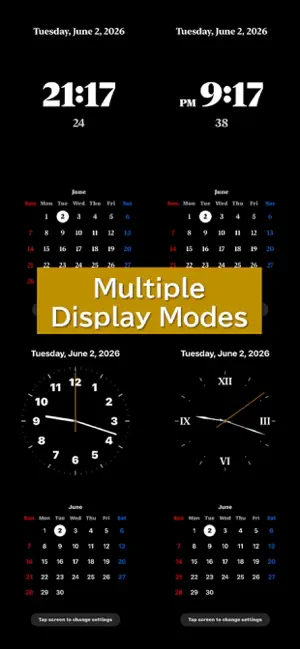

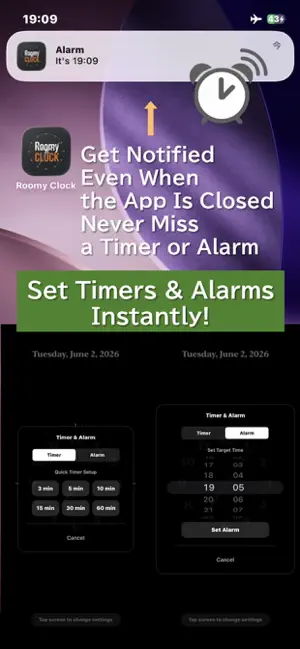
About Roomy Clock - Timer & Alarm
"Roomy Clock" is a simple, easy-to-read clock app with no ads. Switch freely between digital and analog clocks, a monthly calendar, and a variety of timer displays. Whether you're working, studying, reading, or attending meetings, Roomy Clock helps you manage your time with ease. With support for Always On Display (Auto-Lock disabled), you can check the time at a glance without having to tap the screen. Place your device on a desk or bedside table and turn it into your own personal clock. The timer is designed to be visually intuitive, making it easy to see the remaining time at a glance. Alarm notifications ensure you never miss important moments, even when the app is closed or your device is locked. "We wanted a clock that is simple, easy to read, and always visible." Roomy Clock was created from that simple idea. Instead of treating your smartphone as a device full of distractions, transform it into a beautiful clock that naturally fits into your daily space. == Main Features == * Timer & Alarm Functions - Easy-to-use timer and alarm features - Notifications work even in sleep or background mode - Nightstand Mode is also available (Night Clock Mode) * Digital & Analog Clock Styles - Swipe left or right to switch clock styles - Includes 7 different clock designs * Beautiful Customization - Change backgrounds, colors, and fonts - Toggle calendar display ON/OFF * Minimal Calendar Display - Clean monthly calendar that matches the clock design - Weekend colors adapt to your selected theme - Switch displays with vertical swipes (Portrait Mode) * Landscape Mode Support - Large centered clock display in landscape mode (Clock-Only Mode) - Stable layout even while seconds update * Always-On Display Support - Keeps the screen awake like a real desk clock - Great for desks, bedside tables, and workspaces * Settings Persistence - Automatically saves your previous settings * Multi-Language Support - Supports Japanese and English - Date formats adapt automatically 【Important Notes for Notifications】 * To use timer and alarm notifications, please make sure notifications are enabled for Roomy Clock. Settings > Apps > Roomy Clock > Notifications > Enable "Allow Notifications" * To make alarm times and notification details easier to view on the Lock Screen, we recommend setting "Show Previews" to "Always". Settings > Apps > Roomy Clock > Notifications > Show Previews > "Always" * If notifications are not being delivered, your iPhone may have a Focus Mode or Do Not Disturb mode enabled. In that case, add Roomy Clock to the list of allowed apps for the active Focus mode. Settings > Focus > Select a Focus Mode > Allowed Apps > Add Roomy Clock * Notification behavior may vary depending on your iPhone settings, iOS version, and system limitations. We hope "Roomy Clock" brings a little more comfort and simplicity to your daily life.
What’s new
Version 1.4.2 · Updated October 18, 2026
What's New in Version 1.4.2 Thank you for using Roomy Clock! In version 1.4.2, we have improved screen brightness control and overall app stability for a smoother user experience. ■ Improved Screen Brightness Restoration Fixed an issue where returning to your iOS system's original screen brightness after screen lock or sleep could occasionally be inaccurate. ■ Optimized Nightstand & Brightness Settings Enhanced brightness transition smoothness when using Nightstand Mode and "Keep Previous Brightness" settings. ■ Minor Bug Fixes & Performance Improvements
App privacy
The developer, Takeshi Tokumura, reported these privacy practices to Apple.
Data Not Linked to You
The following data, which may be collected but is not linked to your identity, may be used for the following purposes:
- Identifiers: Device ID
- Usage Data: Product Interaction
- Diagnostics: Crash Data, Performance Data
Used for: Analytics, App Functionality
Alternatives to Roomy Clock - Timer & Alarm
Looking for apps like Roomy Clock - Timer & Alarm? Here are 6 similar apps on the App Store. The highest rated is SuperClockRadio (5.0/5), and all 6 are free to download.


| App | Rating | Price | Last updated | Compare |
|---|---|---|---|---|
| Roomy Clock - Timer & Alarm | – | Free | October 18, 2026 | |
| Horalume | – | Free | Aug 20, 2026 | Compare |
| Men’s Ad Blocker | – | Free | Sep 12, 2026 | Compare |
| SuperClockRadio | 5.0 / 5 (1) | Free | May 7, 2026 | Compare |
| フォント置換君 | – | Free | Sep 7, 2026 | Compare |
| Switching Hourglass | – | Free | Sep 7, 2026 | Compare |
| NanoLuna | – | Free | Oct 16, 2026 | Compare |