

Trimly - Memories within Reach
思涵 朱 Photo & Video iPhoneiPadiPod touchMac
Trimly - Memories within Reach is a paid Photo & Video app for iPhone and iPad by 思涵 朱. Requires iOS 18.0. Updated October 29, 2026.
- Price
- 2.99 USD
- on the App Store
- Size
- 39 MB
- Age 4+
- Updated
- Oct 29
- 2026 · v1.8.4
Screenshots


About Trimly - Memories within Reach
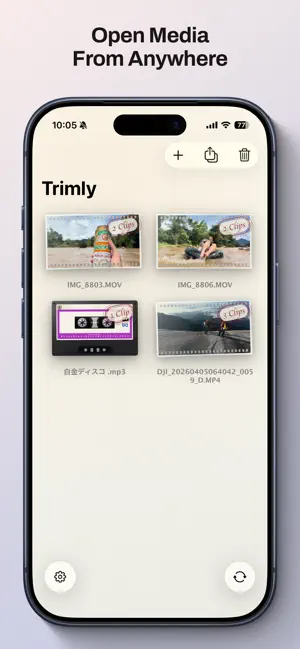
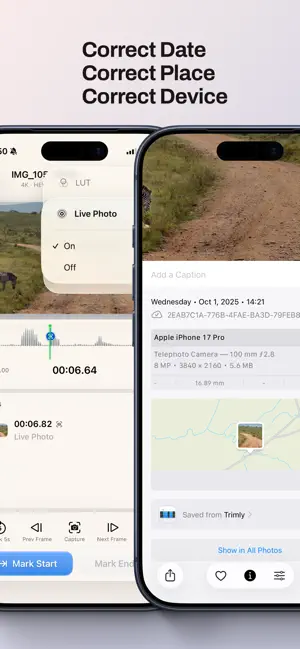
The best moments should live in your Photos library — not buried in an hour-long video or trapped in bulky editing software. Trimly does one thing: helps you find the highlights, cut them out, and save them where you open them every day. Wedding vows, baby’s first steps, a sunset clip, the moment everyone laughed. Many apps try to turn you into a pro editor. Trimly helps you finish in minutes. What Trimly can do • Cut multiple clips from one video: export vows, hugs, confetti and more separately without starting over • Export to Photos, local storage, or an external drive for easy sharing and viewing • Preserve original quality as much as possible • Batch export clips in chronological order, ideal for turning a trip into highlight videos • Share a video from another app and start trimming directly in Trimly From video to highlights in seconds • Reads the source file directly with no extra copy, saving storage • Drag the timeline to set in and out points, create as many clips as you need, with undo support • Add labels such as “Vows,” “Sunset,” or “Funny” • Waveform timeline helps you cut interviews and vlogs by sound • Fine-tune frame by frame, or jump five seconds with one tap • Capture a still image or export a Live Photo at any moment (HDR supported) • iPhone landscape mode for a wider view and more comfortable editing • Rotate footage directly without slow transcoding Built for real shooting scenarios • Travel vlogs: split long videos into shareable clips of arrival, food and more • Outdoor adventures: pick out summit moments or dramatic downhill turns • Family gatherings: save candles, gifts and laughs as separate clips • Concerts: keep the chorus and encore, skip the queue and warm-up Everything belongs in the right place in Photos • Calculates the real time of every exported frame from the source video’s capture time and clip position • Exported videos, screenshots and Live Photos return to Photos with the correct time, alongside that day’s memories • Preserves GPS location, capture device, lens model and other metadata Local AI and automation • On-device AI scene and sound recognition: identifies subjects and sound types locally and lets you add related segments with one tap • On-device AI transcription and subtitle export: speech-to-text and translation run locally; tap text to jump to the exact position; export subtitle files • Shortcuts automation: fits into system workflows for one-tap actions and batch processing A creative relay across devices • Progress is saved automatically and synced through iCloud. Rough cut on iPhone during a commute, then continue on Mac at home • Handoff support: switch devices without tedious importing • AirPlay support: cast trip highlights to the TV and share them with family For photography and video enthusiasts • Built-in Rec. 709 restoration LUTs for Apple Log 2, GoPro, DJI and Insta360 footage • Apply a LUT while trimming to make footage look vivid instantly • Supports the Apple Photos extension, so you can apply LUTs to videos directly in the Photos app • New LUT manager: import custom .cube files, with all LUTs synced through iCloud Privacy by design • Core features run locally on device, with no account and no ads • Your footage never leaves your device. Network requests are limited to syncing progress and presets through your iCloud • AI models are provided by Apple system frameworks and run entirely on device • No third-party cloud processing, user tracking, or behavioral analytics Legal • Apple, iPhone, iPad and Mac are trademarks of Apple Inc. • GoPro is a trademark of GoPro, Inc. • DJI is a trademark of SZ DJI Technology Co., Ltd. • Insta360 is a trademark of Arashi Vision Inc. • Trimly is independently developed and is not affiliated with or endorsed by the companies above • Built-in LUTs are for personal footage only and not for commercial use • All trademarks belong to their respective owners © 2026 Trimly
What’s new
Version 1.8.4 · Updated October 29, 2026
What’s New • Open files in common MKV and WebM formats • Quickly preview LUTs with the new QuickLook Extension • Run Shortcuts in the background on OS 27 or later Bug Fixes • Improved the interface, fixed issues, and enhanced stability
App privacy
The developer, 思涵 朱, reported these privacy practices to Apple.
Data Not Collected
The developer does not collect any data from this app.
Alternatives to Trimly - Memories within Reach
Looking for apps like Trimly - Memories within Reach? Here are 6 similar apps on the App Store.
-
 CiTY — Your Urban Archive
-
 VSplit - Video Splitter
-
 PicNow - AI Photo Creation
-
 LongShot: Scrolling Screenshot
-
 Auto Video Slicer
-
 Useful Video Best Shot
| App | Rating | Price | Last updated | Compare |
|---|---|---|---|---|
| Trimly - Memories within Reach | – | 2.99 USD | October 29, 2026 | |
| CiTY — Your Urban Archive | – | Free | Oct 31, 2026 | Compare |
| VSplit - Video Splitter | – | Free | Jan 6, 2026 | Compare |
| PicNow - AI Photo Creation | – | Free | Oct 6, 2026 | Compare |
| LongShot: Scrolling Screenshot | – | Free | Oct 21, 2026 | Compare |
| Auto Video Slicer | – | Free | Aug 5, 2026 | Compare |
| Useful Video Best Shot | – | Free | Oct 29, 2026 | Compare |