

Run to TCX
Chisan Ahn Health & Fitness iPhoneiPadiPod touch
Run to TCX is a free Health & Fitness app for iPhone and iPad by Chisan Ahn. Requires iOS 18.0. Updated October 20, 2026.
- Price
- Free
- on the App Store
- Size
- 11 MB
- Age 4+
- Updated
- Oct 20
- 2026 · v1.2
Screenshots


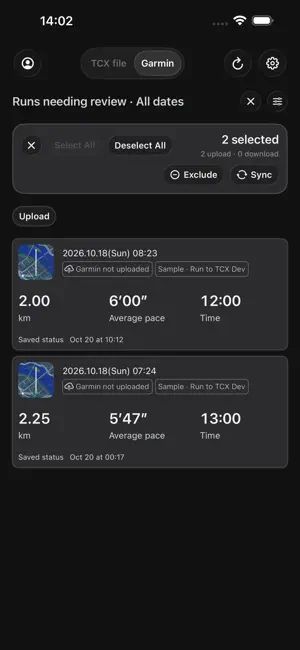

About Run to TCX
Move your workouts between Apple Health and Garmin Connect, or save them as TCX files. Run to TCX supports running by default. Enable additional workouts in Settings to export and upload traditional and functional strength workouts. Garmin-to-Apple Health imports support running only. FEATURES • Read Apple Health workouts and available GPS routes, distance, heart rate and calories with your permission. • Export one workout or multiple selected workouts as TCX files. • Sign in on Garmin’s web page and upload selected workouts to Garmin Connect. • Optionally import Garmin runs into Apple Health, including available route and heart-rate data. Imports are off by default. Choose workouts manually or enable automatic downloads in Settings. • Check for matching activities before transfers to help avoid duplicates. • Enable automatic uploads and downloads independently in Background sync settings. Scheduled checks cover the last 24 hours and revisit pending workouts when missing distance or route data arrives. • Choose running, strength or both for automatic uploads, and require distance or GPS routes for running. • Receive optional completion notifications with each workout’s name, date, distance and duration. • Keep workout upload statuses between app launches. • Browse all dates with paged cards, or choose the last 3 days, 1 week, 2 weeks, 4 weeks or a custom range. • Filter upload candidates, download candidates, synced and excluded workouts. Clearing the last status selects all. • Review failure details, retry transfers, or save TCX files for manual Garmin import. • Choose English or Korean and system, light or dark appearance. PRIVACY Health data is read on your device. Selected workout data is sent directly to Garmin when you request an upload or enable automatic upload, or saved to destinations you choose when exporting. Optional Garmin imports are saved to Apple Health after you choose to import or enable automatic download and grant Health write access. Imported TCX data is processed in memory and is not retained as a file. You enter your password and MFA on Garmin’s web page. Session credentials are stored in the iOS Keychain. Run to TCX does not use a developer-operated server to store your workouts or Garmin credentials. Garmin sign-in is optional for TCX file export. Available measurements depend on source data and permissions.
What’s new
Version 1.2 · Updated October 20, 2026
• Added optional strength workout support alongside running. • Improved Garmin sign-in with a Garmin-hosted web login and clearer account controls. • Simplified workout status filters and made applied filters clearer. • Improved loading indicators and fixed duplicate progress displays. • Added optional background uploads and downloads with separate controls. • Added automatic upload conditions and rechecks for workouts waiting for distance or GPS routes. • Added optional per-workout sync completion notifications. • Added a support and FAQ link in Settings.
App privacy
The developer, Chisan Ahn, reported these privacy practices to Apple.
Data Not Collected
The developer does not collect any data from this app.
Alternatives to Run to TCX
Looking for apps like Run to TCX? Here are 6 similar apps on the App Store. The highest rated is FitFerry (5.0/5), and all 6 are free to download.
-
 Ruttio
-
 Healthcove: Export & Sync
3.0
-
 WorkoutPort: Sync to Strava
2.0
-
 TCX to HealthKit
-
 FitFerry
5.0
-
 Workout Exporter for AI
| App | Rating | Price | Last updated | Compare |
|---|---|---|---|---|
| Run to TCX | – | Free | October 20, 2026 | |
| Ruttio | – | Free | Jun 25, 2026 | Compare |
| Healthcove: Export & Sync | 3.0 / 5 (2) | Free | Sep 25, 2026 | Compare |
| WorkoutPort: Sync to Strava | 2.0 / 5 (1) | Free | Oct 20, 2026 | Compare |
| TCX to HealthKit | – | Free | Aug 29, 2026 | Compare |
| FitFerry | 5.0 / 5 (1) | Free | Oct 18, 2026 | Compare |
| Workout Exporter for AI | – | Free | Sep 24, 2026 | Compare |
Compare Run to TCX with the top alternatives: ratings, updates, ASO score and keyword gaps →