

Mercurius AI
KEVIN NICHOLAS CHRISTENSEN Education iPhoneiPadiPod touch
Mercurius AI is a free Education app for iPhone and iPad by KEVIN NICHOLAS CHRISTENSEN. Rated 5.0/5 from 6 ratings. Requires iOS 17.0.
- Rating
- 5.0
- 6 ratings
- Price
- Free
- on the App Store
- Size
- 17 MB
- Age 12+
- Updated
- Oct 30
- 2026 · v2.3.0
Screenshots



About Mercurius AI
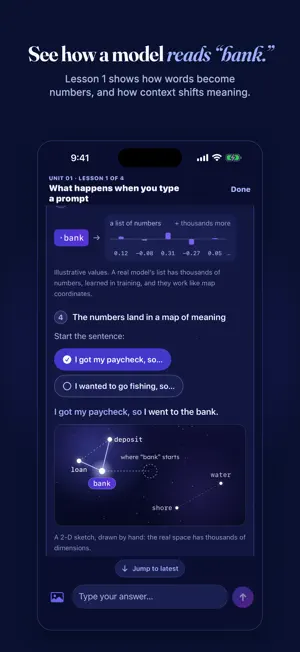
Mercurius AI is a tutor for understanding artificial intelligence — how it works, where it goes wrong, and how to use it without letting it think for you. It is built around verification and reflection. In Socratic chat, the default, it guides with questions instead of handing over answers. TWO COURSES Choose one when you start. You can switch any time, and each course keeps its own progress. BASICS — new to AI chatbots? Start here. Five units and 18 short lessons, one small step at a time: • Meet AI chatbots • Your first conversations, safely • Getting good answers • Everyday tasks • Using it wisely on your own Each idea is taught plainly. You practice by writing real messages, and the tutor does the task for real, the way any chatbot would, then points out what made it work. You learn what never to share, how to spot fake calls that sound like family and other scams that use AI, and when to ask a person instead about health, money or legal questions. A lesson is done once you've practiced and answered its check; the four safety lessons need the right answer. Every Basics lesson ends with something to try today, and you can make the words bigger. DEEP DIVE — already use AI? Learn how it works. Eight units and 35 short lessons take you from "what happens when you type a prompt" to agents and what comes next: • How AI Actually Works • Bias & Fairness • AI in Society • Prompt Engineering • Ethics & Alignment • Spotting AI: Deepfakes & Synthetic Media • Using AI Well • The Frontier: Agents & What's Next Lessons teach one idea at a time and check your understanding with a question before moving on. A Deep dive lesson is marked complete when you show you understand its objective — not when you reach the end of the text. Unit checks tie each unit together. In Lesson 1, an interactive card shows a sentence turning into tokens, then numbers, then a place on a map of meaning. In both courses, lessons stream in short beats with KEY IDEA and EXAMPLE cards. Quick checks are multiple-choice questions you answer with a tap; some Deep dive checks ask for your own words. THREE WAYS TO TALK • Socratic (the default): the tutor asks questions that lead you to the idea. • Discussion: reflect on a topic and get a scored response on your reasoning. • Debate: take a side and argue it while the tutor argues the other side. ALSO • Attach a photo to a message — a screenshot, a diagram, a suspicious image — and talk it through. • Earn a certificate: pass all eight Deep dive unit checks, or finish all 18 Basics lessons, then print it or save it as a PDF. The name you type on it is kept on the device and never sent to our server. • Opt-in reminders, and a streak on the Deep dive, help you keep the habit going. • Long-press any reply to report it. • The tutor is not a counselor. A setup screen lists crisis lines. If our server reads a unit-check answer, or a chat you ask to be quizzed on, as a crisis, that activity stops and shows how to call or text 988 or text HOME to 741741. HOW IT WORKS Responses are generated by Claude, Anthropic's AI model, through Mercurius's own server. Like any AI, it can be wrong — checking claims is part of the curriculum, and the app says so plainly. There are no accounts and no ads. Your session is an anonymous id. Our server keeps your messages for 90 days and photos for 24 hours, then deletes them. Deleting the app doesn't delete them, but you can delete them sooner in Settings → Delete my data & start over. The privacy policy at trymercurius.com/privacy has the details. WHO IT'S FOR Students 13 and up, and anyone who wants to use AI well rather than passively. The Basics course is written for anyone 13 or older who is new to AI chatbots. Mercurius AI is built by the Mayo AI Literacy Club, a student club.
Ratings & reviews
5.0
6 ratings
What’s new
Version 2.3.0 · Updated October 30, 2026
Mercurius 2.3 adds a course for beginners, certificates, and clearer privacy. • After you update, you'll confirm your age, see where your messages and photos go (Anthropic's Claude, through our server) and how long our server keeps them, and read what Merc can't do. Then Home opens. New installs also meet Merc and choose a course. • New: Basics, a course for people new to AI chatbots. 18 short lessons, one small step at a time, including how to spot scams that use AI. You stay on the Deep dive, the 35-lesson course on how AI works, and can switch any time with "Basics | Deep dive" at the top of the Curriculum tab. Each course keeps its own progress. • Lessons now have KEY IDEA and EXAMPLE cards, and multiple-choice checks you answer with a tap. • Deep dive Lesson 1 has an interactive card that shows a sentence turning into tokens, then numbers, then a place on a map of meaning. • Certificates: pass all eight Deep dive unit checks, or finish every Basics lesson, then print yours or save it as a PDF. The name you type is kept on the device and never sent to our server. • Settings → "Delete my data & start over" erases your data on our server and gives you a fresh anonymous id. Your session id is fully visible and copyable, and Privacy choices, Help & FAQ and Contact support are one tap away. • Finished lessons are saved to your anonymous id on our server, so your path comes back after a reinstall. On the Deep dive, Home shows your next lesson and this week's goal of two lessons. • New weekly nudges on Sunday and Wednesday evenings, skipped once you've done the week's two lessons. They stay off until you turn them on. The daily reminder now comes only while you have a streak going. • If our server reads a unit-check answer, or a chat you ask to be quizzed on, as a crisis, the activity stops and shows how to reach the 988 Suicide & Crisis Lifeline and the Crisis Text Line. • One dark look for the whole app, whatever your device's appearance setting. The Light and System theme options are gone. • Reporting a reply (long-press it) now asks you for a reason. • Honest messages when a daily limit or a service pause is reached, with the local time a daily limit resets. • Better support for large text sizes and VoiceOver. Links in replies open only secure (https) pages, and remote images never load. • Bug fixes and polish throughout.
App privacy
The developer, KEVIN NICHOLAS CHRISTENSEN, reported these privacy practices to Apple.
Data Linked to You
The following data, which may be collected and linked to your identity, may be used for the following purposes:
- Usage Data: Product Interaction
- User Content: Photos or Videos
Used for: Analytics, App Functionality
Data Not Linked to You
The following data, which may be collected but is not linked to your identity, may be used for the following purposes:
- User Content: Other User Content
- Identifiers: User ID
Used for: App Functionality
Alternatives to Mercurius AI
Looking for apps like Mercurius AI? Here are 6 similar apps on the App Store. The highest rated is Karu - Personal AI Tutor (5.0/5), and all 6 are free to download.
-
 Forte — AI Tutor
-
 NewSpeak: AI English Tutor
-
 STREAM: Wellness & Resilience
-
 Karu - Personal AI Tutor
5.0
-
 AI Tutor: Learn Spoken English
-
 Read My Paper
3.0
| App | Rating | Price | Last updated | Compare |
|---|---|---|---|---|
| Mercurius AI | 5.0 / 5 (6 ratings) | Free | October 30, 2026 | |
| Forte — AI Tutor | – | Free | Jun 1, 2026 | Compare |
| NewSpeak: AI English Tutor | – | Free | Jun 6, 2026 | Compare |
| STREAM: Wellness & Resilience | – | Free | Sep 3, 2024 | Compare |
| Karu - Personal AI Tutor | 5.0 / 5 (3) | Free | Jan 21, 2024 | Compare |
| AI Tutor: Learn Spoken English | – | Free | Apr 21, 2026 | Compare |
| Read My Paper | 3.0 / 5 (1) | Free | Mar 4, 2026 | Compare |
Compare Mercurius AI with the top alternatives: ratings, updates, ASO score and keyword gaps →