

App Volume: a volume per app
CHIH YU LIN Utilities iPhoneiPadiPod touch
App Volume: a volume per app is a free Utilities app for iPhone and iPad by CHIH YU LIN. Rated 3.5/5 from 6 ratings. Requires iOS 18.2.
- Rating
- 3.5
- 6 ratings
- Price
- Free
- on the App Store
- Size
- 35 MB
- Age 4+
- Updated
- Oct 24
- 2026 · v1.4.0
Screenshots


About App Volume: a volume per app
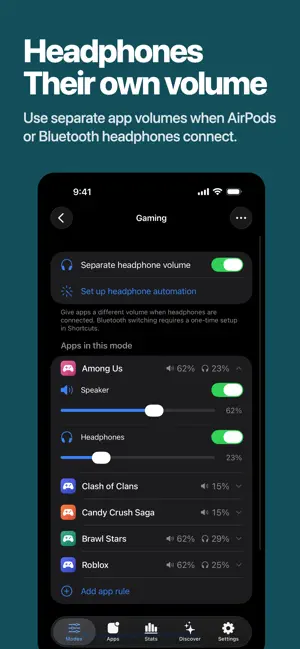
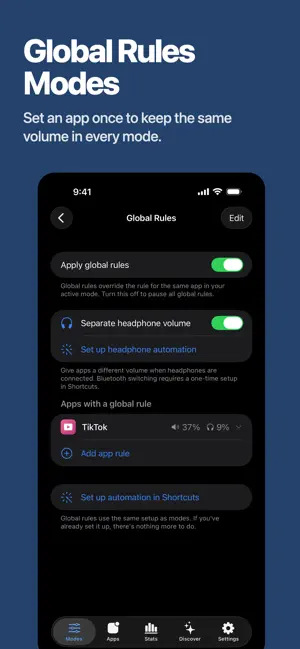
App Volume saves a target media volume for each app on iPhone and iPad. After you install the shortcut template and configure its App trigger, opening or switching to a selected app applies its saved level to the system media volume. Note: Due to system limitations, this app cannot keep independent volume levels for two apps playing at the same time. The volume of music playing in the background may also change. — HOW IT WORKS — 1. Create a mode and add your apps with their target volumes (TikTok 30%, Podcast 70%, Netflix 80%). 2. Install Per-App Volume in Apple Shortcuts. On iOS 27, select apps in the App trigger at the top of the template. On earlier versions, follow the in-app guide to create a Personal Automation. 3. When you add an app rule, also add that app to the trigger in Shortcuts. Changing volumes or switching modes does not require editing the shortcut. 4. Add the widget to Lock Screen, Home Screen, or Control Center — tap to switch the whole mode in one go. — NEW: HEADPHONE VOLUMES — Turn on "Separate headphone volume" for any app to give it a second, headphone-only level. Bluetooth helper automations handle the switch when they run; wired headphones aren't supported. — USE CASES — • A volume per app — Podcast 70%, music 60%, video 80%. Set once; switching apps auto-applies. • Ears vs room — TikTok at 25% on AirPods, 60% on the speaker. — FEATURES — • Saved volume per app: applies the preset to the system media volume when you open the app • Headphone volumes — a second per-app volume that applies while Bluetooth headphones are connected • Modes — bundle rules into named modes, swap the whole set instantly • Global rules — pin an app's volume across every mode; great for games that should always open muted • Ready-made modes — browse Discover, install Bedtime or Silent Game Ads in one tap • Share your setup — send any mode as a picture + link a friend can import • Widgets everywhere — Lock Screen, Home Screen, Control Center (iOS 18+): see the active mode, tap to switch • Switch notifications — silent banner by default, sound + haptic, or off • iCloud backup — modes backed up to your iCloud — GOOD TO KNOW — Headphone volume requires the Bluetooth helper automations. After disconnection, the speaker volume may take a few seconds to return. Wired headphones are not supported. — PRIVACY FIRST — • No ad tracking or data sales. We collect basic analytics and crash reports. Feedback you choose to send reaches us with its text, optional email, app/build and iOS versions, device model, and locale. • No microphone, no location, no contacts • Troubleshooting guide • Privacy Policy in Settings → Privacy — SUPPORT — Use the in-app feedback button to reach us directly — we read every message. Built for iPhone and iPad. From a one-person studio. Transparent development. Terms of Use (EULA) : https://www.apple.com/legal/internet-services/itunes/dev/stdeula/
Ratings & reviews
3.5
6 ratings
What’s new
Version 1.4.0 · Updated October 24, 2026
Supports the iOS 27 Shortcuts setup flow, so you can open the template directly to add app rules.
App privacy
The developer, CHIH YU LIN, reported these privacy practices to Apple.
Data Linked to You
The following data, which may be collected and linked to your identity, may be used for the following purposes:
- Location: Coarse Location
- Identifiers: User ID, Device ID
- Usage Data: Product Interaction, Other Usage Data
- Diagnostics: Other Diagnostic Data, Crash Data
- Contact Info: Email Address
- User Content: Customer Support
Used for: Analytics, App Functionality
Data Not Linked to You
The following data, which may be collected but is not linked to your identity, may be used for the following purposes:
- Diagnostics: Performance Data
Used for: Analytics
Alternatives to App Volume: a volume per app
Looking for apps like App Volume: a volume per app? Here are 6 similar apps on the App Store. The highest rated is Lumeoprime (5.0/5), and 5 of the 6 are free to download.
-
 ScreenHound: OCR & Translation
3.7
ScreenHound: OCR & Translation
3.7
-
 Lumeoprime
5.0
Lumeoprime
5.0
-
 Tally Counter 123: Pitch Count
-
 PageScribble for Safari
3.7
PageScribble for Safari
3.7
-
 Unlimited Audio Converter
5.0
Unlimited Audio Converter
5.0
-
 PhoneVet
| App | Rating | Price | Last updated | Compare |
|---|---|---|---|---|
| App Volume: a volume per app | 3.5 / 5 (6 ratings) | Free | October 24, 2026 | |
| ScreenHound: OCR & Translation | 3.7 / 5 (3) | Free | Jun 2, 2026 | Compare |
| Lumeoprime | 5.0 / 5 (2) | Free | Oct 20, 2026 | Compare |
| Tally Counter 123: Pitch Count | – | Free | Oct 4, 2026 | Compare |
| PageScribble for Safari | 3.7 / 5 (3) | 4.99 USD | Sep 21, 2026 | Compare |
| Unlimited Audio Converter | 5.0 / 5 (1) | Free | Apr 29, 2026 | Compare |
| PhoneVet | – | Free | Mar 24, 2026 | Compare |