

Surface Remote for Companion
Thomas Brown Utilities iPhoneiPadiPod touch
Surface Remote for Companion is a free Utilities app for iPhone and iPad by Thomas Brown. Rated 5.0/5 from 2 ratings. Requires iOS 17.0.
- Rating
- 5.0
- 2 ratings
- Price
- Free
- on the App Store
- Size
- 2 MB
- Age 4+
- Updated
- Oct 9
- 2026 · v1.1.3
Screenshots


About Surface Remote for Companion
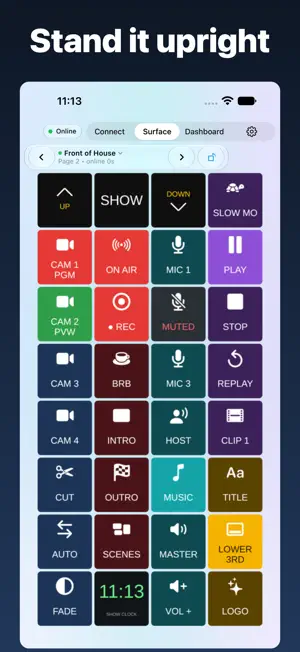
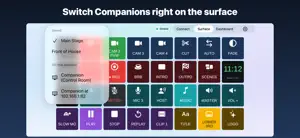
NO ADS. Surface Remote for Companion turns an iPhone or iPad into a button surface for Bitfocus Companion. It connects over Companion's Satellite API, on your own network, and shows your Companion buttons live. Built for control rooms, live events, streams, churches, schools and AV booths — anywhere you run a show from Companion and want one more set of buttons in your hand. WHAT IT DOES • Connects to Companion as a Satellite surface (WebSocket, port 16623 by default) • Finds Companion on your network by itself — tap it to connect, no address to type • Live button text, colour and press state from Companion • Tap or hold to press; page up and down; current page shown • Dashboard: pick the keys you need from any Companion page and put them on one screen • Operator mode: share chosen Dashboard keys with a crew member's phone by QR code; they see only those keys, and you can revoke them at any time • PIN lock: when Companion's PIN lock is on, unlock with the app's own keypad • Keeps the screen awake while connected • Light, Dark or System theme • Free to download and use • Remembers your last Companion and your surface settings, and connects on launch • Multi-Instance (in-app purchase, $9.99): save several servers, switch between them right on the surface, and on iPad run two surfaces at once • Auto reconnect when Companion restarts • Choose the grid: rows, columns, text size • Optional button artwork, or text-only for the fastest updates • Optional advanced layout with encoder controls • Diagnostics: latency, uptime, reconnects, Companion version, and a connection log you can share • Landscape layout for iPhone and iPad, or turn the surface upright with one tap • Settings in their own tab; the Connect and Settings screens turn with your phone PRIVACY No account. No ads. No analytics. The app talks only to the Companion server you use. Saved servers stay on your device. The camera is used only to scan an Operator QR code, on the device. REQUIREMENTS Bitfocus Companion running on a computer on the same network, with the Satellite WebSocket listener on. Dashboard and Operator mode need Companion 5 with Satellite subscriptions on. Surface Remote for Companion is not affiliated with, endorsed by, or sponsored by Bitfocus.
What’s new
Version 1.1.3 · Updated October 9, 2026
• Saving your connection is now free. The app remembers your last Companion and your settings, and connects on launch. • Multi-Instance is the one in-app purchase: saved servers, the switcher, and two surfaces on iPad. • iPad: upright keys now fill the screen.
App privacy
The developer, Thomas Brown, reported these privacy practices to Apple.
Data Not Collected
The developer does not collect any data from this app.
Alternatives to Surface Remote for Companion
Looking for apps like Surface Remote for Companion? Here are 6 similar apps on the App Store. The highest rated is EZAudioCut(MT)-Audio Editor (4.6/5), and 5 of the 6 are free to download.
-
 Chamii
-
 EZAudioCut(MT)-Audio Editor
4.5
-
 KromaDMX
-
 Lumens Camera Controller
-
 TVU Review
-
 Virtual Stream Deck
| App | Rating | Price | Last updated | Compare |
|---|---|---|---|---|
| Surface Remote for Companion | 5.0 / 5 (2 ratings) | Free | October 9, 2026 | |
| Chamii | – | Free | Mar 4, 2026 | Compare |
| EZAudioCut(MT)-Audio Editor | 4.6 / 5 (40) | 59.99 USD | Oct 24, 2026 | Compare |
| KromaDMX | – | Free | Oct 20, 2026 | Compare |
| Lumens Camera Controller | – | Free | Sep 4, 2024 | Compare |
| TVU Review | – | Free | Jun 17, 2026 | Compare |
| Virtual Stream Deck | – | Free | Sep 2, 2026 | Compare |