

cardlio: Business Card Scanner
Lars Gruenitz Business iPhoneiPadiPod touch
cardlio: Business Card Scanner is a free Business app for iPhone and iPad by Lars Gruenitz. Rated 5.0/5 from 1 ratings. Requires iOS 26.5.
- Rating
- 5.0
- 1 ratings
- Price
- Free
- on the App Store
- Size
- 80 MB
- Age 4+
- Updated
- Oct 26
- 2026 · v3.2.25
Screenshots


About cardlio: Business Card Scanner
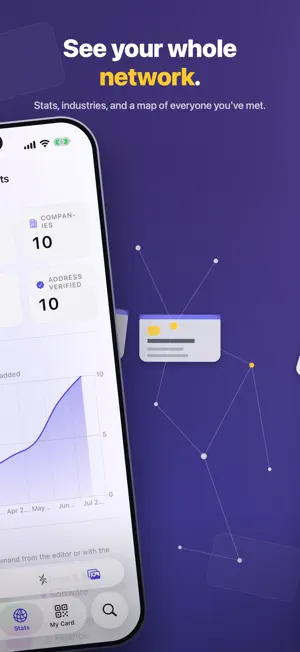
Scan a card once and never check it twice. cardlio shows you exactly what it read, flags the fields it wasn't sure of, and zooms to that spot on the card so you can confirm in a second — instead of re-reading every contact you save. Free to try: scan up to 10 cards. Unlock cardlio once — a single purchase, no subscription — for unlimited cards, every export, and sync to Office 365 and Google Contacts. NO SIGNAL, NO PROBLEM Conference Wi-Fi is where card scanners fail. cardlio reads every card on your device, with no server in the loop — so a whole stack scans just as fast in a basement exhibition hall, on a plane, or in another country as it does at your desk. SCAN ANYTHING WITH A CARD ON IT • Live camera capture finds the card, straightens it, and reads it — even several cards in one shot • Scan both sides; a Japanese front and an English back become one contact • Import photos or whole PDF stacks at once • Paste an email signature and get a contact, no photo needed THE WHOLE CARD, NOT JUST A NAME AND A NUMBER cardlio reads every line: title, company, every phone and email, the website, and the full street address down to building and postcode, checked against Apple Maps and pinned. It reads the layout, not just the letters: the big name up top is the person, the line by the logo is the company. ALL-CAPS names, spaced-out emails, foreign address formats and multi-office cards come out right. ONE CONTACT PER PERSON Scanned someone twice? cardlio finds the duplicates and merges them properly — the survivor keeps every phone number, email and note from both. YOUR NETWORK, VISIBLE • Ask your network a question in plain English and get an answer from your own cards — free, and it works offline • A world map with your contacts' cards as pins • Stats: countries, companies, industries, growth over time • Search that filters — tap suggestions like "Industry: Finance" HAND OUT YOUR CARD WITHOUT THE CARD • Keep several cards — work, personal, a side project — and switch with a tap • Share it as a link — your whole card travels inside the link and opens in any browser with an Add to Contacts button (free) • Show a QR code anyone's camera can scan, or put the QR widget on your Home and Lock Screen (free) • Write it to an NFC tag — any phone taps it to open your card, no app needed • Add it to Apple Wallet, QR included, two taps from the lock screen GET YOUR CARDS OUT (premium) • Sync straight into your Office 365 / Outlook contacts — one click, no duplicates, even Business Fax • Sync into your Google Contacts the same way — edit a card, sync again, and it updates that contact instead of adding another • Save cards to your Apple Contacts • Hand a colleague a set: pick several cards and send them as one contact file • Export vCard, CSV, Outlook-ready CSV, and Salesforce-ready CSV ALSO • Team libraries: share a fair's cards with colleagues, claim your leads, open the team in any browser at team.cardlio.app • Syncs across iPhone, iPad, and Mac through your private iCloud • Voice notes: dictate context after a scan, transcribed on your device • Follow-up emails drafted on your device by Apple Intelligence — nothing is sent to a server • Translate foreign cards, and search across scripts — type "shiquan" and find the card printed in Chinese • Siri and Shortcuts: scan a card, open one, or export a vCard from your own workflows YOUR CONTACTS OUTLIVE US No accounts and no servers means there is nothing to shut down. Your library lives on your own devices and syncs through your private iCloud. Exports are vCard and CSV — open formats every address book reads. If cardlio vanished tomorrow, everything you scanned would still be yours, and still readable. No tracking, no analytics, no server reading your contacts. Office 365 and Google sync send contacts only to your own account with those services. Optionally bring your own AI key for the trickiest cards — off by default. cardlio is also on the Mac App Store — one library, every machine.
What’s new
Version 3.2.25 · Updated October 26, 2026
New with Apple's Private Cloud Compute: while you review a scan, the address and company are now also read from the card's photo, so building, unit, city, postcode and country come out right much more often. You can switch it off under Settings → AI & Refine → Read the Address from the Photo. Sharper address reading: a card that prints two offices side by side keeps one office's address and puts the other in the notes, and a founding year printed under the logo no longer ends up in the street.
Alternatives to cardlio: Business Card Scanner
Looking for apps like cardlio: Business Card Scanner? Here are 6 similar apps on the App Store. The highest rated is FirstSeed Planner (5.0/5), and all 6 are free to download.
-
 Hi Sticky: Sticky Notes
4.6
Hi Sticky: Sticky Notes
4.6
-
 Memo - AI Voice Notes
4.8
Memo - AI Voice Notes
4.8
-
 Moment - Screen Time Blocker
4.9
Moment - Screen Time Blocker
4.9
-
 FirstSeed Planner
5.0
FirstSeed Planner
5.0
-
 FirstSeed Notes
5.0
FirstSeed Notes
5.0
-
 Zoho Scanner – Scan PDF Docs
4.4
Zoho Scanner – Scan PDF Docs
4.4
| App | Rating | Price | Last updated | Compare |
|---|---|---|---|---|
| cardlio: Business Card Scanner | 5.0 / 5 (1 rating) | Free | October 26, 2026 | |
| Hi Sticky: Sticky Notes | 4.6 / 5 (44) | Free | Oct 26, 2026 | Compare |
| Memo - AI Voice Notes | 4.8 / 5 (9) | Free | Oct 24, 2026 | Compare |
| Moment - Screen Time Blocker | 4.9 / 5 (21) | Free | Oct 22, 2026 | Compare |
| FirstSeed Planner | 5.0 / 5 (2) | Free | Oct 18, 2026 | Compare |
| FirstSeed Notes | 5.0 / 5 (1) | Free | Oct 27, 2026 | Compare |
| Zoho Scanner – Scan PDF Docs | 4.4 / 5 (89) | Free | Sep 26, 2026 | Compare |