

Kynd: ADHD Focus
JC Mobile App Studio LLC Productivity iPhoneiPadiPod touchApple Watch
Kynd: ADHD Focus is a free Productivity app for iPhone and iPad by JC Mobile App Studio LLC. Rated 5.0/5 from 1 ratings. Requires iOS 18.0.
- Rating
- 5.0
- 1 ratings
- Price
- Free
- on the App Store
- Size
- 23 MB
- Age 4+
- Updated
- Sep 27
- 2026 · v1.6.3
Screenshots
About Kynd: ADHD Focus
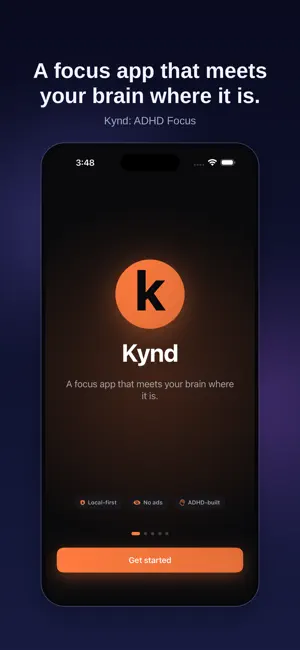
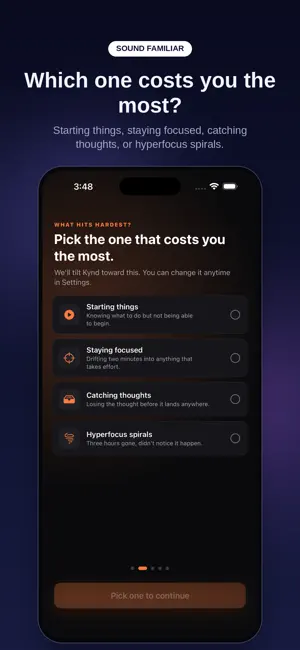
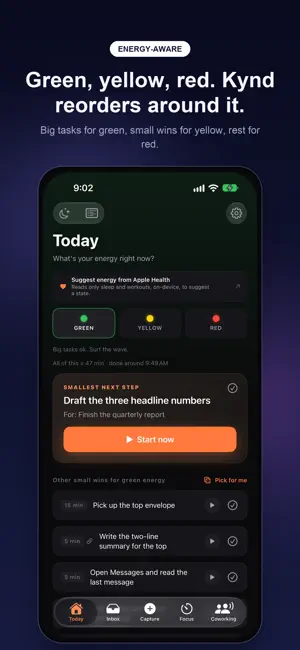
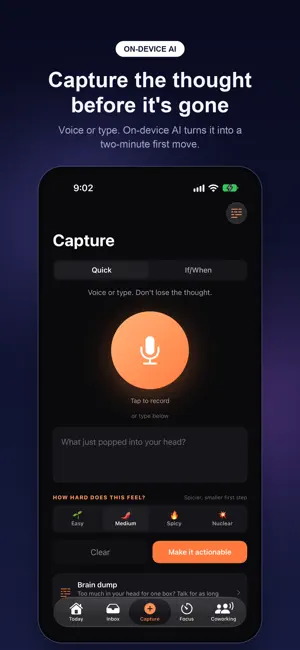
There are a lot of focus apps. Kynd is the one that meets your brain where it is. Most productivity apps assume your tank is full. They schedule deep work right after a draining meeting, punish you with a broken streak for one missed day, and ask you to decide what to do next at the exact moment your executive function is offline. That doesn't help an ADHD brain. Kynd runs on one idea: the smallest physical next step is everything. Tell Kynd your energy. Green, yellow, or red. Today reorders to match: big tasks for green, small wins for yellow, a brain dump or rest for red. Capture before you lose the thought. Speak or type, and on device AI proposes a physical first move you can finish in two minutes. If/When mode for the stuff that always slips. Pair a trigger ("when I sit down with coffee") with an action ("I'll open the doc"). Focus that doesn't punish you. Sprint, Pomo, or Flow, with a visual time disk so time stops being abstract. When a Pomo ends, take a break, add five minutes, or start the next one. Nothing is forced. Feel the time pass. Optional gentle pulses every 5, 10, or 15 minutes, so time keeps moving while your eyes are on the work. Rebuild from now. When the list is bigger than what's left of your day, keep what fits and move the rest to tomorrow. One tap, nothing lost. Not today. Snooze a task and it comes back like it never left. Worked on something without finishing? That counts too. Can't choose? Pick for me. No streaks. A missed day resets nothing. The next start is the only thing that counts. Calm mode, light or dark, gentle haptics, and banners you can act on without opening the app. On iPad and iPhone Duo, Today, Focus, and Capture spread into two columns. Routines, an inbox, an evening shutdown, widgets, Siri, and an Apple Watch companion are included, no subscription needed. Kynd Premium - Break it down: turn any task into three to seven concrete steps, sized by how hard it feels. Steps stay linked, so finishing them adds up. No credits, no monthly caps. (Needs an iPhone with Apple Intelligence.) - Brain dump: talk as long as you need, then Kynd sorts it into separate tasks, each with a first move, for you to keep or drop. - Bigger brain, optional: send hard tasks to Apple's Private Cloud Compute instead. Off by default, free, and designed so nobody, including Apple, can read what's sent. Needs iOS 27. - Focus shield: distracting apps behind a one tap liftable shield that shows your own task and reason, never a scold. - Drop in audio coworking rooms and scheduled Flocks. Live rooms cost real money to run, so Premium includes 500 minutes a month. - 10 CBT for ADHD micro modules; the first is free. - Recurring tasks, including every other week, quarterly, and "not before" a time you choose. - Per task timers, guided routine run throughs with spoken prompts, and 4 more soundscapes. - Apple Health energy hints, calendar context on Today, and iCloud sync. - Family Sharing: one subscription covers up to six people. Kynd is local first. Your tasks live on your device and sync only through your own iCloud if you turn it on. AI runs on your iPhone unless you choose Private Cloud Compute. No analytics, no Kynd server, and we never see your captures. KYND PREMIUM (auto renewing subscription) Monthly: $4.99. Annual: $29.99, including a 7 day free trial for new subscribers. Payment is charged to your Apple Account at purchase confirmation. Subscriptions renew automatically unless cancelled at least 24 hours before the end of the current period. Manage or cancel anytime in your Apple Account settings. Privacy Policy: https://jcmobileappstudio.com/apps/kynd/privacy/ Terms of Use (Apple standard EULA): https://www.apple.com/legal/internet-services/itunes/dev/stdeula/
What’s new
Version 1.6.3 · Updated September 27, 2026
Light mode. Kynd follows your phone's appearance, or you choose in Settings. Installs that were already dark stay dark until you say otherwise. Haptics you can feel time by. Each energy has its own tap. The last three seconds of a countdown tick. Optional gentle pulses every 5, 10, or 15 minutes of Pomo and Flow, for when your eyes are on the work and not the clock. Off, Gentle, or Full; Calm mode keeps it gentle. Real Pomodoro breaks. Take a break, add five more minutes, or start the next one, with a long break after every fourth. Nothing counts during a break, and nothing is forced. Rebuild from now. When the list is bigger than the time left before your day ends, Today offers to keep what fits and move the rest to tomorrow. One tap, nothing lost. Steps that add up. Break it down now keeps the steps attached: the task shows "2 of 5", and finishing the last step asks whether the whole thing counts as done. Brain dump (Premium). Talk for as long as you need, no one-minute cap. Kynd sorts it into separate tasks, each with a smallest first move, for you to keep or drop. Bigger brain, optional (Premium, iOS 27). Send hard ones to Apple's Private Cloud Compute instead of your iPhone. Off by default, free, and every result says which one made it. Banners that do something. Mark it done and 5 more minutes on the timer banner. Save my spot on the 90-minute one. An optional morning check-in with Green, Yellow, and Red right on the banner, and an optional evening reminder that opens the shutdown flow. Pick for me. Can't choose? One tap picks a small win at random. Lock Screen and Siri. Done and +5 min on the Live Activity, a StandBy layout, and "Start focus in Kynd" and "Mark my step done in Kynd" for Siri. Plus: a kinder end-of-day note in the shutdown flow, energy by hour of day in Your patterns, a heads-up before a routine step ends, better VoiceOver on the timer, energy shapes for Differentiate Without Color, and larger type on the countdown.
App privacy
The developer, JC Mobile App Studio LLC, reported these privacy practices to Apple.
Data Linked to You
The following data, which may be collected and linked to your identity, may be used for the following purposes:
- Identifiers: User ID
Used for: App Functionality
Alternatives to Kynd: ADHD Focus
Looking for apps like Kynd: ADHD Focus? Here are 6 similar apps on the App Store. The highest rated is ADHD Timer: End Time Blindness (5.0/5), and all 6 are free to download.
-
 NEURA: Habits and Practices
-
 FocusCall: ADHD Reminder Calls
-
 ADHD Timer: End Time Blindness
5.0
ADHD Timer: End Time Blindness
5.0
-
 Waddle: Gentle ADHD Routines
5.0
Waddle: Gentle ADHD Routines
5.0
-
 OkOliver: AI Memory Assistant
5.0
OkOliver: AI Memory Assistant
5.0
-
 My Local Voice
5.0
My Local Voice
5.0
| App | Rating | Price | Last updated | Compare |
|---|---|---|---|---|
| Kynd: ADHD Focus | 5.0 / 5 (1 rating) | Free | September 27, 2026 | |
| NEURA: Habits and Practices | – | Free | Sep 10, 2026 | Compare |
| FocusCall: ADHD Reminder Calls | – | Free | Sep 25, 2026 | Compare |
| ADHD Timer: End Time Blindness | 5.0 / 5 (1) | Free | Sep 18, 2026 | Compare |
| Waddle: Gentle ADHD Routines | 5.0 / 5 (4) | Free | Sep 27, 2026 | Compare |
| OkOliver: AI Memory Assistant | 5.0 / 5 (2) | Free | Jul 28, 2026 | Compare |
| My Local Voice | 5.0 / 5 (1) | Free | Jan 22, 2026 | Compare |
Compare Kynd: ADHD Focus with the top alternatives: ratings, updates, ASO score and keyword gaps →