

Tulpar: Offline Flight Tracker
Gokhan Efe Navigation iPhoneiPadiPod touch
Tulpar: Offline Flight Tracker is a free Navigation app for iPhone and iPad by Gokhan Efe. Rated 1.0/5 from 1 ratings. Requires iOS 17.0.
- Rating
- 1.0
- 1 ratings
- Price
- Free
- on the App Store
- Size
- 68 MB
- Age 4+
- Updated
- Oct 13
- 2026 · v1.3.0
Screenshots

About Tulpar: Offline Flight Tracker
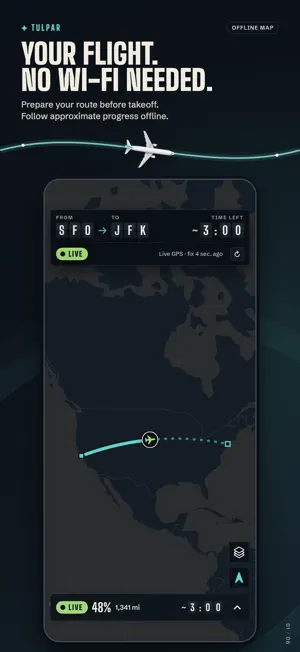
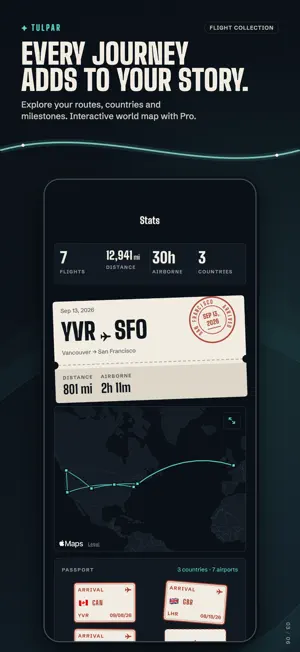
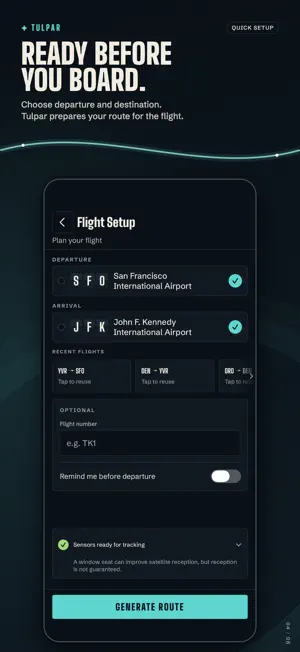
Follow your flight in airplane mode. No Wi-Fi needed. Set your departure and destination before takeoff. Tulpar prepares the route and map while you're online, then shows your approximate position from your iPhone's GPS once you're in the air, fully offline. WHILE YOU FLY • Your position on the route, with progress, distance left, time left, speed and altitude • A night design inspired by airport departure boards • Honest signal status: live, weak, estimated or unavailable, so you always know when Tulpar is estimating • Keeps estimating your progress when GPS drops for a while • A Lock Screen Live Activity and Dynamic Island (Pro), plus a Home Screen widget AFTER LANDING • A flight log with distance, duration, peak altitude and the route you flew • A shareable boarding-pass card for every flight • Stats with passport stamps, milestones and a Year in the air poster TRY IT FIRST Fly a Berlin–Istanbul sample flight from Home. It doesn't count toward your free flights. FREE AND PRO Track 3 flights free. Tulpar Pro is a one-time purchase, no subscription, and unlocks: • Unlimited flights • Live flight on your Lock Screen and Dynamic Island • Full flight history • Live altitude graph • Personal world map of all your routes • Custom map styles: satellite, tactical and Tulpar • Multi-leg trips • Every future Pro feature Tulpar is for passenger situational awareness and recreational use only. It is not a certified navigation, aircraft operations or emergency tool. GPS reception depends on your seat, the aircraft and your device; a window seat usually works best.
What’s new
Version 1.3.0 · Updated October 13, 2026
Tulpar 1.3 brings a new look and steadier, more honest tracking. - A new night design inspired by airport departure boards, with split-flap figures while you track - The Lock Screen Live Activity (Tulpar Pro), the Dynamic Island and the Home Screen widget get the same departure-board look - The flown trail now uses measured GPS only. Signal gaps show as faint dashed lines, and the trail is kept if iOS relaunches the app - Steadier estimates when GPS drops during the climb. The signal pill always shows whether your position is live, weak, estimated or unavailable - The plane marker points in your direction of travel - Flight Setup puts From and To first, with one clear readiness check - Try a Berlin–Istanbul sample flight from Home. It doesn't count toward your free flights - Stats adds passport stamps, milestones and a shareable Year in the air poster. With Tulpar Pro, tap a route on your flight map to see its flights - How Tulpar works, in Settings, is now a swipeable guide
App privacy
The developer, Gokhan Efe, reported these privacy practices to Apple.
Data Not Linked to You
The following data, which may be collected but is not linked to your identity, may be used for the following purposes:
- Usage Data: Product Interaction
- Purchases: Purchase History
- Identifiers: User ID
Used for: Analytics, App Functionality