

Trazo Studio
Jose Galisteo Graphics & Design iPadMac
Trazo Studio is a free Graphics & Design app for iPad and Mac by Jose Galisteo. Requires iOS 15.0. Updated October 20, 2026.
- Price
- Free
- on the App Store
- Size
- 7 MB
- Age 4+
- Updated
- Oct 20
- 2026 · v1.0.4
Screenshots



About Trazo Studio
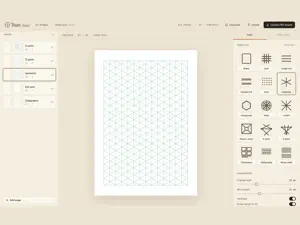
Trazo Studio builds printable practice notebooks for drawing and drafting. Pick a template, tune it on a live preview, then export a clean, print-ready PDF — one page per sheet, at A5 or A4. FEATURES • Perspective guides — 1, 2 and 3-point, with draggable vanishing points • Isometric, square grid, dot grid and hexagonal pages • Calligraphy guides and music staves • Drag the horizon and vanishing points right on the page • Per-page colours, line weight, paper size and orientation • Save and reopen your projects as .trzs files • Works offline — nothing leaves your Mac The whole editor is free. A one-time In-App Purchase unlocks print-ready PDF export.
What’s new
Version 1.0.4 · Updated October 20, 2026
iPad: Trazo Studio now works in portrait as well as landscape, and in Split View, Stage Manager and resizable windows, with the editor filling the whole screen. Small fixes.
App privacy
The developer, Jose Galisteo, reported these privacy practices to Apple.
Data Not Collected
The developer does not collect any data from this app.
Alternatives to Trazo Studio
Looking for apps like Trazo Studio? Here are 6 similar apps on the App Store. The highest rated is Statera (5.0/5), and 4 of the 6 are free to download.


| App | Rating | Price | Last updated | Compare |
|---|---|---|---|---|
| Trazo Studio | – | Free | October 20, 2026 | |
| Trazo App | – | Free | Oct 8, 2026 | Compare |
| Escher Blocks | – | Free | Aug 29, 2026 | Compare |
| Statera | 5.0 / 5 (1) | 0.99 USD | Dec 21, 2025 | Compare |
| GeoArt Creator | – | 1.99 USD | Oct 24, 2026 | Compare |
| Fractal Atlas | 5.0 / 5 (2) | Free | Oct 27, 2026 | Compare |
| Honeytile | – | Free | Nov 21, 2025 | Compare |
Compare Trazo Studio with the top alternatives: ratings, updates, ASO score and keyword gaps →