

Moon: Mood Tracker & Journal
SCADA SIA Lifestyle iPhoneiPadiPod touch
Moon: Mood Tracker & Journal is a free Lifestyle app for iPhone and iPad by SCADA SIA. Rated 5.0/5 from 3 ratings. Requires iOS 18.6.
- Rating
- 5.0
- 3 ratings
- Price
- Free
- on the App Store
- Size
- 15 MB
- Age 4+
- Updated
- Oct 21
- 2026 · v1.1.10
Screenshots


About Moon: Mood Tracker & Journal
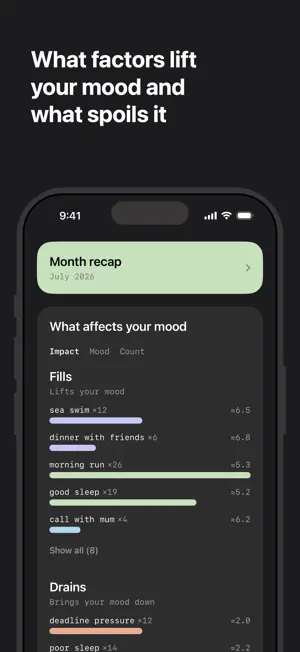
Moon helps you track your mood trends and what influences them, or simply keep a regular journal. Moon doesn't give advice and doesn't pretend to know you better than you do. Its whole value is in surfacing the factors behind your mood — so you can, in the end, make it better. At least, that's what we hope. How it works Rate your mood on a scale of 1 to 7 and add a note: by text or by voice. You can also log your mood quickly — right from the widget. What's inside • Mood calendar — the whole year on one screen, each day colored by your average mood. • Journal — all your entries in one feed, with search. • Charts — day, week, month, year. Three trend lines — 14, 30, and 90 days — show where your mood is really heading beneath the daily swings. Tap any point to jump back to the entry. • Voice input — dictate your entry out loud, speech recognition turns it into text. • Fills & Drains — Moon finds recurring factors in your notes (people, places, activities, habits, and so on) and shows which ones your mood is usually higher with, and which ones lower. No judgments and no advice — just your own data. • Day, week, month, and year recaps — a story of what happened, what changed, and what stood behind your mood's movements. Looks for patterns across your whole history: notices your rhythms, your best and worst days of the week — and especially the days that break the usual picture. Shows correlations, not causes. • Visual recaps — the day, the week, and the month drawn by the app from your own data: the mood curve with your factors placed on it, rhythms by weekday and time of day, what came up more often than usual. Ready the moment the period ends. • Rhythms — your best weekdays, hours, and months: this month against the last year, and the whole year in pixels. • Apple Health — sleep, workouts, steps, and activity become part of your entries' context. • Reminders — once a day, four times a day, or your own schedule: up to eight reminders at the times you choose. • 13 languages — the app follows your iPhone's language. Privacy • Syncs between your devices through your iCloud. • Backup in iCloud Drive: stays in place even if you delete the app. Plus file export at any time. • PIN code and Face ID lock. • Local Mode — entries marked with it never leave your device: they aren't sent for analysis, recaps, or factor extraction. Fully private. • In AI Mode, entries are sent to powerful AI models for analysis — only at the moment of analysis, with no server-side storage. • No sign-up, no accounts, no ads. Premium Every new install gets Premium+ free for at least 14 days — no purchase, no card, nothing to cancel. The window always covers two week recaps, so you can read a couple before deciding. After that the essentials stay free — mood logging, journal, calendar, charts, search, reminders, widgets, iCloud sync, and manual backup and restore. Premium unlocks week, month, and year recaps powered by advanced AI models, Fills & Drains, visual recaps, Rhythms, the three trend lines on the chart, your own reminder schedule, voice input, Apple Health, PIN lock, automatic backup, and data export. Premium+ adds the day recap: every single day analyzed. Moon Premium ($29.99/year or $2.99/month) and Moon Premium+ ($49.99/year or $4.99/month) are auto-renewing subscriptions. Payment is charged to your Apple Account at confirmation of purchase. The subscription renews automatically unless cancelled at least 24 hours before the end of the current period. Manage or cancel anytime in your App Store settings. Everything you create during the free trial stays yours. Terms of Use: https://moonapp.lv/terms Privacy Policy: https://moonapp.lv/privacy
What’s new
Version 1.1.10 · Updated October 21, 2026
• Edit past entries: change the text or rating, or move an entry to another time. • Rhythms now show how sleep and activity go with your mood, next to the weather. • Day colours are more accurate: scores round to the nearest level (3.5 is 4, 3.4 is 3). Some past days have changed colour.
App privacy
The developer, SCADA SIA, reported these privacy practices to Apple.
Data Not Linked to You
The following data, which may be collected but is not linked to your identity, may be used for the following purposes:
- Identifiers: User ID
- Usage Data: Product Interaction, Other Usage Data
- Health & Fitness: Health
- User Content: Audio Data, Other User Content
Used for: Analytics, App Functionality
Alternatives to Moon: Mood Tracker & Journal
Looking for apps like Moon: Mood Tracker & Journal? Here are 6 similar apps on the App Store. The highest rated is Bipolar Mood Tracker° (4.8/5), and all 6 are free to download.
-
 Mood-Tracker
4.4
Mood-Tracker
4.4
-
 Bipolar Mood Tracker°
4.8
Bipolar Mood Tracker°
4.8
-
 My Diary : Diary With Lock
4.2
My Diary : Diary With Lock
4.2
-
 eMoods Bipolar Mood Tracker
4.8
eMoods Bipolar Mood Tracker
4.8
-
 Daylio Journal - Mood Tracker
4.8
Daylio Journal - Mood Tracker
4.8
-
 footnotes: notes for noticing
4.8
footnotes: notes for noticing
4.8
| App | Rating | Price | Last updated | Compare |
|---|---|---|---|---|
| Moon: Mood Tracker & Journal | 5.0 / 5 (3 ratings) | Free | October 21, 2026 | |
| Mood-Tracker | 4.4 / 5 (94) | Free | Sep 13, 2026 | Compare |
| Bipolar Mood Tracker° | 4.8 / 5 (1,318) | Free | Dec 15, 2025 | Compare |
| My Diary : Diary With Lock | 4.2 / 5 (55) | Free | Jan 23, 2026 | Compare |
| eMoods Bipolar Mood Tracker | 4.8 / 5 (4,250) | Free | Dec 7, 2025 | Compare |
| Daylio Journal - Mood Tracker | 4.8 / 5 (62,148) | Free | Oct 17, 2026 | Compare |
| footnotes: notes for noticing | 4.8 / 5 (172) | Free | Oct 15, 2026 | Compare |