

Vision Simulator: Eye Disease
Ryan Evans Medical iPhoneiPadiPod touch
Vision Simulator: Eye Disease is a free Medical app for iPhone and iPad by Ryan Evans. Rated 5.0/5 from 1 ratings. Requires iOS 15.0.
- Rating
- 5.0
- 1 ratings
- Price
- Free
- on the App Store
- Size
- 46 MB
- Age 4+
- Updated
- Oct 21
- 2026 · v4.1
Screenshots

About Vision Simulator: Eye Disease
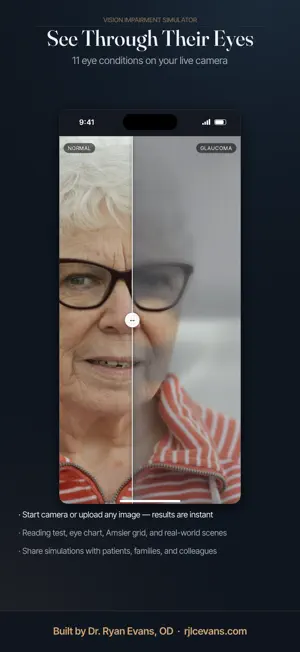
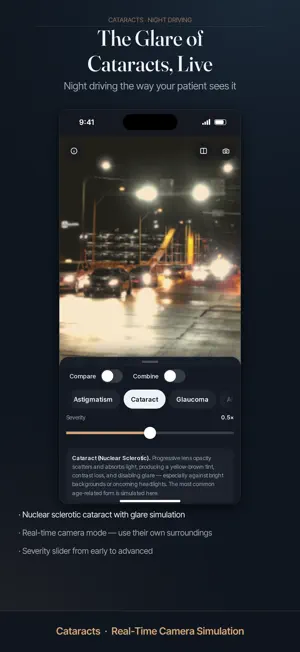
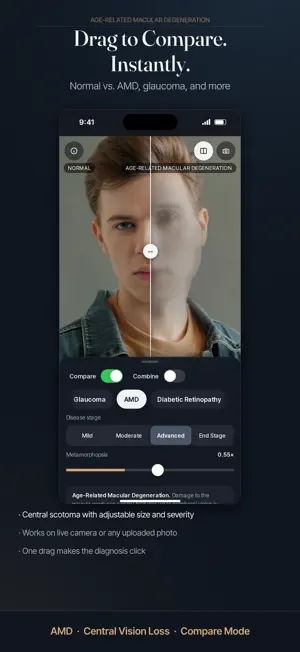
See the world the way someone with an eye condition does. Vision Simulator applies realistic, clinically informed vision effects to your live camera or any photo. Point it at a room, a face, a street at night or an eye chart, then switch conditions to see how each one changes sight. It was built by Dr. Ryan Evans, OD, a practicing optometrist, to help patients and families understand what an eye condition does to vision. WHO IT'S FOR • Families who want to understand what a parent or child is going through • Eye care professionals explaining a diagnosis in the exam room • Optometry, medical and nursing students • Teachers, caregivers, designers and anyone curious about vision 11 CONDITIONS • Normal Vision: a clear reference to compare against • Myopia (nearsightedness): with Snellen acuity presets • Astigmatism: with adjustable axis • Cataract: yellowing, glare and contrast loss • Glaucoma: peripheral field loss by stage • Age-Related Macular Degeneration (AMD): central loss with distortion (metamorphopsia) • Diabetic Retinopathy: patchy spots and blur • Color Vision Deficiency: red, green and blue types • Floaters & Posterior Vitreous Detachment (PVD) • Retinitis Pigmentosa (RP): narrowing tunnel vision • Presbyopia: the near-focus blur that starts in your 40s FREE • Live camera and photo upload • 6 built-in sample scenes, including a reading test, eye chart and Amsler grid • 4 conditions: Normal Vision, Myopia, Astigmatism and Cataract • Adjustable severity • Plain-language notes for each condition • Full-screen viewer: tap the picture to hide the controls PRO: ONE-TIME $4.99 UNLOCK No subscription. Pay once, keep it. • 7 more conditions: Glaucoma, AMD, Diabetic Retinopathy, Color Blindness, Floaters/PVD, Retinitis Pigmentosa and Presbyopia • Combine multiple conditions at once, such as cataract plus glaucoma • Side-by-side Compare: drag to wipe between normal and simulated vision • Restore your purchase anytime on your devices • Family Sharing: one purchase covers your family PRIVACY • No ads • No account needed • Data Not Collected: images are processed on your device and are never stored or shared An internet connection is required to use the app. IMPORTANT Vision Simulator is for education and demonstration only. It is not a diagnostic tool and does not replace a comprehensive eye examination. Simulations are approximations, and every person's vision is different. If you notice changes in your vision, see your eye doctor.
What’s new
Version 4.1 · Updated October 21, 2026
• All-new full-screen viewer: tap the picture to hide the controls • Compare switch right next to Combine, easier to find • Opens on a live cataract side-by-side • New sharper night street and flower sample photos • Larger buttons, cleaner text and a new About screen • Landscape and iPad layout fixes
App privacy
The developer, Ryan Evans, reported these privacy practices to Apple.
Data Not Collected
The developer does not collect any data from this app.
Alternatives to Vision Simulator: Eye Disease
Looking for apps like Vision Simulator: Eye Disease? Here are 6 similar apps on the App Store. The highest rated is DermScope (5.0/5), and all 6 are free to download.
-
 Caffeine Mate: Coffee Tracker
-
 DermScope
5.0
DermScope
5.0
-
 Movli — Kick Counter
5.0
Movli — Kick Counter
5.0
-
 SETGO! Workout Tracker
5.0
SETGO! Workout Tracker
5.0
-
 Safeeya Health
-
 Kyoru. More world, less you.
| App | Rating | Price | Last updated | Compare |
|---|---|---|---|---|
| Vision Simulator: Eye Disease | 5.0 / 5 (1 rating) | Free | October 21, 2026 | |
| Caffeine Mate: Coffee Tracker | – | Free | Oct 15, 2026 | Compare |
| DermScope | 5.0 / 5 (1) | Free | Aug 6, 2026 | Compare |
| Movli — Kick Counter | 5.0 / 5 (2) | Free | Aug 8, 2026 | Compare |
| SETGO! Workout Tracker | 5.0 / 5 (7) | Free | Sep 3, 2026 | Compare |
| Safeeya Health | – | Free | Sep 10, 2026 | Compare |
| Kyoru. More world, less you. | – | Free | Oct 18, 2026 | Compare |