

QC Cam Watch
NATHAN MANDLE Utilities iPhoneiPadiPod touch
QC Cam Watch is a free Utilities app for iPhone and iPad by NATHAN MANDLE. Requires iOS 18.6. Updated September 17, 2026.
- Price
- Free
- on the App Store
- Size
- 7 MB
- Age 4+
- Updated
- Sep 17
- 2026 · v1.5
Screenshots

About QC Cam Watch
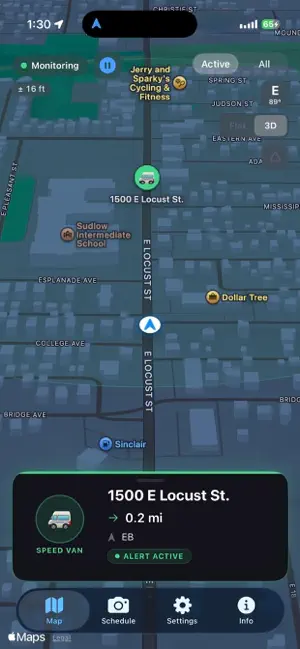
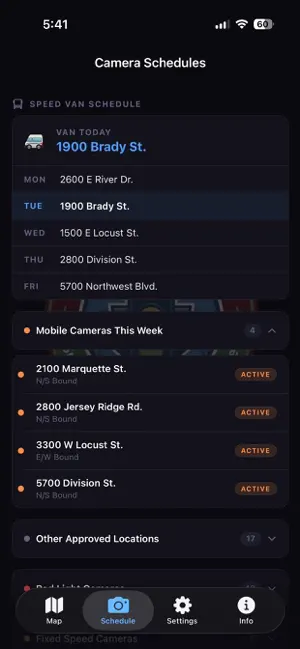
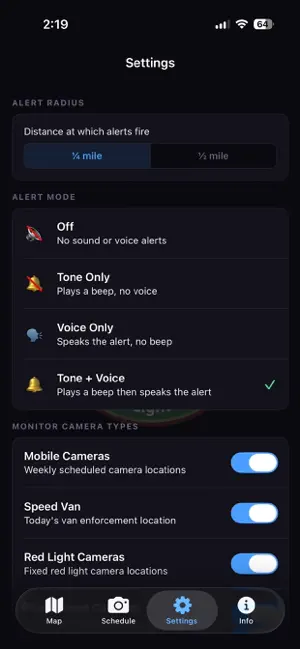
QC Cam Watch — Speed & Red Light Camera Tracker for the Quad Cities Davenport, Iowa operates one of the most active Automated Traffic Enforcement (ATE) programs in the state — mobile speed cameras, a daily speed enforcement van, and permanent red light and fixed speed cameras throughout the city. QC Cam Watch tracks them all and alerts you in real time as you approach active cameras while driving. Free vs Pro — Read Before Downloading QC Cam Watch is free to download and includes a fully interactive map showing all camera locations across the Quad Cities. However, all alert and monitoring features require a QC Cam Watch Pro subscription. The free version is a map viewer only — it does not track your location or send any alerts. If you are looking for active camera alerts while driving, Pro is required. QC Cam Watch Pro — $1.99/month or $14.99/year. Cancel anytime through your Apple ID settings. What Pro Includes: Real-Time Mobile Camera Alerts Davenport deploys mobile speed cameras at up to 4 locations simultaneously, rotating weekly across 21 approved sites. QC Cam Watch pulls the current week's active locations directly from the Davenport Police Department and alerts you the moment you approach one. Only confirmed active locations trigger alerts — no false alarms from inactive sites. Speed Van Tracking The Davenport speed enforcement van operates at a different location every weekday. QC Cam Watch shows you exactly where it is today and displays the full week's schedule. Fines start at $75 for 11-20 mph over the limit — up to $1,000 in construction zones. Red Light & Fixed Speed Cameras All permanent red light and fixed speed cameras in Davenport and Muscatine are mapped and monitored. These never move — so you'll always know where they are. Background Alerts With Screen Locked Alerts fire even with your screen locked. QC Cam Watch monitors quietly in the background, sounding a tone and voice alert the moment a camera enters your alert radius — no need to keep the screen on while driving. Intelligent Directional Alerts Cameras only monitor specific directions of travel. QC Cam Watch uses your GPS heading to determine if you're actually approaching a camera's monitored direction — reducing false alerts when driving parallel to or away from a camera. Live Position & Speed Display See your real-time position on the map with a live speedometer and heading indicator while monitoring is active. Fully Customizable Alert radius — 0.25 mile, 0.5 mile, or both Tone only, voice only, or tone and voice Toggle individual camera types on or off What's Free: Full interactive map of all camera locations Weekly schedule and van location display Camera type legend and location details No location tracking, no alerts Always Up to Date Camera data is pulled directly from official Davenport Police Department sources and checked daily for changes. The app displays when data was last refreshed. Your Privacy QC Cam Watch does not collect, store, or transmit your location or any personal data. GPS processing happens entirely on your device. No accounts, no tracking, no ads. Terms of Use https://www.apple.com/legal/internet-services/itunes/dev/stdeula/
What’s new
Version 1.5 · Updated September 17, 2026
• New: Live Activities for camera alerts — see approaching cameras right on your Lock Screen, in the Dynamic Island, and on your CarPlay display, no need to unlock your phone. • Tap an alert to jump straight to the map. • Fixed an issue where monitoring could fail to resume when connecting to CarPlay after sitting idle. • Alerts no longer show a duplicate notification when a Live Activity is already on screen.
App privacy
The developer, NATHAN MANDLE, reported these privacy practices to Apple.
Data Not Collected
The developer does not collect any data from this app.
Alternatives to QC Cam Watch
Looking for apps like QC Cam Watch? Here are 6 similar apps on the App Store. The highest rated is Tattoo Vision (5.0/5), and 5 of the 6 are free to download.
-
 Tattoo Vision
5.0
Tattoo Vision
5.0
-
 CRT Viewer & Convert PEM PFX
-
 YazooValley
3.3
YazooValley
3.3
-
 Tow Link
3.7
Tow Link
3.7
-
 IP Camera Pro
3.0
IP Camera Pro
3.0
-
 Timegrapher — Watch Accuracy
4.7
Timegrapher — Watch Accuracy
4.7
| App | Rating | Price | Last updated | Compare |
|---|---|---|---|---|
| QC Cam Watch | – | Free | September 17, 2026 | |
| Tattoo Vision | 5.0 / 5 (3) | Free | Nov 10, 2025 | Compare |
| CRT Viewer & Convert PEM PFX | – | Free | Sep 12, 2026 | Compare |
| YazooValley | 3.3 / 5 (3) | Free | Oct 14, 2026 | Compare |
| Tow Link | 3.7 / 5 (3) | Free | Oct 16, 2024 | Compare |
| IP Camera Pro | 3.0 / 5 (24) | 2.99 USD | Oct 23, 2026 | Compare |
| Timegrapher — Watch Accuracy | 4.7 / 5 (16) | Free | Oct 19, 2026 | Compare |
Compare QC Cam Watch with the top alternatives: ratings, updates, ASO score and keyword gaps →