

PrivacyVeil: Blur & Mosaic
Tiger Ng Photo & Video iPhoneiPadiPod touch
PrivacyVeil: Blur & Mosaic is a free Photo & Video app for iPhone and iPad by Tiger Ng. Requires iOS 26.0. Updated June 8, 2026.
- Price
- Free
- on the App Store
- Size
- 15 MB
- Age 4+
- Updated
- Jun 8
- 2026 · v1.0
Screenshots


About PrivacyVeil: Blur & Mosaic
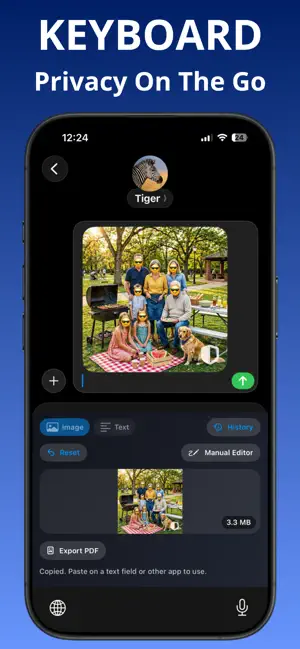
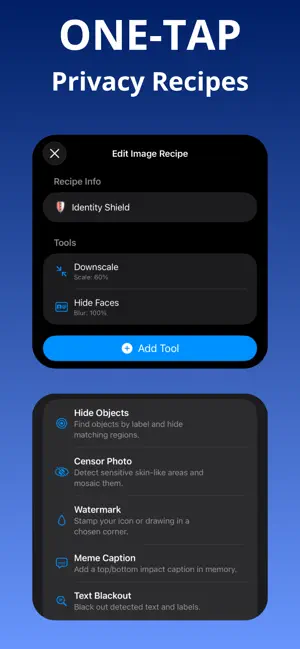
PrivacyVeil helps you blur, mosaic, redact, and remove sensitive details before anything leaves your device. KEY FEATURES One-Tap Privacy Recipes - Apply automation tools in one tap for repeatable results. - Save time on common privacy tasks. Image Recipe Tools - Downscale large images for faster, lighter sharing. - Hide Faces: blur, pixelate, blackout, or emoji cover. - Hide Objects by label with blur, pixelate, blackout, or emoji. - Blackout detected text in screenshots and photos. - Crop Status Bar to remove top UI details quickly. - Gradient Canvas for cleaner presentation backgrounds. - Background Swap with gradients or Unsplash image selection. - Remove Background for subject cutout workflows. - Meme Caption for top and bottom caption overlays. - Watermark with text, icon, or drawing. - Background Blur Focus for subject spotlight effect. - Censor Photo for likely sensitive region mosaics. Manual Photo Editor - Blur, pixelate, blackout, whiteout. - Brush tools + eraser for precise touch-up. - Emoji cover tool for faces and sensitive areas. - Crop tool for fast framing and removal. - Fine-tune settings like blur strength, pixelate strength, and opacity. Keyboard + Share Extension Workflow - Run privacy tools directly from Keyboard Extension. - Process images and text from Share Extension without switching apps. - Export quickly when finished. - Create PDF from cleaned images or text and share instantly. Text Privacy Tools - Clean Link to remove common tracking parameters. - Secret Scanner to mask keys, tokens, JWTs, and private-key patterns. - PII Blockout to mask emails, phone numbers, and card-like strings. - Partial Reveal to keep only a small safe tail (for example last 4 digits). Metadata Protection - Remove EXIF and hidden metadata at export. - Helps reduce accidental data leakage. WHO IT'S FOR - Creators sharing screenshots. - Professionals handling sensitive info. - Anyone who wants safer social sharing. PRIVACY FIRST - Designed for on-device processing workflows. - You stay in control of what gets shared. Use PrivacyVeil in two fast ways: - Keyboard Extension: clean and protect content while you type and share. - Share Extension: open from Photos or other apps, apply privacy tools, and send safely. Need speed? Use Recipes. Need precision? Use Manual Editor. Terms of Use (EULA) https://www.apple.com/legal/internet-services/itunes/dev/stdeula/
App privacy
The developer, Tiger Ng, reported these privacy practices to Apple.
Data Not Linked to You
The following data, which may be collected but is not linked to your identity, may be used for the following purposes:
- Diagnostics: Crash Data, Other Diagnostic Data
- User Content: Photos or Videos
- Usage Data: Other Usage Data
Used for: Analytics, App Functionality
Alternatives to PrivacyVeil: Blur & Mosaic
Looking for apps like PrivacyVeil: Blur & Mosaic? Here are 6 similar apps on the App Store. The highest rated is GR Link (5.0/5), and all 6 are free to download.
-
 Contact Sheet Maker
4.0
Contact Sheet Maker
4.0
-
 Blur Faces in Video & Photo
-
 Daily Studio: AI Teleprompter
-
 GR Link
5.0
GR Link
5.0
-
 Blurfy: Face Blur Editor
4.7
Blurfy: Face Blur Editor
4.7
-
 Profile Picture Maker: PFP Kit
4.7
Profile Picture Maker: PFP Kit
4.7
| App | Rating | Price | Last updated | Compare |
|---|---|---|---|---|
| PrivacyVeil: Blur & Mosaic | – | Free | June 8, 2026 | |
| Contact Sheet Maker | 4.0 / 5 (1) | Free | Aug 30, 2026 | Compare |
| Blur Faces in Video & Photo | – | Free | Oct 12, 2026 | Compare |
| Daily Studio: AI Teleprompter | – | Free | Aug 11, 2026 | Compare |
| GR Link | 5.0 / 5 (4) | Free | Oct 30, 2026 | Compare |
| Blurfy: Face Blur Editor | 4.7 / 5 (59) | Free | Aug 9, 2026 | Compare |
| Profile Picture Maker: PFP Kit | 4.7 / 5 (19) | Free | Sep 5, 2026 | Compare |