

PDFPress - PDF Compressor
CodeNeuron Studios Utilities iPhoneiPadiPod touch
PDFPress - PDF Compressor is a free Utilities app for iPhone and iPad by CodeNeuron Studios. Requires iOS 17.0. Updated October 7, 2026.
- Price
- Free
- on the App Store
- Size
- 8 MB
- Age 4+
- Updated
- Oct 7
- 2026 · v1.2
Screenshots



About PDFPress - PDF Compressor
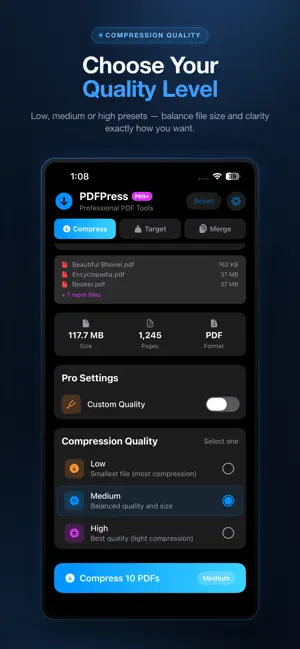
Compress PDFs to fit any upload limit — privately, on your phone. PDFPress shrinks PDF files without losing visible quality, so you can fit them under the strict size limits set by job portals, government forms, email attachments, and online applications. Everything happens on your device — your documents never leave your phone. WHY PDFPRESS: • 100% On-Device — Your sensitive documents never upload to any server. Bank statements, ID proofs, contracts, medical records — they all stay private on your phone. • Compress to Target Size — Tell PDFPress your exact size limit (1 MB, 2 MB, 5 MB, or any custom size) and it intelligently compresses until your PDF fits. Perfect for Aadhaar uploads, job application portals, exam forms, and email attachments. • Three Quality Presets — Low, Medium, and High compression for any need. Plus a custom quality slider for total control. • Batch Compression — Compress up to 500 PDFs at once. Save hours when handling many documents. • Merge PDFs — Combine multiple PDFs into a single document with drag-to-reorder. • Honest Results — When a PDF cannot be compressed further (text-only documents are already optimized), PDFPress tells you clearly instead of pretending. PERFECT FOR: • Job application uploads with 1-2 MB limits • Aadhaar, PAN, and government form submissions • Exam application portals (UPSC, SSC, NEET, JEE, etc.) • Email attachments that exceed size limits • Bank KYC document uploads • WhatsApp document sharing • Scanned document storage FREE & PRO TIERS: • Free version compresses any PDF up to 25 MB at Low quality, one file at a time. • Pro (one-time purchase) unlocks all quality presets, custom quality slider, target size compression, batch up to 20 PDFs, and unlimited file size. • Pro+ (one-time purchase) adds batch up to 500 PDFs and PDF merge. NO SUBSCRIPTIONS — EVER: PDFPress is a one-time purchase. Pay once, use forever. No monthly fees, no annual renewals, no surprises. PRIVACY FIRST: PDFPress works completely offline. No account required. No analytics tracking. No advertising. Your documents are processed entirely on your device and never sent to any server — not ours, not anyone's.
What’s new
Version 1.2 · Updated October 7, 2026
- New: compress to exact KB sizes (100/200/300/500 KB) for strict government and job-portal uploads - Performance improvements for faster, smoother compression - Minor bug fixes and refinements
App privacy
The developer, CodeNeuron Studios, reported these privacy practices to Apple.
Data Not Linked to You
The following data, which may be collected but is not linked to your identity, may be used for the following purposes:
- Usage Data: Other Usage Data
- Diagnostics: Crash Data, Performance Data
Used for: Analytics
Alternatives to PDFPress - PDF Compressor
Looking for apps like PDFPress - PDF Compressor? Here are 6 similar apps on the App Store. The highest rated is compress pdf, reduce pdf size (5.0/5), and all 6 are free to download.
-
 ExactPress: Compress to Size
-
 compress pdf, reduce pdf size
5.0
compress pdf, reduce pdf size
5.0
-
 PDF Compressor: Resize file
-
 PDF Compressor | Reduce Size
-
 PDF Compressor: Reduce PDF
-
 PDF Compressor: Convert Photo
| App | Rating | Price | Last updated | Compare |
|---|---|---|---|---|
| PDFPress - PDF Compressor | – | Free | October 7, 2026 | |
| ExactPress: Compress to Size | – | Free | Jun 10, 2026 | Compare |
| compress pdf, reduce pdf size | 5.0 / 5 (1) | Free | Jun 30, 2026 | Compare |
| PDF Compressor: Resize file | – | Free | Aug 24, 2026 | Compare |
| PDF Compressor | Reduce Size | – | Free | Sep 5, 2026 | Compare |
| PDF Compressor: Reduce PDF | – | Free | Sep 26, 2026 | Compare |
| PDF Compressor: Convert Photo | – | Free | Sep 15, 2026 | Compare |