

PrimeHour: Golden Hour Planner
Lucas Melendez Photo & Video iPhoneiPadiPod touch
PrimeHour: Golden Hour Planner is a free Photo & Video app for iPhone and iPad by Lucas Melendez. Rated 4.7/5 from 3 ratings. Requires iOS 15.1.
- Rating
- 4.7
- 3 ratings
- Price
- Free
- on the App Store
- Size
- 47 MB
- Age 4+
- Updated
- Aug 27
- 2026 · v1.7.2
Screenshots


About PrimeHour: Golden Hour Planner
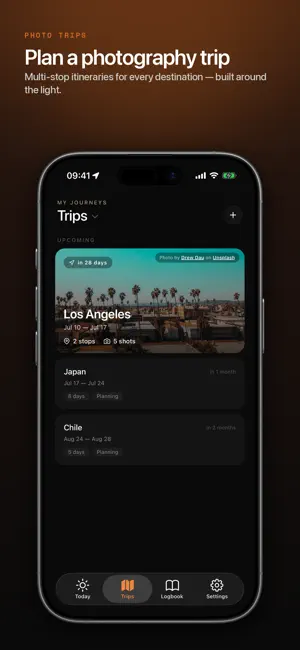
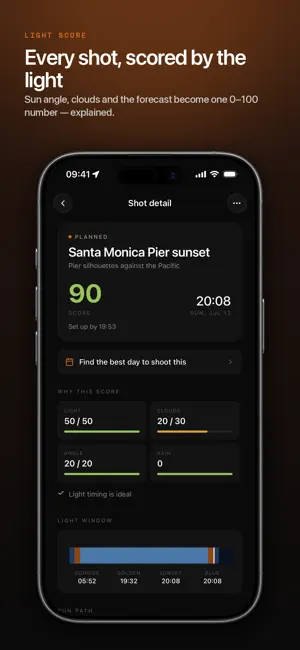
PrimeHour is the trip planner built for photographers. Add your destinations and dates, and PrimeHour turns every trip into a shot-by-shot plan — scoring each location by sun, moon, and weather, then scheduling your shoots around the best light. PLAN THE WHOLE TRIP • Multi-stop itineraries on a map — every destination, every day • A shot list for each location, with the timing and gear it needs • AI-generated photography spots near every stop, scored for the light SCORE THE LIGHT Every shot gets a 0–100 light score combining sun angle, cloud cover, and the forecast — plus a plain-language reason for the number. The engine reads conditions through the lens of your shot: a breeze that ruins a macro shot won't dent a cityscape, and the same high cloud that kills an astro night is what makes a sunset. Opinionated and transparent, never a black box. SEE FURTHER AHEAD Ensemble weather models and climate history score shots well past the 10-day forecast, so you can plan a trip months out — and the app tells you honestly how much to trust each number. SHOOT THE NIGHT SKY • True astronomical darkness, not just "after sunset" • Moon impact judged by height and phase, so a low moon doesn't sink a good night • The Milky Way core's real position, tracked properly • Light pollution for any location on Earth — know before you drive • Dew risk, because the clearest, stillest nights are the ones that fog a lens NAIL GOLDEN & BLUE HOUR • Live sun & moon compass — point your phone to see exactly where the sun and moon will rise, set, and sit • An automatic daily schedule with "set up by" times so you're in position before the light peaks • Best-window finding across your whole trip DIAL IN EVERY SHOT • AI gear & camera settings — the right lens from your own kit, plus exact aperture, shutter, and ISO for the conditions • A packing list built from your trip's shots and the gear you own BUILT FOR THE FIELD • Offline-first — sun, moon, schedules, scores, and light pollution all compute on-device, so every screen works on a plane, in a canyon, or on bad hotel wifi • Weather-change alerts when conditions for an upcoming shot shift • A heads-up when the light near you turns good — even when you have nothing planned START FREE Plan unlimited trips with up to five shots each, score every shot from sun, moon, and weather, and use the live sun & moon compass, nearby spots, the 10-day forecast, the daily schedule, best-window finding, and alerts when the light near you turns good — all free. GO PRO WHEN YOU TRAVEL PrimeHour Pro adds unlimited shots per trip, AI gear & camera settings, AI photo spots across your whole trip, instant light checks for any spot you're standing in, calendar sync and shoot reminders, and your photo logbook — $4.99/month or $39.99/year, with a 7-day free trial on the annual plan. Subscriptions auto-renew unless canceled at least 24 hours before the end of the current period. Payment is charged to your Apple ID. Manage or cancel anytime in your App Store account settings. The 7-day free trial applies to the annual plan; unused portion is forfeited on purchase. Privacy policy: https://primehourapp.com/privacy Terms of Service: https://primehourapp.com/tos
What’s new
Version 1.7.2 · Updated August 27, 2026
• New: PrimeHour now tells you when the light near you is worth shooting — even when you have nothing planned. Free for everyone, and you choose how often. • Pick the sky you want for each shot — clear, dramatic cloud, or anywhere in between — and every score moves to match, with a real cost when the sky misses. • Best-day finding now searches your whole trip, not just one location. • Tap any "what's special" row to see the full reasoning behind a score. • Scores stay steady offline: PrimeHour holds the last real forecast instead of assuming clear skies. • Friendlier messaging when an AI feature needs a connection. • Purchases restore more reliably, and Pro prompts now explain exactly what you get.
App privacy
The developer, Lucas Melendez, reported these privacy practices to Apple.
Data Linked to You
The following data, which may be collected and linked to your identity, may be used for the following purposes:
- Identifiers: User ID
- Usage Data: Product Interaction
- Location: Coarse Location
- Contact Info: Email Address, Name
- User Content: Photos or Videos, Other User Content
- Diagnostics: Crash Data, Performance Data
Used for: Analytics, App Functionality
Alternatives to PrimeHour: Golden Hour Planner
Looking for apps like PrimeHour: Golden Hour Planner? Here are 6 similar apps on the App Store. The highest rated is OwlPlot: Astro Photo Planner (5.0/5), and 5 of the 6 are free to download.
-
 Silverlog Stars
-
 OwlPlot: Astro Photo Planner
5.0
-
 SnapGuru
5.0
-
 Collage Maker: CollageFlow AI
-
 Easy Desqueezer
5.0
-
 PortraitMode.io
4.1
| App | Rating | Price | Last updated | Compare |
|---|---|---|---|---|
| PrimeHour: Golden Hour Planner | 4.7 / 5 (3 ratings) | Free | August 27, 2026 | |
| Silverlog Stars | – | Free | Sep 29, 2026 | Compare |
| OwlPlot: Astro Photo Planner | 5.0 / 5 (2) | Free | Oct 21, 2026 | Compare |
| SnapGuru | 5.0 / 5 (2) | 1.99 USD | Aug 31, 2026 | Compare |
| Collage Maker: CollageFlow AI | – | Free | Oct 6, 2026 | Compare |
| Easy Desqueezer | 5.0 / 5 (1) | Free | Oct 19, 2025 | Compare |
| PortraitMode.io | 4.1 / 5 (8) | Free | Oct 20, 2026 | Compare |