

Memora — Smart Photo Gallery
KAREKIMLIK BILGI TEKNOLOJILERI ANONIM SIRKETI Photo & Video iPhoneiPadiPod touch
Memora — Smart Photo Gallery is a free Photo & Video app for iPhone and iPad by KAREKIMLIK BILGI TEKNOLOJILERI ANONIM SIRKETI. Requires iOS 17.0.
- Price
- Free
- on the App Store
- Size
- 6 MB
- Age 4+
- Updated
- Jun 6
- 2026 · v1.3.0
Screenshots



About Memora — Smart Photo Gallery
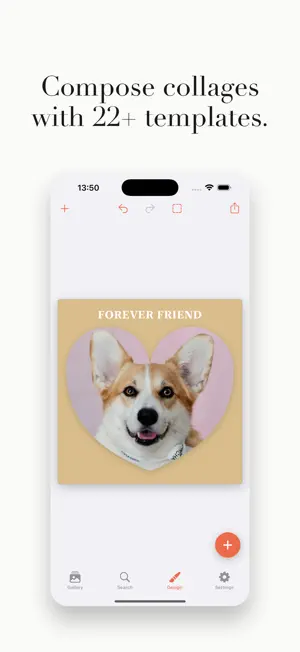
Memora is a privacy-first iPhone photo gallery, on-device editor, and canvas designer — all in one app. Every photo, note, tag, and design stays on your device. No backend. No accounts. No analytics. No third-party SDKs. SMART GALLERY • Group photos by date, location, or your own tags • Scrub through years with a single drag on the timeline • Location story with optional Apple Maps integration • Memories feed: a vertical scroll through your moments • Smart cleanup wizard: duplicates, old screenshots, large videos, burst leftovers • Albums you curate manually, with drag-to-reorder • Custom tags with AI suggestions (on-device Vision) • Search and filter by favorites, notes, tags, videos, and more ON-DEVICE PHOTO EDITOR • Auto-enhance using Apple Vision — face balance, tone curve, white balance, vibrance • 14 filter presets: 7 color treatments (Sepia, Vintage, Cinematic, Noir, Fade, B&W) + 7 stylize effects (Pixel, Honeycomb, Crystal, Dots, Halftone, Comic, Poster) • Color + Effect combine freely for unique looks • Selective brush edits: blur, brighten, darken, vivid — paint exactly where you want them, live preview • Crop, rotate, flip + fine straighten (±45°) • Background blur and removal (portrait-mode style, all local) • Save your adjustments as a reusable Style preset CANVAS DESIGNER • 30+ ready templates: Story Hero, Polaroid Stack, Magazine, Postcard, Heart, Circle, Star Frame, and more • Add text, shapes, and date cards • Drag, pinch, rotate widgets freely • Border, shadow, mask shape (heart, circle, star, hexagon, and more) • Save your own canvas as a custom template • Export full-res to Photos or share PRIVACY BY DEFAULT • No servers, no accounts, no analytics, no third-party SDKs • All AI features run on-device via Apple's Vision framework • Your photos, notes, and tags never leave your iPhone • MapKit search is opt-in for location features • Apple Photos remains the source of truth — Memora never modifies your library without your permission FULL LOCALIZATION • English + Turkish, every string REQUIREMENTS • iPhone with iOS 17 or later • Portrait orientation Memora is the photo gallery and creative tool for people who care where their memories live: on their own device, not on someone else's server.
What’s new
Version 1.3.0 · Updated June 6, 2026
• Live Collage — turn any design into a short video, fully on-device • Smart framing — faces stay centered, never clipped • Color palette + blurred background, pulled from your photo • Fixes and polish
App privacy
The developer, KAREKIMLIK BILGI TEKNOLOJILERI ANONIM SIRKETI, reported these privacy practices to Apple.
Data Not Collected
The developer does not collect any data from this app.
Alternatives to Memora — Smart Photo Gallery
Looking for apps like Memora — Smart Photo Gallery? Here are 6 similar apps on the App Store. The highest rated is Kivoo: Photo Cleaner & Cleanup (5.0/5), and all 6 are free to download.
-
 Memora - Gallery
-
 PetGallery: Daily Timelapse
-
 PureCollage - Photo Grid
-
 PhotoChagok – Photo Organizer
-
 Kivoo: Photo Cleaner & Cleanup
5.0
-
 Retrobooth: Vintage Filters
| App | Rating | Price | Last updated | Compare |
|---|---|---|---|---|
| Memora — Smart Photo Gallery | – | Free | June 6, 2026 | |
| Memora - Gallery | – | Free | Jun 22, 2026 | Compare |
| PetGallery: Daily Timelapse | – | Free | Jun 29, 2026 | Compare |
| PureCollage - Photo Grid | – | Free | May 29, 2026 | Compare |
| PhotoChagok – Photo Organizer | – | Free | Sep 28, 2026 | Compare |
| Kivoo: Photo Cleaner & Cleanup | 5.0 / 5 (1) | Free | Oct 22, 2026 | Compare |
| Retrobooth: Vintage Filters | – | Free | Sep 29, 2025 | Compare |