

CLIP-IT! Padel Highlights Cam!
Stijn Pennings Sports iPhoneiPadiPod touchApple Watch
CLIP-IT! Padel Highlights Cam! is a free Sports app for iPhone and iPad by Stijn Pennings. Rated 1.0/5 from 1 ratings. Requires iOS 18.6.
- Rating
- 1.0
- 1 ratings
- Price
- Free
- on the App Store
- Size
- 11 MB
- Age 4+
- Updated
- Sep 1
- 2026 · v2.0 - Portrait, Watch Dictation & much more!
Screenshots


About CLIP-IT! Padel Highlights Cam!
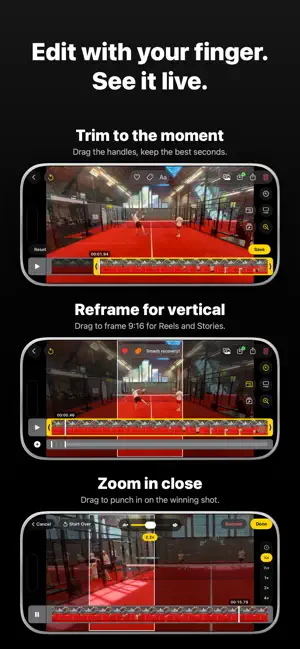
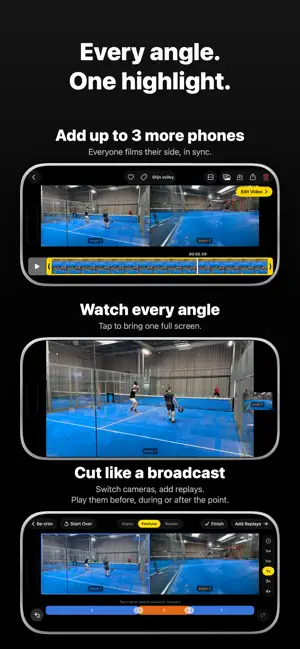
That highlight? Already recorded. CLIP-IT! is always recording. You just decide what to keep. No start and stop button, no hours of footage: after the best point, one tap, and the last 30 to 60 seconds land as a clip in your library. Made for padel. Put your phone behind the glass, play your match, and go home with only the highlights. HOW IT WORKS • The camera films into a continuous buffer, like a dashcam • Tap the button, wave at the camera, or use your Apple Watch: highlight saved • Labels set the clip length: rally, smash, funny moment ALWAYS ON, ALL MATCH • Dim the screen to save battery while recording keeps running • Smart thermal management protects your quality when the phone runs hot • 4K 60 fps and HDR on supported devices EDIT IN SECONDS • Trim with your finger, see it live • Zoom, slow-motion, horizon straighten and highlight splice • Reframe to 9:16 for Reels and Stories MULTI-CAM LIKE A BROADCAST • Link up to 3 more iPhones, each with its own angle • Clips arrive in sync on the main phone • Switch cameras, add replays, render one video Download CLIP-IT! and never miss a point again. Privacy Policy: https://stijnpennings.github.io/omnicut-privacy-policy/ Terms of Use: https://www.apple.com/legal/internet-services/itunes/dev/stdeula/
What’s new
Version 2.0 - Portrait, Watch Dictation & much more! · Updated September 1, 2026
Portrait mode is here. Film, edit and share without ever turning your phone sideways. Filming for a club, a sponsor or a tournament? Club Mode, Challenge Mode and Partner Mode put their logo on your clips automatically. • Portrait: the whole app works upright now, and portrait clips record in true 9:16 • Apple Watch 2.0: quick labels on your wrist, plus dictate a clip title with your voice • Pinch to zoom in the clip viewer, just like Photos • Smoother playback: the clip viewer was rebuilt from the ground up, so clips open without a jump • Slow motion in steps: half, quarter and eighth speed • Nederlands and Español are available now • A counter for clips you have not watched yet, colour coded labels, and a trophy filter for challenge entries EVERYTHING NEW IN 2.0 PORTRAIT • The whole app works upright: camera, clips, editing and settings • Portrait clips record in true 9:16, not a cropped landscape frame • Film from either side now, landscape left and right • A clip filmed the other way round turns into place when you open it • The camera fills the screen, and Dim mode blacks out everything APPLE WATCH • A quick menu on your wrist for labels, so a clip is saved and named in one tap • Dictate a clip title with your voice, in Dutch, English, Spanish or a mix • Add your own names and words so dictation gets your teammates right • Wrist alerts, a battery and quality glance, and clip length from your watch • A complication to launch straight from your watch face • Start filming on your phone and the watch app opens by itself EDITING AND PLAYBACK • The clip viewer is rebuilt from the ground up: clips open instantly, without a jump • Pinch to zoom into any clip, exactly like Photos • Slow motion in steps: half, quarter and eighth speed • Cleaner editing bars, matched to the iOS Photos layout, in both orientations • Tilted clip? The straighten tool gives you a nudge • Renaming a clip no longer covers the video YOUR CLIPS • A counter shows how many clips you have not watched yet • New labels pick their own colour, and groups carry that colour to your watch • Little badges show what you did to a clip, and whether it is saved to Photos • A trophy filter to find your challenge entries in one tap CLUBS, SPONSORS AND TOURNAMENTS • Club Mode: film at a partner club and your clips carry their logo, automatically • Challenge Mode: join a sponsored contest and play for a real prize • Partner Mode: organisers and crews can unlock a licence with a code • A ready made caption to paste under your post on Instagram ALSO • Nederlands and Español are back • Many fixes for smoother swiping, playback and exporting
App privacy
The developer, Stijn Pennings, reported these privacy practices to Apple.
Data Not Linked to You
The following data, which may be collected but is not linked to your identity, may be used for the following purposes:
- Contact Info: Other User Contact Info
- Identifiers: User ID
- Usage Data: Product Interaction
- Diagnostics: Crash Data
Used for: Analytics, App Functionality
Alternatives to CLIP-IT! Padel Highlights Cam!
Looking for apps like CLIP-IT! Padel Highlights Cam!? Here are 6 similar apps on the App Store.
-
 PadelClippy
-
 RallyPro: AI Padel Highlights
-
 Padelbuddy - Padel Partner
-
 KNLTB Leraren App
-
 Vibra Padel
-
 TERWEGEN INDOOR
| App | Rating | Price | Last updated | Compare |
|---|---|---|---|---|
| CLIP-IT! Padel Highlights Cam! | 1.0 / 5 (1 rating) | Free | September 1, 2026 | |
| PadelClippy | – | Free | Oct 11, 2026 | Compare |
| RallyPro: AI Padel Highlights | – | Free | Oct 16, 2026 | Compare |
| Padelbuddy - Padel Partner | – | Free | Sep 8, 2026 | Compare |
| KNLTB Leraren App | – | Free | Jun 24, 2025 | Compare |
| Vibra Padel | – | Free | Oct 19, 2026 | Compare |
| TERWEGEN INDOOR | – | Free | Sep 16, 2026 | Compare |