

Pulse Vitals: Health Widgets
Rocco D'Affuso Health & Fitness iPhoneiPadiPod touchApple Watch
Pulse Vitals: Health Widgets is a free Health & Fitness app for iPhone and iPad by Rocco D'Affuso. Requires iOS 18.0. Updated November 12, 2026.
- Price
- Free
- on the App Store
- Size
- 85 MB
- Age 4+
- Updated
- Nov 12
- 2026 · v1.9
Screenshots
Save to Pinterest

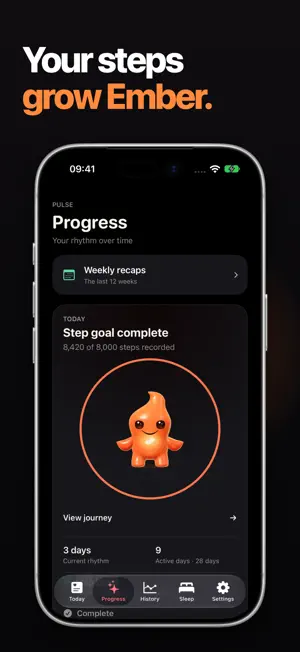

About Pulse Vitals: Health Widgets
Heart rate, blood oxygen and steps in one Apple Watch complication. Your readings, sleep and daily progress together on iPhone and in widgets. Now with a redesigned Ember, Sprout and Orbit to accompany your everyday rhythm. On the larger iPhone Duo display, Today, Progress and Sleep adapt to two columns when space allows. MEET YOUR GROWING COMPANION Choose Ember, a warm flame; Sprout, a leafy tree spirit; or Orbit, a star-lit ray. Each animated 3D companion grows through five forms and 34 steps as your active days add up. Discovery and evolution moments show what has changed. Follow your goals at your own pace, or hide your companion while keeping your progress. Start an optional Step Quest with a Live Activity, and choose whether to enable reminders. YOUR DAY, AT A GLANCE Check today's steps, active and resting calories, latest available heart rate and blood oxygen, and recorded workouts. See when readings were updated. When enough comparable data is available, a short daily summary puts your activity or sleep in the context of your own previous days. ON YOUR WRIST AND HOME SCREEN See heart rate, blood oxygen and steps together in a single Apple Watch complication. Choose a supported layout for your watch face, open the Watch app for your readings and daily progress, or add Pulse widgets to your iPhone Home Screen. SLEEP AND HISTORY Explore recorded sleep duration and stages, available averages and changes in sleep timing. Browse your readings by day, week, month or year to see how they change over time. You can also choose to show recorded heart rate variability (HRV, SDNN) and resting heart rate, with their own history views. YOUR WEEK, BROUGHT TOGETHER Review movement, sleep and your personal rhythm in a weekly recap on iPhone. Browse the last 12 completed weeks, with the available data clearly indicated. Recaps are available whether or not you join a progress journey. PRIVATE BY DESIGN No account, no ads and no third-party analytics. Pulse keeps your health data on your devices and uses no server to process it. You choose which Health data to share with Pulse and whether to enable notifications. Pulse displays data available in Apple Health; some readings require a compatible device or another data source. Blood oxygen availability depends on Apple Watch model, region and settings. Widgets, complications and Live Activities update according to Apple's system rules.
What’s new
Version 1.9 · Updated November 12, 2026
You can now rate Pulse in the App Store from Settings. Step counts are easier to read in Apple Watch complications.
App privacy
The developer, Rocco D'Affuso, reported these privacy practices to Apple.
Data Not Collected
The developer does not collect any data from this app.
Alternatives to Pulse Vitals: Health Widgets
Looking for apps like Pulse Vitals: Health Widgets? Here are 6 similar apps on the App Store. The highest rated is HealthVitals: Analytics (4.0/5), and all 6 are free to download.
-
 HydroLog: Water Tracker
-
 Driftless Vitals
-
 Pulse - Heart Stats
-
 HealthVitals: Analytics
4.0
-
 Vitals Screen
-
 Everspan: Health & Longevit
| App | Rating | Price | Last updated | Compare |
|---|---|---|---|---|
| Pulse Vitals: Health Widgets | – | Free | November 12, 2026 | |
| HydroLog: Water Tracker | – | Free | Nov 20, 2026 | Compare |
| Driftless Vitals | – | Free | Nov 1, 2026 | Compare |
| Pulse - Heart Stats | – | Free | May 27, 2026 | Compare |
| HealthVitals: Analytics | 4.0 / 5 (4) | Free | Nov 21, 2026 | Compare |
| Vitals Screen | – | Free | Aug 3, 2026 | Compare |
| Everspan: Health & Longevit | – | Free | Sep 4, 2026 | Compare |