

Doubles Draw & Pairings
Naoko Furuyama Sports iPhoneiPadiPod touch
Doubles Draw & Pairings is a free Sports app for iPhone and iPad by Naoko Furuyama. Requires iOS 17.0. Updated October 5, 2026.
- Price
- Free
- on the App Store
- Size
- 23 MB
- Age 4+
- Updated
- Oct 5
- 2026 · v7.4.0
Screenshots

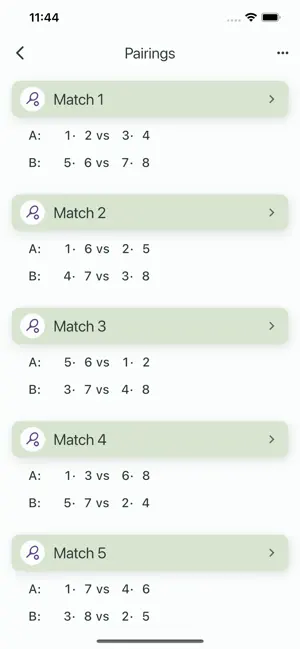
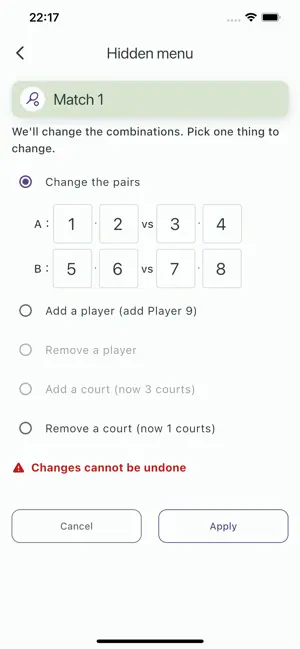
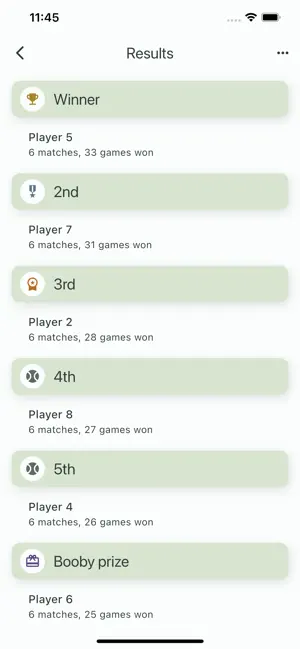
About Doubles Draw & Pairings
TennisDraw shows doubles pairings based on the number of players and courts. It supports 4 to 40 players and 1 to 7 courts, and shows pairings for 20 matches. The app works out the pairings so that opponents change as much as possible and rest breaks are shared evenly. You can also change the number of players or courts partway through. Use it not just for tennis but for any doubles sport, such as table tennis, badminton, pickleball, or padel. Free, no ads, no data collection, no internet needed. Made to support everyone who simply loves playing. Features - Show pairings Shows doubles pairings for 20 matches based on the number of players and courts. - Continue When you reopen the app, it reuses your previous pairings and results. - Show all Shows the pairings for everyone. - Per player Shows only the pairings that involve a chosen player. - Results Shows the match results. - Share Shares the match results and pairings. - Change pairings Changes just one pairing. Handy when a pairing is unbalanced or someone can't play for a while. - Change players Handles players joining or leaving partway through. - Change courts Handles courts being added or removed partway through. How to use - Show pairings On the top screen, choose "Create new pairings", pick the number of players and courts, and tap "Create". - Continue On the top screen, choose "Continue" and tap "Create". - Show all Tap the menu button and choose "Show all". - Per player Tap the menu button, choose "Per player", and pick the player number to show. - Results 1. Tap a match on the doubles pairings screen to enter its result. 2. Tap the menu button and choose "Results". Rankings are calculated by (total games won / number of matches), highest first. - Share Tap the menu button, choose "Share", and pick where to share. - Change pairings, courts, or players 1. Long-press the match you want to change on the doubles pairings screen. 2. Choose what to change and tap "Apply".
What’s new
Version 7.4.0 · Updated October 5, 2026
Improved display and usability, and fixed minor bugs.
App privacy
The developer, Naoko Furuyama, reported these privacy practices to Apple.
Data Not Collected
The developer does not collect any data from this app.
Alternatives to Doubles Draw & Pairings
Looking for apps like Doubles Draw & Pairings? Here are 6 similar apps on the App Store. The highest rated is Beach Tennis Super 8 (3.5/5), and all 6 are free to download.
-
 Padelya: Padel Tournaments
-
 Dupla de Dois
-
 Super Beach: Torneios Super 8
-
 Beach Play
-
 Sorteos de padel
-
 Beach Tennis Super 8
3.5
Beach Tennis Super 8
3.5
| App | Rating | Price | Last updated | Compare |
|---|---|---|---|---|
| Doubles Draw & Pairings | – | Free | October 5, 2026 | |
| Padelya: Padel Tournaments | – | Free | Oct 11, 2026 | Compare |
| Dupla de Dois | – | Free | Aug 23, 2026 | Compare |
| Super Beach: Torneios Super 8 | – | Free | Aug 20, 2026 | Compare |
| Beach Play | – | Free | Jun 22, 2026 | Compare |
| Sorteos de padel | – | Free | Oct 24, 2025 | Compare |
| Beach Tennis Super 8 | 3.5 / 5 (2) | Free | Aug 19, 2026 | Compare |