

Logo Maker & Design - LogoForm
Pentarab Graphics & Design iPhoneiPadiPod touch
Logo Maker & Design - LogoForm is a free Graphics & Design app for iPhone and iPad by Pentarab. Rated 5.0/5 from 2 ratings. Requires iOS 26.0.
- Rating
- 5.0
- 2 ratings
- Price
- Free
- on the App Store
- Size
- 182 MB
- Age 4+
- Updated
- Oct 9
- 2026 · v1.4.0
Screenshots



About Logo Maker & Design - LogoForm
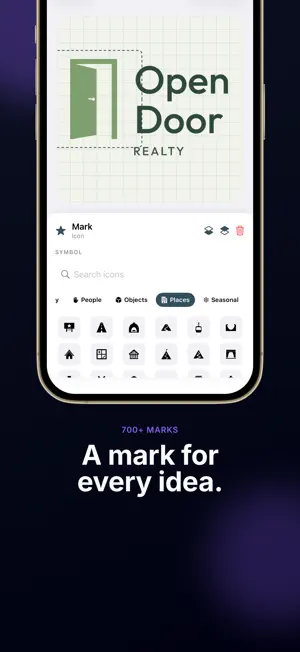
Design professional logos in minutes — no design experience needed. LogoForm is a powerful logo maker packed with 1,800+ ready-made templates, hundreds of icons, and the typographic techniques real brands use. MASSIVE TEMPLATE LIBRARY • 1,800+ professionally designed templates • Made for 60 industries — from cafés, bakeries and barbers to law firms, AI startups and nonprofits • Browse by industry, by theme (animals, nature, food, places…) or by visual style • Search every template by name or industry • Signature pack: premium marks built on one idea each DEEP CUSTOMIZATION • Tap any part to recolor, resize, swap, or move it • Smart palette system — change one color and every part bound to it updates together • 14 typefaces including Google Fonts (Bebas Neue, Pacifico, Playfair Display, Anton, Caveat, and more) • 11 container shapes (circle, rounded, capsule, shield, hexagon, diamond, triangle, star, banner, blob…) • 12 decorative accents (line, dots, stars, triangles, chevrons, waves, sparkles…) • 20 background patterns (dots, grids, stripes, waves, stencil, hex grid, rings, plaid…) • Solid and gradient fills on any element or background BUSINESS CARDS • Turn the logo you made into a business card in the Cards tab • 352 card designs in 44 print styles, each drawn with your logo and your details • Each design places the logo its own way — corner, side column, header, centered or on the back — and you choose the size • Drag any line and change the typeface; the back can carry a QR code that saves your contact • Three card sizes: 90×50 mm, 85×55 mm and 3.5×2 in • Free: 44 designs and PNG export with a watermark. Premium: all 352 designs, clean PNG, a print-ready PDF with bleed and crop marks, and A4/Letter print sheets TYPOGRAPHIC TECHNIQUES • Lettermark: monogram, mega initial, dual initial, bracket [X], stacked shadow, negative space, slashed • Wordmark: classic, underlined, framed, stamp, side ornaments, script handwriting, arc, reverse, color split, tall condensed, stencil cut, outline, two-line • Emblem: ring, heraldic crest, arc seal, ribbon banner, monoline, star, medal, vintage label, wreath, icon badge • Curved text with adjustable bend, outline/glow text effects ICONS & SYMBOLS • 700+ logo marks drawn for the templates — every mark you see in a template is yours to use • Built-in SF Symbols + 720 Lucide vector icons • Tabs for animals, nature, food, tech, tools, music, travel, people, objects, places, seasonal and more • Search by word ("open door", "coffee") and keep favorites (long press to star) POWERFUL EDITOR • Drag-and-drop with snap-to-center guides • Add shapes, icons, text, accents at any time • Undo / redo with keyboard shortcuts • Auto-save on exit • Background color and pattern picker • Suggested palette presets (Pantone-inspired) EXPORT ANYWHERE • PNG — Free: 512×512 with watermark. Premium: 1024×1024 without watermark. • SVG — vector for web and code (Premium) • PDF — vector for print (Premium) PREMIUM Free includes 12 Starter templates and PNG export. Premium unlocks every collection and industry, all marks, SVG/PDF vector export, and every business card design with print-ready PDFs. • Available plans and prices are shown before purchase. LogoForm Premium — Monthly or yearly subscription Payment is charged to your Apple Account when you confirm the purchase. Subscriptions renew automatically unless canceled at least 24 hours before the current period ends. Manage or cancel in your App Store account settings. Privacy Policy: https://www.pentarab.com/logoform/privacy Terms of Use (EULA): https://www.pentarab.com/logoform/terms
What’s new
Version 1.4.0 · Updated October 9, 2026
New: Cards — turn your logo into a print-ready business card.
App privacy
The developer, Pentarab, reported these privacy practices to Apple.
Data Not Linked to You
The following data, which may be collected but is not linked to your identity, may be used for the following purposes:
- Identifiers: Device ID
- Usage Data: Product Interaction
Used for: Analytics
Alternatives to Logo Maker & Design - LogoForm
Looking for apps like Logo Maker & Design - LogoForm? Here are 6 similar apps on the App Store. The highest rated is AI Logo Generator – Logo Maker (5.0/5), and all 6 are free to download.
-
 Logo Maker: AI Logo Maker
-
 AI Logo Maker: Brand Design
-
 Custom logo maker: AI Logo
-
 AI Logo Maker: Design Studio
-
 AI Logo Generator – Logo Maker
5.0
-
 3DMockups Generator Unlimited
5.0
| App | Rating | Price | Last updated | Compare |
|---|---|---|---|---|
| Logo Maker & Design - LogoForm | 5.0 / 5 (2 ratings) | Free | October 9, 2026 | |
| Logo Maker: AI Logo Maker | – | Free | Sep 15, 2026 | Compare |
| AI Logo Maker: Brand Design | – | Free | Apr 20, 2026 | Compare |
| Custom logo maker: AI Logo | – | Free | Oct 21, 2025 | Compare |
| AI Logo Maker: Design Studio | – | Free | Oct 28, 2026 | Compare |
| AI Logo Generator – Logo Maker | 5.0 / 5 (1) | Free | Jan 21, 2026 | Compare |
| 3DMockups Generator Unlimited | 5.0 / 5 (1) | Free | Sep 2, 2026 | Compare |