

ADHD Planner Organizer: ZingDo
Joy Ghosh Productivity iPhoneiPadiPod touch
ADHD Planner Organizer: ZingDo is a free Productivity app for iPhone and iPad by Joy Ghosh. Rated 5.0/5 from 2 ratings. Requires iOS 26.0.
- Rating
- 5.0
- 2 ratings
- Price
- Free
- on the App Store
- Size
- 18 MB
- Age 4+
- Updated
- Jul 7
- 2026 · v1.3
Screenshots
About ADHD Planner Organizer: ZingDo
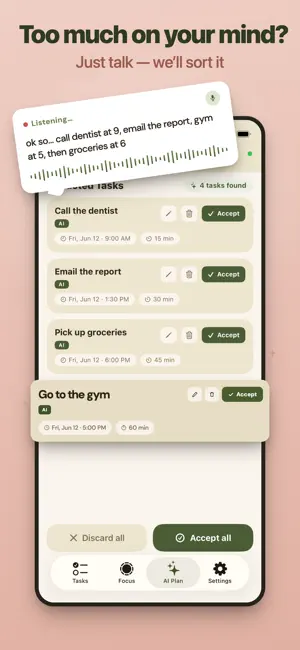
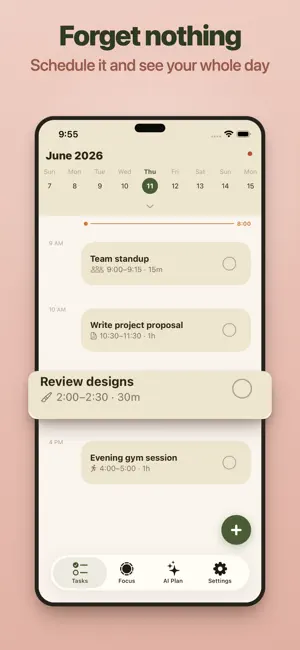
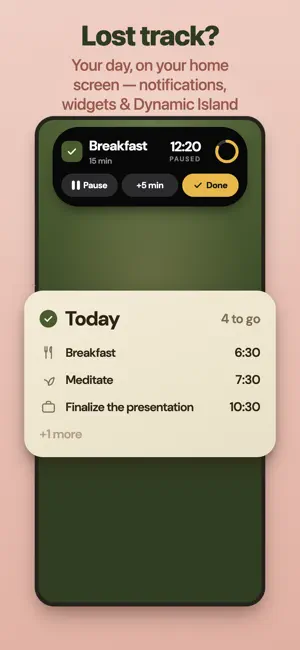
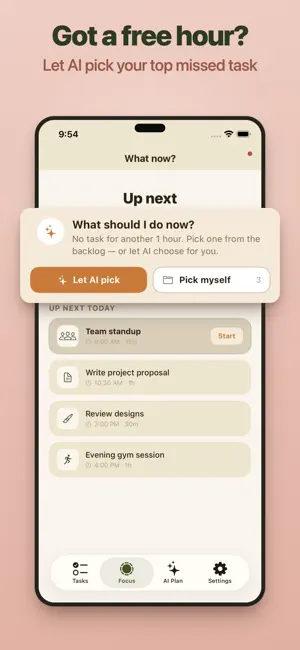
ZingDo is a daily planner and to-do list for anyone who struggles to get started — built with ADHD and busy, distractible minds in mind. Instead of a blank to-do list that stares back at you, ZingDo turns a messy brain dump into a clear, doable plan — then shows you the one thing to do right now. WHY ZINGDO • Beat the blank page. Dump everything in your head — typed or spoken — and ZingDo shapes it into tasks and subtasks. • One thing at a time. The Focus screen shows your next task with a countdown timer, so you're never deciding what's next. • Let AI pick what's next. Stuck with time to spare? ZingDo ranks your backlog and picks the single best task to do right now — and tells you why — so you beat procrastination instead of doom-scrolling a list. • No setup, no account. No signup, no login, no email. Open it and go. STAY ON TRACK, EVERYWHERE • Home-screen widgets — see your next task, or your whole day at a glance, without opening the app. • Dynamic Island & Lock Screen — start a Focus session and your countdown timer lives right there. Pause, add time, or finish without unlocking your phone. • Reminders that reach you — a gentle nudge before each task, with time-sensitive alerts that can break through Focus and Do Not Disturb so you don't miss a start. AI ON EVERY iPHONE — YOUR CHOICE ZingDo plans your day with AI on any supported iPhone. On Apple Intelligence devices (iPhone 15 Pro and newer Pro models) you can run planning fully on-device — nothing leaves your phone, and it works offline. On other devices, planning uses a privacy-respecting cloud service: only the text of your brain dump is sent to build your plan, and no copies or logs are kept. You choose your mode in onboarding and can change it anytime in Settings. Either way, your tasks and notes are stored on your device and your own private iCloud. YOUR DATA STAYS YOURS Your tasks, notes, and plans are saved on your device and synced through your own private iCloud — never our servers. We don't store your data and we can't see it. Use the same iCloud account on another iPhone or iPad and everything's already there — no app account, no password, nothing to set up. You can turn sync off anytime in Settings. A SMART BACKLOG, NOT A GUILT PILE Tasks you don't get to roll into a backlog instead of stacking up as red overdue badges. When a gap opens before your next thing, tap "Let AI pick" and ZingDo chooses a backlog task that actually fits the time you have — or browse and pick one yourself. It's lightweight time blocking and prioritizing, without the overwhelm. WHAT'S INSIDE • Tasks — today's schedule at a glance, add anything inline. • AI Plan — brain dump by voice or text, preview the plan, then add it to your day. • Focus — your next task, a countdown timer, and AI that picks the right backlog task to fill spare time. • Widgets & Live Activity — your next task and Focus timer on the Home Screen, Lock Screen, and Dynamic Island. • Settings — choose your AI mode, manage your subscription, restore purchases, and reset all data anytime. BUILT FOR FOCUS, NOT FRICTION ZingDo is intentionally small. No streaks to maintain, no guilt, no endless configuration. Just plan, focus, repeat — daily planning, time management, and getting things done made simple, and friendly to ADHD and neurodivergent minds. PRICING Start with a 7-day free trial — everything unlocked. After that, continue with a monthly, 6-month, or yearly plan. Subscriptions are billed through your Apple ID and renew automatically until cancelled; manage or cancel anytime in your App Store account settings. Privacy Policy: https://zingdo.pages.dev/privacy.html Terms of Use: https://zingdo.pages.dev/terms.html
What’s new
Version 1.3 · Updated July 7, 2026
• Widgets — Today widget shows more tasks without cutting them off • Dynamic Island & Lock Screen — a more reliable focus timer that resumes where you left off • Notifications — reminders now break through Focus modes so you don't miss a start • Focus fixes: picks the right task, shows what's happening now, plus performance and battery improvements
App privacy
The developer, Joy Ghosh, reported these privacy practices to Apple.
Data Linked to You
The following data, which may be collected and linked to your identity, may be used for the following purposes:
- Purchases: Purchase History
- Identifiers: User ID
- Usage Data: Product Interaction
Used for: Analytics, App Functionality
Alternatives to ADHD Planner Organizer: ZingDo
Looking for apps like ADHD Planner Organizer: ZingDo? Here are 6 similar apps on the App Store. The highest rated is RightNow Focus: ADHD Planner (5.0/5), and all 6 are free to download.
-
 RightNow Focus: ADHD Planner
5.0
RightNow Focus: ADHD Planner
5.0
-
 Nudge: Simple To Do Planner
5.0
Nudge: Simple To Do Planner
5.0
-
 Batch QR Code Scanner & Reader
5.0
Batch QR Code Scanner & Reader
5.0
-
 Vividly: ADHD Task Coach
-
 CalmCatch: ADHD Planner
5.0
CalmCatch: ADHD Planner
5.0
-
 Bitby: ADHD Focus & Tasks
| App | Rating | Price | Last updated | Compare |
|---|---|---|---|---|
| ADHD Planner Organizer: ZingDo | 5.0 / 5 (2 ratings) | Free | July 7, 2026 | |
| RightNow Focus: ADHD Planner | 5.0 / 5 (3) | Free | Sep 23, 2026 | Compare |
| Nudge: Simple To Do Planner | 5.0 / 5 (1) | Free | Mar 31, 2026 | Compare |
| Batch QR Code Scanner & Reader | 5.0 / 5 (1) | Free | May 22, 2026 | Compare |
| Vividly: ADHD Task Coach | – | Free | Sep 24, 2026 | Compare |
| CalmCatch: ADHD Planner | 5.0 / 5 (1) | Free | Jul 30, 2026 | Compare |
| Bitby: ADHD Focus & Tasks | – | Free | May 3, 2026 | Compare |