

Word Editor: DOCX Documents
omar yaboutene Productivity iPhoneiPadiPod touch
Word Editor: DOCX Documents is a free Productivity app for iPhone and iPad by omar yaboutene. Rated 1.0/5 from 1 ratings. Requires iOS 18.6.
- Rating
- 1.0
- 1 ratings
- Price
- Free
- on the App Store
- Size
- 11 MB
- Age 4+
- Updated
- Sep 24
- 2026 · v1.0.4
Screenshots


About Word Editor: DOCX Documents
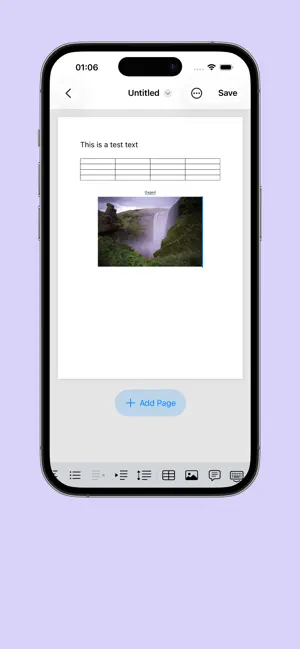
Unlike basic text editors that strip away your document's original formatting, Word Editor features a robust preservation engine. It parses and preserves your .docx structure during edits, ensuring that your layout remains intact when shared with others or opened back up on a desktop. KEY FEATURES: DUAL VIEW MODES: Read Mode: View your documents using high-fidelity native system rendering. Perfect for comfortable, distraction-free reading. Edit Mode: Switch with a single tap into an elegant, dark-themed card workspace designed specifically for mobile touchscreens. PRECISE TEXT FORMATTING: Full control over individual text runs. Customize typography: Select custom fonts and adjust text sizing. Apply emphasis: Bold, Italic, Underline, and Strikethrough. Vibrant coloring: Choose custom text colors to make headings or critical action items stand out. POWERFUL TABLE EDITING: Ditch clunky desktop interfaces. Tweak and edit tables cell-by-cell inside an interactive, scrollable grid view. Keep track of table dimensions instantly with dynamic row and column counting. CREATE OR IMPORT IN SECONDS: Start from scratch with clean, pre-built templates. Easily import existing .docx files from the Files app, iCloud, or external drives. EFFORTLESS FILE MANAGEMENT: Access recently opened documents instantly from your Home dashboard. Organize your workspace with intuitive iOS gestures—simply swipe a file card to clear it from your recents list. Real-time status badges keep track of paragraph counts, table counts, and unsaved changes. PRIVACY-FIRST & OFFLINE-READY: Your documents are processed completely locally on your device. No cloud uploads, no forced accounts, and absolute privacy. Works 100% offline—draft and edit wherever you go.
What’s new
Version 1.0.4 · Updated September 24, 2026
Fisxing bugs and adding more features
App privacy
The developer, omar yaboutene, reported these privacy practices to Apple.
Data Not Collected
The developer does not collect any data from this app.
Alternatives to Word Editor: DOCX Documents
Looking for apps like Word Editor: DOCX Documents? Here are 6 similar apps on the App Store. The highest rated is Word Document: Edit Docs,Share (5.0/5), and all 6 are free to download.
-
 Word Document: Edit Docs,Share
5.0
Word Document: Edit Docs,Share
5.0
-
 Docx Editor & Create Document
4.3
Docx Editor & Create Document
4.3
-
 Glazr DOCX File Editor
5.0
Glazr DOCX File Editor
5.0
-
 Documents Editor - Read & Edit
5.0
Documents Editor - Read & Edit
5.0
-
 Word Editor: DOCX, Office, PDF
-
 Documents Editor: DocPro
| App | Rating | Price | Last updated | Compare |
|---|---|---|---|---|
| Word Editor: DOCX Documents | 1.0 / 5 (1 rating) | Free | September 24, 2026 | |
| Word Document: Edit Docs,Share | 5.0 / 5 (1) | Free | Jul 13, 2026 | Compare |
| Docx Editor & Create Document | 4.3 / 5 (14) | Free | Sep 1, 2025 | Compare |
| Glazr DOCX File Editor | 5.0 / 5 (1) | Free | Jan 7, 2026 | Compare |
| Documents Editor - Read & Edit | 5.0 / 5 (4) | Free | Aug 13, 2026 | Compare |
| Word Editor: DOCX, Office, PDF | – | Free | Oct 27, 2026 | Compare |
| Documents Editor: DocPro | – | Free | Apr 16, 2026 | Compare |