

KelvinCam: Light Meter
JAMES STINSON RADCLIFF Photo & Video iPhoneiPadiPod touch
KelvinCam: Light Meter is a free Photo & Video app for iPhone and iPad by JAMES STINSON RADCLIFF. Rated 5.0/5 from 1 ratings. Requires iOS 18.0.
- Rating
- 5.0
- 1 ratings
- Price
- Free
- on the App Store
- Size
- 8 MB
- Age 4+
- Updated
- Oct 23
- 2026 · v1.6.3
Screenshots



About KelvinCam: Light Meter
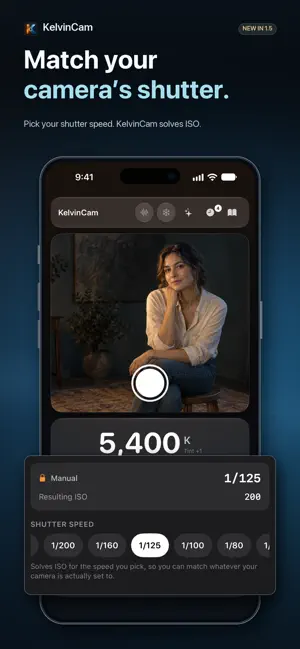
KelvinCam turns your iPhone into a precision light meter and color temperature reader for photographers, filmmakers, and lighting pros. Measure exposure (EV), lux/foot-candles, and white balance in Kelvin instantly. Save readings, match your lighting, and nail every shot. Free to download and use. KelvinCam Pro is one optional purchase: no subscription, no account, no ads. WHAT IT MEASURES • Color temperature: a large Kelvin number shows how warm or cool your light is, with a gradient bar from warm to cool. • Tint: the green-magenta axis that color temperature alone doesn't capture, critical for fluorescent and LED environments. • EV100: exposure value normalized to ISO 100, shown as a human-readable label (Candlelight, Indoor, Overcast, Full Sun, and more). PHOTO AND VIDEO MODES Photo mode gives you full control with eight scene presets: Auto, Portrait, Landscape, Action, Golden Hour, Sunset, Indoor, and Low Light. Each one biases the recommendations for that shooting situation. Video mode applies the 180° shutter rule automatically. Pick a preset frame rate (24, 25, 30, 50, 60, 120 fps) or type any custom value, and KelvinCam calculates the correct shutter for natural motion blur. It also tells you when you need an ND filter and which strength. LOCK AND SOLVE Tap Shutter or ISO in the recommendations card to lock it. KelvinCam solves for the other value in real time, like shooting in semi-automatic mode. Handy for a fixed frame rate, a maximum usable ISO, or a creative shutter speed. LIVE HISTOGRAM Tap the waveform button to open a live luma histogram. Clipping indicators warn you when highlights blow out or shadows crush, and show how much of the frame is affected. SNAPSHOT HISTORY Save any reading with a tap. Each snapshot keeps Kelvin, tint, EV, light source, mode, frame rate, preset, and the recommended settings, with a timestamp and your notes, ready to share as text. The free version keeps 3 saved readings; Pro keeps unlimited history and exports it as CSV. FILM STOCKS (PRO) Shooting film? Choose your stock, from Portra and HP5+ to Tri-X and beyond, and KelvinCam pins ISO to the box speed and automatically corrects long exposures for reciprocity failure. Each stock carries notes on its character and handling. CONTRAST RATIO METERING (PRO) Spot-meter your key light and mark it, then meter the fill. KelvinCam reads out the lighting ratio in stops, so you can dial in exactly the contrast you want, from flat and even to deep and dramatic. LENS APERTURE AND EQUIVALENT EXPOSURES (PRO) Set the f-stop your lens is actually on and KelvinCam solves shutter and ISO around it. The equivalent exposures table lists every aperture and shutter pair for the light you just measured. CALIBRATION (PRO) Align KelvinCam to a trusted reference meter using independent offsets for EV (±3 stops), color temperature (±500 K), and tint (±15). A live comparison card shows raw and calibrated readings side by side as you adjust. BUILT-IN GUIDES Seven in-depth guides cover the exposure triangle, shutter speed, ISO and noise, color temperature, the 180° shutter rule, reading EV, and a complete app walkthrough. FREE OR PRO Free: live Kelvin, tint, EV and lux, photo and video modes, lock and solve, the live histogram, the guides, the Home Screen widget, and 3 saved readings. KelvinCam Pro, one in-app purchase: everything marked PRO above, unlimited history with CSV export, and the on-device lighting assistant (on iPhones with Apple Intelligence). Try every Pro tool free for 20 minutes first, no card required. PRIVACY Light is measured on your iPhone. The camera feed is never recorded or sent anywhere; when you save a reading, a small preview image is kept with it in the app. Anonymous usage statistics help improve KelvinCam and are not linked to you.
What’s new
Version 1.6.3 · Updated October 23, 2026
The shutter now responds the moment you tap it, and quick taps are no longer lost. The welcome screen closes with a tap anywhere outside the card.
App privacy
The developer, JAMES STINSON RADCLIFF, reported these privacy practices to Apple.
Data Not Linked to You
The following data, which may be collected but is not linked to your identity, may be used for the following purposes:
- Purchases: Purchase History
- Location: Coarse Location
- Identifiers: Device ID
- Usage Data: Product Interaction
Used for: Analytics
Alternatives to KelvinCam: Light Meter
Looking for apps like KelvinCam: Light Meter? Here are 6 similar apps on the App Store.
-
 Lumyra
-
 Lumen - DualShot Record
-
 AozoraCamera Magnifier
-
 Local SlowMo Frame
-
 Video Sound Swap
-
 WiFi Photo Transfer - Crosync
| App | Rating | Price | Last updated | Compare |
|---|---|---|---|---|
| KelvinCam: Light Meter | 5.0 / 5 (1 rating) | Free | October 23, 2026 | |
| Lumyra | – | Free | Jun 3, 2026 | Compare |
| Lumen - DualShot Record | – | 3.99 USD | Aug 19, 2026 | Compare |
| AozoraCamera Magnifier | – | Free | Jun 9, 2026 | Compare |
| Local SlowMo Frame | – | Free | May 29, 2026 | Compare |
| Video Sound Swap | – | Free | Dec 4, 2025 | Compare |
| WiFi Photo Transfer - Crosync | – | Free | Jun 9, 2026 | Compare |