

Expense Tracker: Scan Receipts
Phuc Pham Utilities iPhoneiPadiPod touch
Expense Tracker: Scan Receipts is a free Utilities app for iPhone and iPad by Phuc Pham. Requires iOS 17.0. Updated August 29, 2026.
- Price
- Free
- on the App Store
- Size
- 7 MB
- Age 4+
- Updated
- Aug 29
- 2026 · v1.2.0
Screenshots


About Expense Tracker: Scan Receipts
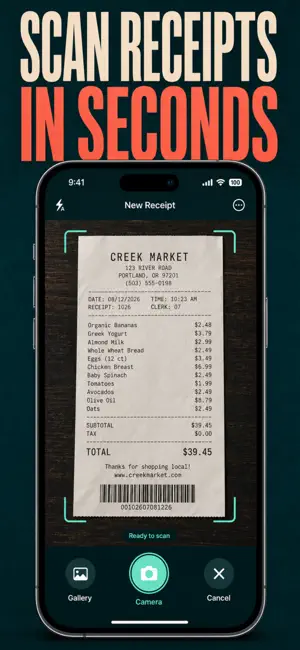
Scan a receipt photo and the total is read for you. Add the picture, confirm the amount and merchant, and every purchase is logged, categorized and ready for tax time — no spreadsheet, no shoebox, no bank login. Most expense apps want your bank account. ReceiptShot only wants the paper in your hand. Text recognition runs entirely on your device — the photo, the amount and the merchant never leave your iPhone, and there is no account to create. Thermal receipts fade in weeks; a photo log lasts forever. WHAT YOU GET - The total filled in for you — on-device text recognition reads the amount and the merchant off the photo, and you correct it in one tap - A running total for the week, month or year, updated the second you save - A category donut and top-merchant list that show where the money actually goes - A six-month bar chart, your average per receipt and your biggest receipt of all time - Reimbursable flags plus a CSV export you can hand straight to payroll or your accountant - Instant search by merchant or note, and one-tap category filters across ten expense types PERFECT FOR - Freelancers and contractors keeping deductible receipts through the year - Employees who file expense reports and want the paperwork done in seconds - Households tracking grocery, dining and transport spend without linking a bank - Anyone whose glovebox, wallet or kitchen drawer is full of fading paper WHY NOT JUST KEEP RECEIPT PHOTOS IN YOUR CAMERA ROLL? A camera roll gives you a thousand unsorted images and no numbers. ReceiptShot reads the total off each one, tags it to a category, adds it to your month, and turns the pile into a chart and a CSV file. Photos alone can't be searched, totalled or exported. PRIVACY Everything is stored on your device. No account, no sign-up, no cloud upload, no bank connection, no ads, no tracking of your spending. Delete the app and the data goes with it. FULL ACCESS The free version stores up to 15 receipts. Full access removes the cap for unlimited receipts and unlocks automatic total scanning and CSV export, alongside the breakdown and insights charts. Choose a weekly subscription, a yearly subscription, or a one-time lifetime purchase — whichever suits you. Subscriptions renew automatically until cancelled in your App Store settings. Photograph the receipt in your pocket right now and watch this month's real number appear. Terms of Use (EULA): https://web-levi.web.app/terms Privacy Policy: https://web-levi.web.app/privacy-policy Questions? [email protected]
What’s new
Version 1.2.0 · Updated August 29, 2026
Bug fixes and performance improvements.
App privacy
The developer, Phuc Pham, reported these privacy practices to Apple.
Data Not Collected
The developer does not collect any data from this app.
Alternatives to Expense Tracker: Scan Receipts
Looking for apps like Expense Tracker: Scan Receipts? Here are 6 similar apps on the App Store. The highest rated is 记录Box - 多功能记录工具 (5.0/5), and all 6 are free to download.
-
 CheckTables — Мои чеки
-
 รับจ่ายจด
-
 GPSauge Telematik-SUITE
-
 记录Box - 多功能记录工具
5.0
-
 Momas Black
-
 Versionamento Stara
| App | Rating | Price | Last updated | Compare |
|---|---|---|---|---|
| Expense Tracker: Scan Receipts | – | Free | August 29, 2026 | |
| CheckTables — Мои чеки | – | Free | Jul 19, 2026 | Compare |
| รับจ่ายจด | – | Free | Mar 10, 2026 | Compare |
| GPSauge Telematik-SUITE | – | Free | Oct 14, 2026 | Compare |
| 记录Box - 多功能记录工具 | 5.0 / 5 (3) | Free | Oct 22, 2026 | Compare |
| Momas Black | – | Free | Sep 16, 2026 | Compare |
| Versionamento Stara | – | Free | Sep 22, 2026 | Compare |