

px to rem: CSS Unit Converter
Phuc Pham Graphics & Design iPhoneiPadiPod touch
px to rem: CSS Unit Converter is a free Graphics & Design app for iPhone and iPad by Phuc Pham. Requires iOS 17.0. Updated August 21, 2026.
- Price
- Free
- on the App Store
- Size
- 4 MB
- Age 4+
- Updated
- Aug 21
- 2026 · v1.1.1
Screenshots

About px to rem: CSS Unit Converter
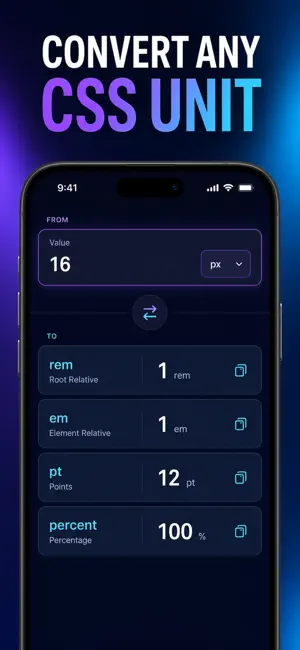
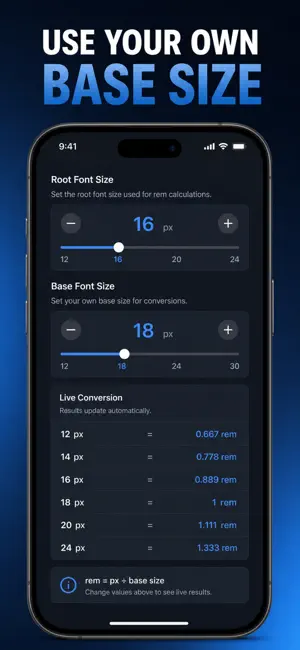
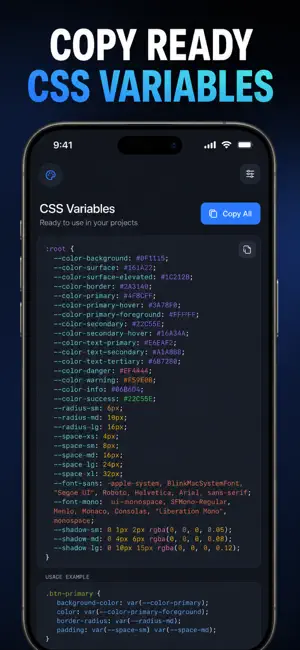
px to rem, rem to px, em, pt and % — converted the moment you type, against the root font size your project actually uses. Most converters assume a 16px root and stop there. This one lets you set the root font size, the em context size and the DPI once, then recomputes everything against that base: the live conversions, the modular type scale, the spacing tokens and the cross-platform density table. It is a native iPhone tool, so there is no browser tab to hunt for and no connection required. WHAT YOU GET - Every unit at once: enter one value and read px, rem, em, pt and % side by side, each copyable with a single tap - Your own base: root size, em context and DPI sliders, so a 62.5% root or a non-96 DPI setup gives correct numbers instead of textbook ones - Modular type scales: pick a base and a ratio from Minor Second to Golden Ratio and get Display down to Caption in px and rem - Copy-ready CSS: export the whole type scale or spacing set as :root custom properties, written in rem with px comments - 4pt and 8pt spacing tokens with common breakpoints from 640 to 1536, shown in px and rem together PERFECT FOR - Front-end developers turning a design file into real stylesheet values - UI and product designers keeping type and spacing consistent across screens - Design system maintainers who want one source of truth for their tokens - Anyone learning why rem, em and % behave differently, with a built-in Learn tab that explains each unit WHY NOT JUST USE A WEB CONVERTER? A web converter forgets your base the second you close the tab, handles one value at a time, and gives you nothing to paste. Here your root size, context size and DPI persist, results appear in all five units simultaneously, pinned values stay in a Saved tab, and the type and spacing scales come out as CSS you can drop straight into a stylesheet. PRIVACY Everything is computed and stored on your device. No account, no sign-in, no ads, no analytics, no data leaves your phone. The app works completely offline. FULL ACCESS Full access unlocks the modular type-scale generator, the CSS variable export, the 4pt/8pt spacing and cross-platform density tools, plus unlimited pinned conversions and saved history. Choose a weekly plan, a yearly plan, or a one-time lifetime purchase. Payment is charged to your Apple Account at confirmation. Subscriptions renew automatically unless cancelled at least 24 hours before the current period ends, and can be managed or cancelled in your App Store account settings. The lifetime option is a single purchase and does not renew. Set your root size, type your first value, and paste the result straight into your stylesheet. Terms of Use (EULA): https://web-levi.web.app/terms Privacy Policy: https://web-levi.web.app/privacy-policy Questions? [email protected]
What’s new
Version 1.1.1 · Updated August 21, 2026
Bug fixes and performance improvements.
App privacy
The developer, Phuc Pham, reported these privacy practices to Apple.
Data Not Collected
The developer does not collect any data from this app.
Alternatives to px to rem: CSS Unit Converter
Looking for apps like px to rem: CSS Unit Converter? Here are 6 similar apps on the App Store. The highest rated is Resize & Convert Photo (4.8/5), and all 6 are free to download.
-
 Laser Photo Prep: EngravePrep
4.5
Laser Photo Prep: EngravePrep
4.5
-
 Gaming Logo Esport Maker
4.6
Gaming Logo Esport Maker
4.6
-
 Resize & Convert Photo
4.8
Resize & Convert Photo
4.8
-
 Large Text, Big Text to Speech
4.4
Large Text, Big Text to Speech
4.4
-
 AI Emojis Generator
4.7
AI Emojis Generator
4.7
-
 Icon Themer: Custom App Icons
4.5
Icon Themer: Custom App Icons
4.5
| App | Rating | Price | Last updated | Compare |
|---|---|---|---|---|
| px to rem: CSS Unit Converter | – | Free | August 21, 2026 | |
| Laser Photo Prep: EngravePrep | 4.5 / 5 (2) | Free | Oct 11, 2026 | Compare |
| Gaming Logo Esport Maker | 4.6 / 5 (19) | Free | Sep 3, 2025 | Compare |
| Resize & Convert Photo | 4.8 / 5 (21) | Free | Jul 6, 2026 | Compare |
| Large Text, Big Text to Speech | 4.4 / 5 (216) | Free | Oct 9, 2025 | Compare |
| AI Emojis Generator | 4.7 / 5 (225) | Free | Oct 21, 2026 | Compare |
| Icon Themer: Custom App Icons | 4.5 / 5 (931) | Free | Feb 1, 2026 | Compare |