

Text Remover & Editor - Qutu
FunPixel LLC Utilities iPhoneiPadiPod touch
Text Remover & Editor - Qutu is a free Utilities app for iPhone and iPad by FunPixel LLC. Rated 4.9/5 from 10 ratings. Requires iOS 17.0.
- Rating
- 4.9
- 10 ratings
- Price
- Free
- on the App Store
- Size
- 40 MB
- Age 4+
- Updated
- Oct 18
- 2026 · v1.1.8
Screenshots


About Text Remover & Editor - Qutu
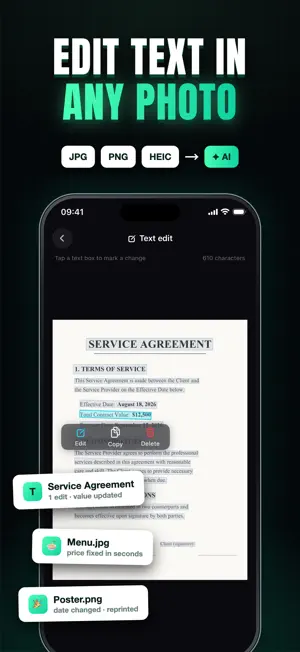
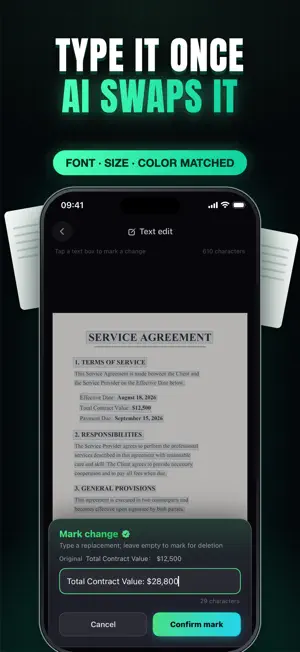
Edit the words inside your photos naturally, restore precious memories, and make every image clearer in just a few taps. Qutu makes professional AI photo editing simple, private, and watermark-free. • Replace, remove, or rewrite words while matching the original font, color, and background • Restore faded, scratched, torn, or blurry old photos • Translate menus, signs, screenshots, and documents while preserving their layout • Upscale low-resolution images and sharpen small or fuzzy text • Remove backgrounds, expand image borders, and extract editable text Tap text in a photo to change, remove, or rewrite it. Qutu rebuilds the surrounding design so your edit blends naturally into the image. You can also add new text, with AI matching the style of the original image. For restoration and enhancement, choose a photo, select the result you want, and let AI do the hard work. Edit a typo on a poster, update a screenshot, change a product image, translate a foreign menu, or bring a family photo back to life. Qutu is made for travelers, creators, students, small businesses, and anyone who wants polished photos without complicated tools. Export clean, high-resolution results without a watermark, while privacy-minded design helps keep your photos yours. Qutu offers optional PRO membership with weekly or yearly plans, plus one-time credit packs for additional usage. Payment is charged to your Apple ID at confirmation of purchase. Subscriptions renew automatically unless auto-renewal is turned off at least 24 hours before the end of the current period. You can manage or cancel your subscription anytime in your App Store account settings. Terms of Use: https://funnypixcel.com/terms/ Privacy Policy: https://funnypixcel.com/privacy/ Download Qutu and make every photo say exactly what you want.
Ratings & reviews
4.9
10 ratings
What’s new
Version 1.1.8 · Updated October 18, 2026
• A better first-time guide: learn to edit, add and remove text in photos right away, with AI matching the original font and color. • Smoother saving: edited text, restored old photos, HD enhancements and cutouts go straight to your library in full resolution, no watermark.
App privacy
The developer, FunPixel LLC, reported these privacy practices to Apple.
Data Not Linked to You
The following data, which may be collected but is not linked to your identity, may be used for the following purposes:
- Usage Data: Product Interaction, Other Usage Data
- Diagnostics: Crash Data, Performance Data
- User Content: Photos or Videos
- Identifiers: User ID, Device ID
Used for: Analytics, App Functionality
Alternatives to Text Remover & Editor - Qutu
Looking for apps like Text Remover & Editor - Qutu? Here are 6 similar apps on the App Store. The highest rated is Docs Editor: Edit Word File (5.0/5), and all 6 are free to download.
-
 EditShot – Photo Text Editor
4.8
EditShot – Photo Text Editor
4.8
-
 Docs Editor: Edit Word File
5.0
Docs Editor: Edit Word File
5.0
-
 Location Changer - Loc Shifter
3.3
Location Changer - Loc Shifter
3.3
-
 无痕P图改字
4.9
无痕P图改字
4.9
-
 SMSVerified: SMS Verification
4.4
SMSVerified: SMS Verification
4.4
-
 Heart Moments
4.5
Heart Moments
4.5
| App | Rating | Price | Last updated | Compare |
|---|---|---|---|---|
| Text Remover & Editor - Qutu | 4.9 / 5 (10 ratings) | Free | October 18, 2026 | |
| EditShot – Photo Text Editor | 4.8 / 5 (285) | Free | Sep 14, 2026 | Compare |
| Docs Editor: Edit Word File | 5.0 / 5 (1) | Free | Sep 1, 2026 | Compare |
| Location Changer - Loc Shifter | 3.3 / 5 (259) | Free | Nov 3, 2025 | Compare |
| 无痕P图改字 | 4.9 / 5 (8) | Free | Apr 29, 2026 | Compare |
| SMSVerified: SMS Verification | 4.4 / 5 (530) | Free | Aug 18, 2026 | Compare |
| Heart Moments | 4.5 / 5 (70) | Free | Aug 26, 2026 | Compare |