

Auto AI Diagnostics
Matthew Sheaffer Utilities iPhoneiPadiPod touch
Auto AI Diagnostics is a free Utilities app for iPhone and iPad by Matthew Sheaffer. Requires iOS 15.1. Updated August 6, 2026.
- Price
- Free
- on the App Store
- Size
- 84 MB
- Age 4+
- Updated
- Aug 6
- 2026 · v1.3.1
Screenshots


About Auto AI Diagnostics
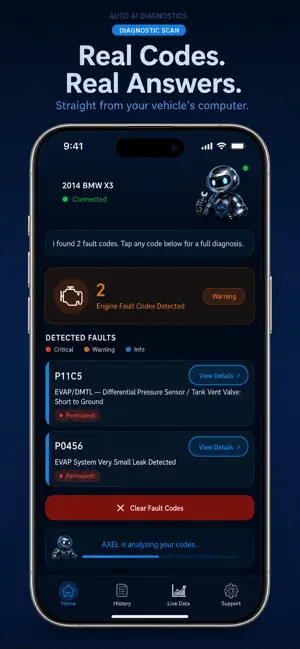
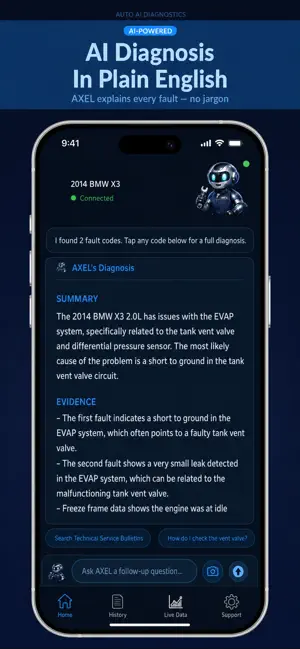
Your check engine light is on. Now what? Auto AI Diagnostics turns your iPhone into an AI-powered car diagnostic tool. Plug a Bluetooth OBD2 adapter into the port under your dash, tap scan, and AXEL — your AI shop foreman — reads the fault codes straight from your car's computer and explains what's going on in plain English or Spanish: what's happening, how serious it is, whether it's a DIY fix or a shop job, and what to do next. FEATURES: • Real fault codes pulled straight from your car's computer — engine and control modules • Automatic VIN read directly from your vehicle's ECU • AI-powered diagnosis with evidence and an action plan — not just a code definition • Fault code descriptions verified against the web for accuracy • View Conditions: see the mileage, battery voltage, and speed recorded when each fault set • Live engine data — RPM, coolant temp, battery voltage, throttle, and more • Odometer tracking with every scan • Scan history so you can track issues over time • DIY repair guidance and YouTube repair video suggestions for your exact vehicle • Ask AXEL follow-up questions about your specific car • Works with older, pre-2008 (K-line) vehicles too • The entire app in English or Spanish — including AXEL's AI diagnosis. Switch anytime. WHAT YOU NEED: A Bluetooth OBD2 adapter (ELM327-compatible, sold separately). It plugs into the OBD port under the dashboard on the driver's side — and on iPhone there's no pairing needed, the app finds it automatically. Works with most gas-powered cars and light trucks sold since 1996 (OBD2), including many pre-2008 K-line vehicles. Auto AI Diagnostics helps you understand your car and make informed decisions — it's information and guidance, not a substitute for a professional inspection when safety is on the line.
What’s new
Version 1.3.1 · Updated August 6, 2026
AXEL AI is still FREE during launch. • Enter fault codes by hand — no adapter required. Type the codes off a shop quote, an AutoZone printout, or a dealer estimate, and AXEL diagnoses them like a real scan • Repair videos linked right on the report, matched to your car and the job • Snap a photo of your VIN to add a car, instead of typing 17 characters • Garage artwork now covers 215 vehicles • AXEL's module answers come back noticeably faster Still want live scanning? On iPhone you need a Bluetooth 4.0 (BLE) OBD2 adapter — about $60. Pair it in the app, not in iOS Settings.
App privacy
The developer, Matthew Sheaffer, reported these privacy practices to Apple.
Data Linked to You
The following data, which may be collected and linked to your identity, may be used for the following purposes:
- Contact Info: Email Address
- Identifiers: User ID
Used for: App Functionality
Data Not Linked to You
The following data, which may be collected but is not linked to your identity, may be used for the following purposes:
- Usage Data: Product Interaction
- Diagnostics: Crash Data
Used for: Analytics, App Functionality
Alternatives to Auto AI Diagnostics
Looking for apps like Auto AI Diagnostics? Here are 6 similar apps on the App Store. The highest rated is Honest Mechanic (5.0/5), and all 6 are free to download.
-
 DG Cortex
-
 Ratchet AI
-
 Honest Mechanic
5.0
Honest Mechanic
5.0
-
 Car-Brain.pro
-
 MIMP: Car Diagnosis & Repair
5.0
MIMP: Car Diagnosis & Repair
5.0
-
 FixMyRidePro Mechanics
| App | Rating | Price | Last updated | Compare |
|---|---|---|---|---|
| Auto AI Diagnostics | – | Free | August 6, 2026 | |
| DG Cortex | – | Free | Sep 24, 2026 | Compare |
| Ratchet AI | – | Free | Jun 25, 2026 | Compare |
| Honest Mechanic | 5.0 / 5 (7) | Free | Sep 24, 2026 | Compare |
| Car-Brain.pro | – | Free | Apr 14, 2026 | Compare |
| MIMP: Car Diagnosis & Repair | 5.0 / 5 (5) | Free | Mar 26, 2026 | Compare |
| FixMyRidePro Mechanics | – | Free | Mar 15, 2026 | Compare |