

ImageToPDF: Scan & Create PDF
Nguyen Nghiem Utilities iPhoneiPadiPod touch
ImageToPDF: Scan & Create PDF is a free Utilities app for iPhone and iPad by Nguyen Nghiem. Requires iOS 16.0. Updated August 19, 2026.
- Price
- Free
- on the App Store
- Size
- 6 MB
- Age 4+
- Updated
- Aug 19
- 2026 · v2.0
Screenshots


About ImageToPDF: Scan & Create PDF
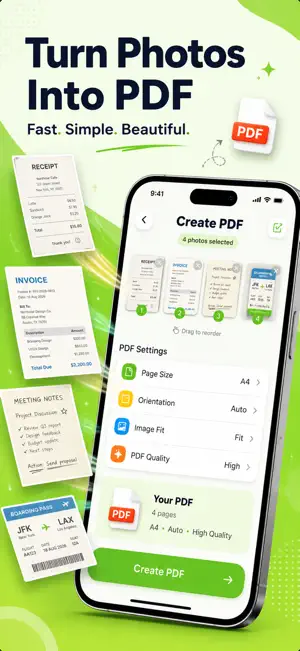
Turn photos and documents into polished PDFs with ImageToPDF — a fast, simple document scanner and PDF creator built for everyday use. Whether you're saving receipts, scanning paperwork, combining photos, or preparing documents to share, ImageToPDF gives you the essential tools in one clean and easy-to-use workspace. CREATE PDF FROM PHOTOS Select multiple photos and turn them into a single PDF in just a few taps. • Import multiple images • Arrange pages in your preferred order • Combine photos into one PDF • Create clean, high-quality documents SCAN DOCUMENTS Use your camera to quickly capture paper documents and turn them into digital files. Perfect for: • Receipts • Invoices • Notes • Forms • Reports • Contracts • Work documents • Personal records EDIT & ENHANCE Make photographed documents easier to read before creating your PDF. Use simple editing tools to: • Crop pages • Rotate scans • Apply document filters • Adjust image appearance • Review pages before export CUSTOMIZE YOUR PDF Create documents that fit your needs. Choose from available options for: • Page size • Margins • Image fitting • Page orientation • PDF quality ORGANIZE YOUR DOCUMENTS Keep your PDFs together in a visual document library. Quickly: • Browse your PDFs • Search documents • View recent files • Rename documents • Preview PDFs • Manage your files SAVE & SHARE Once your PDF is ready, easily continue your workflow. • Preview your PDF • Share with other apps • Save to Files • Rename your document • Print when supported • Create another PDF DESIGNED TO BE SIMPLE ImageToPDF combines powerful document tools with a clean, friendly interface designed to keep common actions easy to find. No complicated workflow. Just select, scan, create, and share. Download ImageToPDF and turn your photos and documents into PDFs whenever you need them.
What’s new
Version 2.0 · Updated August 19, 2026
A fresh new ImageToPDF experience is here! We've redesigned the app to make creating and managing PDFs faster, simpler, and more enjoyable. What's new: • A completely redesigned interface • A faster, more visual PDF creation workflow • An improved document scanning experience • A refreshed scan editor with easier editing tools • A redesigned PDF settings experience • A new visual document library • Easier PDF preview, saving, and sharing • Improved navigation throughout the app • Dark Mode refinements • Performance and stability improvements Same essential PDF tools. A whole new experience. Thanks for using ImageToPDF!
App privacy
The developer, Nguyen Nghiem, reported these privacy practices to Apple.
Data Not Collected
The developer does not collect any data from this app.
Alternatives to ImageToPDF: Scan & Create PDF
Looking for apps like ImageToPDF: Scan & Create PDF? Here are 6 similar apps on the App Store. The highest rated is ASO Tool - AI Keyword Tracker (5.0/5), and all 6 are free to download.
-
 AI's Photo
-
 ASO Tool - AI Keyword Tracker
5.0
-
 BCS Training Tool
-
 PDF Converter - Photo to PDF.
-
 Document Scanner - Photo Scan
4.7
-
 Easy Contacts Cleaner
4.5
| App | Rating | Price | Last updated | Compare |
|---|---|---|---|---|
| ImageToPDF: Scan & Create PDF | – | Free | August 19, 2026 | |
| AI's Photo | – | Free | Oct 22, 2026 | Compare |
| ASO Tool - AI Keyword Tracker | 5.0 / 5 (6) | Free | Jul 5, 2026 | Compare |
| BCS Training Tool | – | Free | Feb 27, 2024 | Compare |
| PDF Converter - Photo to PDF. | – | Free | Dec 15, 2025 | Compare |
| Document Scanner - Photo Scan | 4.7 / 5 (24) | Free | Mar 22, 2026 | Compare |
| Easy Contacts Cleaner | 4.5 / 5 (40) | Free | Mar 23, 2024 | Compare |