

Apex IPTV
Mathijs van Wijk Entertainment iPhoneiPadiPod touchMac
Apex IPTV is a free Entertainment app for iPhone and iPad by Mathijs van Wijk. Requires iOS 17.0. Updated August 25, 2026.
- Price
- Free
- on the App Store
- Size
- 52 MB
- Age 12+
- Updated
- Aug 25
- 2026 · v2.3
Screenshots


About Apex IPTV
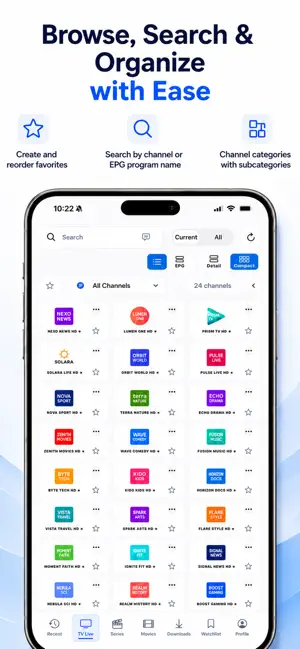
Many IPTV players feel limited. Some struggle with certain streams, others have weak search, poor favorites management, missing subtitle options, no proper AirPlay or Chromecast support, limited EPG controls, or a confusing layout when your library contains thousands of channels, movies and series. APEX IPTV brings these missing pieces together in one modern player for iPad and Mac. Add your own Xtream Codes account or M3U playlist URL and browse live TV, movies, series, favorites, watchlist items, reminders and downloads in a clear and organized interface. Large libraries are easier to manage with fast search, smart categories, favorite reordering, hidden categories, detailed movie and series information, watchlists, reminders, and TV guide support where available. For live TV, APEX IPTV helps make your channel list easier to use with EPG support where available, including the option to filter out channels without EPG data. This makes it faster to focus on channels that actually include programme information. The app also includes multiple playback options, giving you a better chance of playing different stream formats smoothly. For supported content, APEX IPTV offers subtitles, audio track selection, Picture in Picture, AirPlay, Chromecast support and automatic subtitle search via OpenSubtitles when using your own OpenSubtitles account. Whether you use IPTV mainly for live TV, movies, series, watchlists or downloaded content, APEX IPTV is designed to make everything feel easier, cleaner and more reliable. Main features: • Add your own Xtream Codes account or M3U playlist URL • Watch live TV from your own IPTV source • Browse movies and series from supported providers • Multiple player options for better stream compatibility • Fast search across channels, movies and series • Create, organize and reorder favorites • Add movies and series to your watchlist • Set reminders for supported TV guide programmes • Hide unwanted categories • TV guide / EPG support where available • Filter out channels without EPG data • Detailed movie and series information where supported • Download supported movies and episodes • Manage downloads inside the app • Subtitle and audio track selection • Automatic subtitle search via OpenSubtitles with your own account • Picture in Picture support where available • AirPlay and Chromecast support where available • Built for iPad and Mac APEX IPTV does not provide, sell, host, stream or distribute any TV channels, movies, series, playlists or other media content. Users must add their own legal IPTV source. The app is intended only as a media player for personal and legally accessible IPTV sources. Terms of Use (EULA): https://www.apple.com/legal/internet-services/itunes/dev/stdeula/
What’s new
Version 2.3 · Updated August 25, 2026
bugfixes
App privacy
The developer, Mathijs van Wijk, reported these privacy practices to Apple.
Data Not Linked to You
The following data, which may be collected but is not linked to your identity, may be used for the following purposes:
- Identifiers: Device ID
- Usage Data: Product Interaction
- Diagnostics: Other Diagnostic Data
Used for: Analytics, App Functionality
Alternatives to Apex IPTV
Looking for apps like Apex IPTV? Here are 6 similar apps on the App Store. The highest rated is Apex Player (5.0/5), and all 6 are free to download.
-
 Apex Player
5.0
-
 StreamX – IPTV Player & M3U
4.5
-
 Smarter IPTV Stream: LiveTV
4.4
-
 SWIPTV - IPTV Player
4.2
-
 Tivimax IPTV Player (Lite)
2.1
-
 IPTV Player Live: M3U & Xtream
4.9
| App | Rating | Price | Last updated | Compare |
|---|---|---|---|---|
| Apex IPTV | – | Free | August 25, 2026 | |
| Apex Player | 5.0 / 5 (1) | Free | Sep 24, 2026 | Compare |
| StreamX – IPTV Player & M3U | 4.5 / 5 (24) | Free | Oct 23, 2026 | Compare |
| Smarter IPTV Stream: LiveTV | 4.4 / 5 (76) | Free | Oct 12, 2026 | Compare |
| SWIPTV - IPTV Player | 4.2 / 5 (123) | Free | Oct 21, 2026 | Compare |
| Tivimax IPTV Player (Lite) | 2.1 / 5 (63) | Free | Apr 22, 2026 | Compare |
| IPTV Player Live: M3U & Xtream | 4.9 / 5 (1,750) | Free | Oct 6, 2026 | Compare |
Compare Apex IPTV with the top alternatives: ratings, updates, ASO score and keyword gaps →