

PassKeep: Password Generator
LEAN ASIA CO., LTD Utilities iPhoneiPadiPod touch
PassKeep: Password Generator is a free Utilities app for iPhone and iPad by LEAN ASIA CO., LTD. Requires iOS 17.0. Updated October 7, 2026.
- Price
- Free
- on the App Store
- Size
- 4 MB
- Age 4+
- Updated
- Oct 7
- 2026 · v1.1
Screenshots
Save to Pinterest


About PassKeep: Password Generator
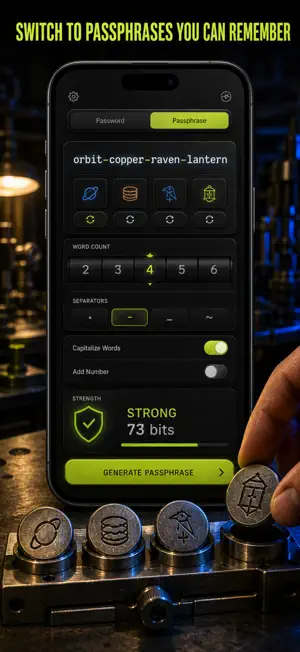
PREMIUM — PURCHASE REQUIRED: All features described below are part of Pro and require a purchase: a weekly or yearly auto-renewing subscription, or a one-time lifetime purchase. Need a password nobody can guess — without handing your logins to a cloud company? PassKeep creates a genuinely random password or passphrase in one tap, and keeps only memory-jogging hints on your device. Remember, don't store. PassKeep is not another cloud vault. Every character is drawn from the iPhone's cryptographic random source — the same CSPRNG the system itself trusts — entropy is computed honestly from your exact settings, and nothing ever leaves the phone. No account, no sync, no server. WHAT YOU GET • A 20-character random password in your clipboard seconds after opening the app — and wiped from the clipboard automatically 30 seconds later • A speakable passphrase like "cedar-lantern-ripple-comet" you can read out loud without spelling l-versus-1 — lookalike characters filtered on request • An honest strength meter: entropy calculated from your real settings against NIST thresholds, Weak to Excellent — no vibes, no guesswork • Paste any old password into Check and see exactly why it is weak — "word + numbers shape", "contains a year", "keyboard pattern" — before an attacker does • A hint vault that stores clues ("the blue notebook, page 3"), never passwords — and warns you the moment a hint starts to look like the real thing • Face ID lock on your hints that re-engages the instant you switch apps PERFECT FOR • People who refuse to put their real passwords in anyone's cloud • Anyone a signup form has just forced to invent yet another "strong" password • Users who keep passwords in their head and only need a nudge to recall which one • Security-minded people who want to audit the passwords they already use WHY NOT JUST USE A PASSWORD MANAGER? A manager stores every password you own in one encrypted database — one master password, one breach headline away from disaster. PassKeep takes the opposite bet: the passwords live in your head, only the hints live on your phone. If your phone is lost, a thief finds "ask past-me: the blue notebook" — not your bank login. PRIVATE BY DEFAULT No account. No cloud. No network calls. Generation happens entirely on-device, hints stay in the local database, and sensitive copies auto-clear from the system clipboard after 30 seconds. PREMIUM (PURCHASE REQUIRED) PassKeep requires Full Access to unlock the app, via an auto-renewing Weekly or Yearly subscription, or a one-time Lifetime purchase. Full Access includes the password and passphrase generator, the strength checker, unlimited hint entries and groups, pinned entries, and Face ID lock. Open PassKeep, tap Generate, and copy a password no one can guess. Terms of Use: https://leanstudio.asia/terms-of-use Privacy Policy: https://leanstudio.asia/privacy-policy Support: [email protected]
What’s new
Version 1.1 · Updated October 7, 2026
Bug fixes and performance improvements. Thanks for using the app — your feedback keeps it getting better.
App privacy
The developer, LEAN ASIA CO., LTD, reported these privacy practices to Apple.
Data Not Collected
The developer does not collect any data from this app.
Alternatives to PassKeep: Password Generator
Looking for apps like PassKeep: Password Generator? Here are 6 similar apps on the App Store. The highest rated is Psswd: Password Generator (4.0/5), and all 6 are free to download.
-
 AnyPaste: Local Clipboard Sync
-
 Password Generator & Strength
-
 Psswd: Password Generator
4.0
-
 BlueSky VPN
-
 Password Generator: Strong PIN
-
 PC Remote: Mouse & Keyboard
| App | Rating | Price | Last updated | Compare |
|---|---|---|---|---|
| PassKeep: Password Generator | – | Free | October 7, 2026 | |
| AnyPaste: Local Clipboard Sync | – | Free | Sep 24, 2026 | Compare |
| Password Generator & Strength | – | Free | Sep 17, 2026 | Compare |
| Psswd: Password Generator | 4.0 / 5 (1) | Free | Jul 2, 2026 | Compare |
| BlueSky VPN | – | Free | Nov 25, 2026 | Compare |
| Password Generator: Strong PIN | – | Free | Aug 24, 2026 | Compare |
| PC Remote: Mouse & Keyboard | – | Free | Nov 27, 2026 | Compare |