

DevSnap: Code to Markdown
AICreator Developer Tools iPhoneiPadiPod touch
DevSnap: Code to Markdown is a free Developer Tools app for iPhone and iPad by AICreator. Requires iOS 18.0. Updated August 30, 2026.
- Price
- Free
- on the App Store
- Size
- 2 MB
- Age 4+
- Updated
- Aug 30
- 2026 · v1.2.5
Screenshots



About DevSnap: Code to Markdown
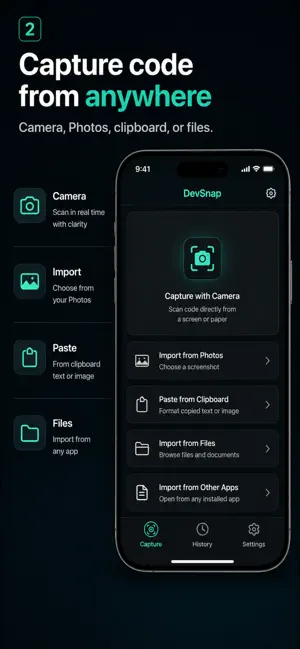
DevSnap turns technical screenshots into clean, reusable developer notes. Import a screenshot, capture with the camera, or paste text or an image. Text Scan is selected by default and recognizes code, logs, JSON, stack traces, and terminal output on your device. It works offline and does not upload your input to the DevSnap transform service. Need richer structure? Switch to optional AI Transform to turn a selected image into organized Markdown, plain text, a summary, or a Mermaid diagram. DevSnap clearly identifies this cloud-processing mode before upload. See the result before you scan: - Open built-in JSON, TypeScript error, and npm log examples - Preview finished results without granting Photos access - Examples do not enter History or use AI Transform credits Use every result: - Copy cleaned text with one tap - Export Markdown or a language-specific source file - Create a polished Share Card from a cleaned excerpt - Share Cards exclude the original screenshot by default - Render Markdown as a readable document, then edit its source - Rename, favorite, search, and reopen saved snippets Your searchable history is stored locally on your device. No account is required. DevSnap does not use your content for advertising or tracking. AI Transform is optional and requires an internet connection. When enabled, the selected image, transform setting, and an app-generated device identifier are sent to DevSnap's processing service.
What’s new
Version 1.2.5 · Updated August 30, 2026
Text Scan is now the default for fast, on-device recognition. A smaller first-run guide keeps capture controls in reach, while new sample items let you preview JSON, TypeScript error, and npm installation results without using Photos, adding History items, or spending AI Transform credits. Results now keep Copy and Share Card actions visible at the bottom. Share Card creates a polished image from a cleaned excerpt with DevSnap attribution and an App Store QR; your original screenshot is not included automatically. Failed AI Transform requests now return the reserved credit. We also clarified on-device versus cloud processing and hide unavailable AI sections.
App privacy
The developer, AICreator, reported these privacy practices to Apple.
Data Linked to You
The following data, which may be collected and linked to your identity, may be used for the following purposes:
- User Content: Photos or Videos
- Identifiers: Device ID
Used for: App Functionality
Alternatives to DevSnap: Code to Markdown
Looking for apps like DevSnap: Code to Markdown? Here are 6 similar apps on the App Store. The highest rated is BalauDeck (5.0/5), and all 6 are free to download.


| App | Rating | Price | Last updated | Compare |
|---|---|---|---|---|
| DevSnap: Code to Markdown | – | Free | August 30, 2026 | |
| CC Peek | – | Free | May 8, 2026 | Compare |
| ReadLogs | – | Free | Oct 12, 2026 | Compare |
| BalauDeck | 5.0 / 5 (1) | Free | Oct 20, 2026 | Compare |
| Json To Table | – | Free | Jun 23, 2026 | Compare |
| BB Run - App Build & Run Tool | – | Free | Oct 1, 2026 | Compare |
| Zodex | – | Free | Oct 27, 2026 | Compare |