

Screen discipline
Jens Gunnar Solli Thoresen Productivity iPhoneiPadiPod touch
Screen discipline is a free Productivity app for iPhone and iPad by Jens Gunnar Solli Thoresen. Requires iOS 16.0. Updated September 15, 2026.
- Price
- Free
- on the App Store
- Size
- 34 MB
- Age 12+
- Updated
- Sep 15
- 2026 · v1.0.4
Screenshots


About Screen discipline
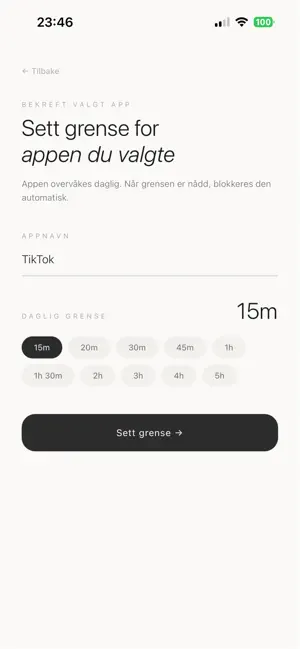
Screen Discipline helps you set daily time limits on your most distracting apps — and actually enforces them. Set a limit. When you reach it, the app is blocked for the rest of the day. Simple, effective, no cheating. FEATURES • Set daily time limits per app (15 min – 5 hours) • Automatic blocking when your limit is reached • Daily stats to track your usage • Leaderboard — compete with friends on who uses their phone less • Earn points for staying within your limits • Hall of Fame badges for top performers at year-end HOW IT WORKS Add an app, set your daily limit. Screen Discipline monitors your usage in the background. When you hit your limit, the app is blocked until midnight — giving you back control of your time. The lower your limit, the more points you earn. Only blocked apps count — no cheating the system. SUBSCRIPTION FREE Screen Discipline Pro is a one-time purchase. No subscription, no hidden fees.
What’s new
Version 1.0.4 · Updated September 15, 2026
App review options.
App privacy
The developer, Jens Gunnar Solli Thoresen, reported these privacy practices to Apple.
Data Not Collected
The developer does not collect any data from this app.
Alternatives to Screen discipline
Looking for apps like Screen discipline? Here are 6 similar apps on the App Store. The highest rated is Lettuce: Screen Time Control (5.0/5), and all 6 are free to download.
-
 Doombreak - App Blocker
-
 Lettuce: Screen Time Control
5.0
-
 MindMap - MindMapper
-
 Slowth: Short Video Blocker
4.0
-
 Website Blocker
4.1
-
 UnSwipe: Beat Social Addiction
4.0
| App | Rating | Price | Last updated | Compare |
|---|---|---|---|---|
| Screen discipline | – | Free | September 15, 2026 | |
| Doombreak - App Blocker | – | Free | Nov 9, 2026 | Compare |
| Lettuce: Screen Time Control | 5.0 / 5 (2) | Free | May 21, 2026 | Compare |
| MindMap - MindMapper | – | Free | Oct 10, 2026 | Compare |
| Slowth: Short Video Blocker | 4.0 / 5 (4) | Free | Nov 6, 2026 | Compare |
| Website Blocker | 4.1 / 5 (26) | Free | Mar 12, 2026 | Compare |
| UnSwipe: Beat Social Addiction | 4.0 / 5 (2) | Free | Oct 24, 2026 | Compare |
Compare Screen discipline with the top alternatives: ratings, updates, ASO score and keyword gaps →