

Photodrift Swipe Photo Cleaner
Vadym Suprun Utilities iPhoneiPadiPod touch
Photodrift Swipe Photo Cleaner is a free Utilities app for iPhone and iPad by Vadym Suprun. Rated 1.0/5 from 1 ratings. Requires iOS 17.0.
- Rating
- 1.0
- 1 ratings
- Price
- Free
- on the App Store
- Size
- 7 MB
- Age 4+
- Updated
- Oct 21
- 2026 · v1.11.1
Screenshots


About Photodrift Swipe Photo Cleaner
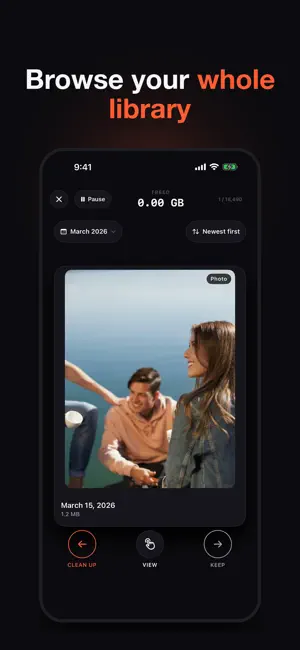
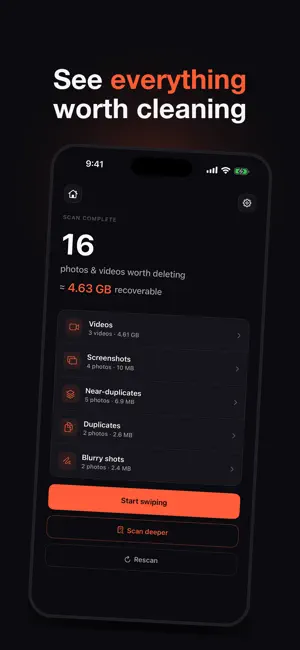
Your photo library is full, and most of what is filling it is not worth keeping. Photodrift shows you one pile of clutter at a time. Swipe left to delete it, swipe right to keep it, and watch the gigabytes come back. Ten minutes of 4K video takes about as much space as a thousand photos, so videos are counted too. The scan tells you exactly what your library can give back, without opening a single settings screen. No ads. Not one, not between swipes, not on a timer. No account to create, and no subscription - the free tier is a working app, not a trial. WHAT IT FINDS • Duplicates - byte-identical copies and re-saves • Near-duplicates - burst shots, and the ten photos you took of the same sunset • Blurry shots - out-of-focus images, detected on-device with Apple's Vision framework • Screenshots - grouped by what they actually show, so a pile of the same screen clears in one swipe • Videos - every clip, labelled small, medium or large for YOUR library, and playable right on the card HOW IT WORKS 1. Open Photodrift. It starts finding cleanup candidates in under two seconds. 2. Swipe left on what you don't need, right on what you do. 3. Tap any card to open the group and pick the sharpest keeper yourself. 4. Hit Done. Everything you deleted lands in Photos > Recently Deleted, where you have 30 days to change your mind. Nothing is ever destroyed on the spot. BROWSE YOUR WHOLE LIBRARY Tap your photo count on the home screen to swipe through every photo and video, one at a time, newest or oldest first. Jump to any month, and pick up where you left off next time. Browsing is free; the one-time unlock adds Largest and Smallest first and 2×–8× video playback. NOTHING LEAVES YOUR PHONE There is no account to create, no server to trust and no analytics. Every photo is analysed on-device with Apple's Vision framework, which also means Photodrift works in airplane mode. The App Store privacy label reads "Data Not Collected", and that is the whole story. PAY ONCE, IF YOU EVER PAY AT ALL Finding and deleting exact duplicates is free, with no swipe limit, no timer and no ads interrupting the job. One purchase - once, not monthly, not yearly - adds near-duplicates, blurry shots, screenshots and videos. Most apps in this category charge by the week, forever. Photodrift asks once, for less than a couple of weeks of what they charge, and then never asks again. No subscription. Ever. BUILT FOR iOS Native SwiftUI, with haptics on every swipe, a live "freed X GB" counter, and a share card for when the number is worth showing someone. Works on iPhone and iPad. Available in 17 languages: English, German, French, Spanish, Portuguese (Brazil), Italian, Polish, Czech, Danish, Norwegian, Swedish, Finnish, Hungarian, Romanian, Greek, Russian and Ukrainian. Photodrift needs access to your photo library in order to scan it and delete on your behalf. That is the only permission it asks for, and it asks before it reads anything. — Questions? [email protected]
What’s new
Version 1.11.1 · Updated October 21, 2026
Photodrift, made for iPad. • Turn it sideways: landscape, Split View, Slide Over and Stage Manager now all work. • Bigger photos and larger text on iPad — the card fills the screen instead of sitting in a phone-sized column. • Keyboard shortcuts: ← delete, → keep, Space plays or pauses a video, ⌘Z undoes. • A video that can't be previewed — another app's draft, for example — now says so instead of showing a blank card. • New since 1.9: tap your photo count on the home screen to browse your whole library, one photo at a time. As always: nothing is deleted until you confirm, everything stays recoverable for 30 days in Photos, and it all runs on your device — no account, no uploads.
App privacy
The developer, Vadym Suprun, reported these privacy practices to Apple.
Data Not Collected
The developer does not collect any data from this app.
Alternatives to Photodrift Swipe Photo Cleaner
Looking for apps like Photodrift Swipe Photo Cleaner? Here are 6 similar apps on the App Store.
-
 AI Duplicate Photo Remover
-
 Hang It Straight: Spirit Level
-
 Photo Cleaner AI: Cleanup
-
 Clean Photos & Free Up Space
-
 PhotoSweep 2.0
-
 WipeX Cleaner: Media Cleanup
| App | Rating | Price | Last updated | Compare |
|---|---|---|---|---|
| Photodrift Swipe Photo Cleaner | 1.0 / 5 (1 rating) | Free | October 21, 2026 | |
| AI Duplicate Photo Remover | – | Free | May 21, 2026 | Compare |
| Hang It Straight: Spirit Level | – | Free | Sep 29, 2026 | Compare |
| Photo Cleaner AI: Cleanup | – | Free | Jul 24, 2026 | Compare |
| Clean Photos & Free Up Space | – | Free | Oct 20, 2026 | Compare |
| PhotoSweep 2.0 | – | Free | Apr 27, 2026 | Compare |
| WipeX Cleaner: Media Cleanup | – | Free | May 29, 2026 | Compare |