

SafeShift
Daric Holdings LLC Business iPhoneiPadiPod touch
SafeShift is a free Business app for iPhone and iPad by Daric Holdings LLC. Rated 5.0/5 from 5 ratings. Requires iOS 15.1. Updated September 18, 2026.
- Rating
- 5.0
- 5 ratings
- Price
- Free
- on the App Store
- Size
- 40 MB
- Age 4+
- Updated
- Sep 18
- 2026 · v1.17.0
Screenshots


About SafeShift
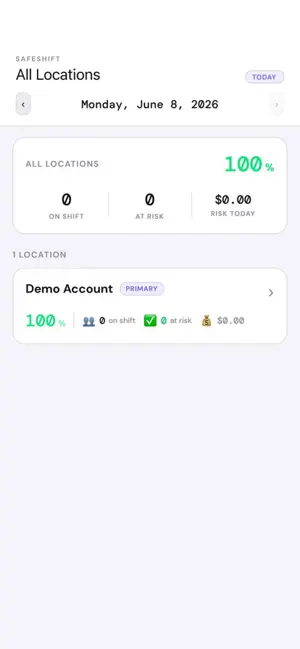
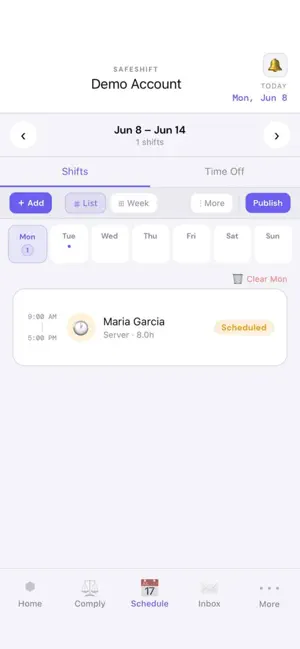
SafeShift helps employers track, enforce, and document employee break compliance — automatically. Schedule shifts, monitor real-time clock-ins, and receive instant push alerts when rest or meal breaks are approaching deadlines or have been missed. Every notification is timestamped and logged, building a documentation trail designed to support your defense in PAGA and labor board proceedings. SafeShift is state-aware: break rules, overtime profiles, and reporting adapt to each location's state — with full support for California's meal and rest break requirements, and federal overtime profiles for states without break mandates. FEATURES: • Real-time break compliance monitoring with automatic violation detection • Push and SMS alerts before break deadlines — 2-hour early warning + 30-minute final notice • Employee time tracking your way: mobile app, PIN kiosk for a shared tablet, GPS-geofenced clock-ins, or POS integration • Shift scheduling with employee shift swaps and manager approval • Break attestations and clock-out tip declarations • Payroll-ready hours, overtime, and tip reports • Multiple roles per employee with per-role pay rates • Violation reports and paycheck certifications • HR document management, onboarding packets, and digital signatures • Workplace concern reporting with anonymous submission • Multi-location support with per-location compliance tracking • Training records and insurance/permit tracking • Employee portal in English and Spanish: schedules, hours, tips, and documents Built for restaurants, retail, hospitality, healthcare, and any employer who wants bullet-proof wage-and-hour records — from Labor Code break, and tip credit requirements to federal FLSA rules. Note: SafeShift accounts are created by your workplace. Managers: visit safeshiftops.com to get started. Employees: ask your manager for an invite.
Ratings & reviews
5.0
5 ratings
What’s new
Version 1.17.0 · Updated September 18, 2026
Pay period review, built for how teams actually work • Employees now review a full time record for each pay period — every shift, break and scheduled day, with hours shown as "10h 10m" — before certifying their pay. • Something wrong? Report unrecorded work, unpaid wages or an unreimbursed expense right on the certification, with a photo of the receipt. Or decline and say why. • Payday reminders and clear "overdue" wording so nothing slips. Workplace concerns • The concerns form now takes the same structured entries, so a report of unpaid hours reaches payroll review automatically. • Managers can record an outcome on each entry, or add a reported entry to the pay instruction in one tap. Documents • Other documents on file: keep one-off files — a garnishment order, a signed offer letter, a doctor's note — in a person's file. Add, view, edit and archive from the employee's sheet. Nothing is ever deleted; every view is logged. • Paper copies of your own custom document types can now be uploaded to an employee's checklist. • The Document Records report opens the file behind each record and shows whether it was signed in the app, uploaded, or a paper copy. Clock Station • The board stays live: it refreshes every minute and whenever you return to the app. • A finished shift never dead-ends the day — "Clock in again" is always available. Fixes • Push notifications reach the right person on a shared device. • One password-reset door for managers and employees, and clearer messages when sign-in is rate-limited.
App privacy
The developer, Daric Holdings LLC, reported these privacy practices to Apple.
Data Linked to You
The following data, which may be collected and linked to your identity, may be used for the following purposes:
- Location: Precise Location
- Contact Info: Physical Address, Email Address, Name, Phone Number
- User Content: Other User Content
- Identifiers: User ID, Device ID
Used for: App Functionality
Data Not Linked to You
The following data, which may be collected but is not linked to your identity, may be used for the following purposes:
- Diagnostics: Crash Data, Performance Data
Used for: App Functionality
Alternatives to SafeShift
Looking for apps like SafeShift? Here are 6 similar apps on the App Store. The highest rated is RC Restaurant Manager (5.0/5), and all 6 are free to download.
-
 RC Restaurant Manager
5.0
RC Restaurant Manager
5.0
-
 California Restaurant Show 26
-
 Supertalents
5.0
Supertalents
5.0
-
 clickBACON
-
 Tama Trading Company
5.0
Tama Trading Company
5.0
-
 Tare: Restaurant Inventory
| App | Rating | Price | Last updated | Compare |
|---|---|---|---|---|
| SafeShift | 5.0 / 5 (5 ratings) | Free | September 18, 2026 | |
| RC Restaurant Manager | 5.0 / 5 (1) | Free | May 11, 2026 | Compare |
| California Restaurant Show 26 | – | Free | May 13, 2026 | Compare |
| Supertalents | 5.0 / 5 (2) | Free | Oct 18, 2024 | Compare |
| clickBACON | – | Free | Oct 2, 2026 | Compare |
| Tama Trading Company | 5.0 / 5 (2) | Free | Apr 9, 2026 | Compare |
| Tare: Restaurant Inventory | – | Free | Oct 18, 2026 | Compare |
Compare SafeShift with the top alternatives: ratings, updates, ASO score and keyword gaps →