

Truck Command Driver
Truck Command LLC Business iPhoneiPadiPod touch
Truck Command Driver is a free Business app for iPhone and iPad by Truck Command LLC. Rated 5.0/5 from 1 ratings. Requires iOS 15.1. Updated August 21, 2026.
- Rating
- 5.0
- 1 ratings
- Price
- Free
- on the App Store
- Size
- 31 MB
- Age 4+
- Updated
- Aug 21
- 2026 · v1.0.3
Screenshots


About Truck Command Driver
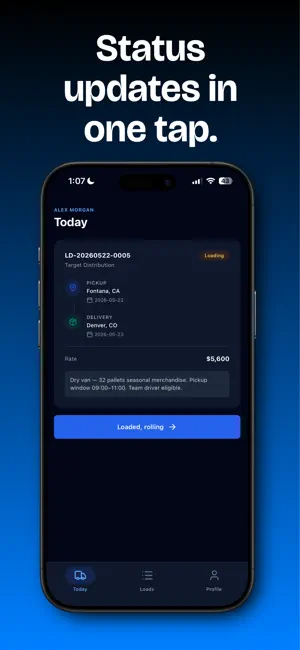
Truck Command Driver is the official mobile companion for drivers managing loads through the Truck Command dispatch platform. Designed for owner-operators and fleet drivers who need a focused, distraction-free way to handle their day on the road. STAY FOCUSED ON THE NEXT STOP The Today tab cuts the noise. See only your active load: the pickup and delivery locations, the rate, and what to do next. One tap advances your status from Assigned to Loading, to In Transit, to Unloading. EVERY LOAD IN ONE PLACE Browse all assigned and completed loads. Tap any load to see the full details: customer, pickup window, delivery window, miles, rate, and trip notes. Tap any address to open it in Maps. PROOF OF DELIVERY IN SECONDS Capture a signed BOL or delivery photo right from the app. Attach up to five photos per load, record the receiver's name, and mark the load delivered. Photos are compressed automatically and synced securely to your fleet's account. BUILT FOR LIFE ON THE ROAD - Works offline. Status updates queue automatically when you're out of coverage and sync when you're back online. - Face ID and fingerprint unlock for quick access between stops. - Dark mode optimized for night driving and bright daytime cabs. - Lightweight on data and battery. Truck Command Driver pairs with the Truck Command dispatch web app. Drivers see only what they're assigned. Fleet managers see everything. There are no separate subscriptions on the driver side — your fleet manager handles billing. US-only by design. Built for the long haul.
What’s new
Version 1.0.3 · Updated August 21, 2026
Your company can now choose whether drivers see what a load pays. Account owners get a switch under Fleet > Drivers on the website. It defaults to showing rates, which is how the app has always worked, so nothing changes unless an owner turns it off. You can now mark a load delivered when there is genuinely no paperwork to upload. Tick "This load has no documents to upload" on the proof-of-delivery screen and tap Mark Delivered - the same option dispatchers already have on the website. Attaching a photo clears it. Also in this update: - A duplicate driver record no longer leaves the app stuck on an empty screen. - The Today, Loads and Load detail screens now show a real error with a Try Again button, instead of looking like you simply have no work. - Removed the location, microphone and barcode-scanning permissions the app requested but never actually used.
App privacy
The developer, Truck Command LLC, reported these privacy practices to Apple.
Data Linked to You
The following data, which may be collected and linked to your identity, may be used for the following purposes:
- Location: Coarse Location
- Contact Info: Email Address, Name
- User Content: Photos or Videos
- Identifiers: User ID, Device ID
Used for: App Functionality
Data Not Linked to You
The following data, which may be collected but is not linked to your identity, may be used for the following purposes:
- Diagnostics: Crash Data, Performance Data
Used for: App Functionality
Alternatives to Truck Command Driver
Looking for apps like Truck Command Driver? Here are 6 similar apps on the App Store. The highest rated is JustTracking: Load Board (4.8/5), and all 6 are free to download.
-
 JustTracking: Load Board
4.8
-
 Vektor Driver
4.3
-
 Numeo - AI Dispatch
4.8
-
 Highway for Carriers
2.4
-
 HOS247 ELD Logbook
4.6
-
 Convoy
4.6
| App | Rating | Price | Last updated | Compare |
|---|---|---|---|---|
| Truck Command Driver | 5.0 / 5 (1 rating) | Free | August 21, 2026 | |
| JustTracking: Load Board | 4.8 / 5 (17) | Free | Sep 26, 2026 | Compare |
| Vektor Driver | 4.3 / 5 (103) | Free | Oct 19, 2026 | Compare |
| Numeo - AI Dispatch | 4.8 / 5 (1,705) | Free | Oct 31, 2026 | Compare |
| Highway for Carriers | 2.4 / 5 (76) | Free | Oct 26, 2026 | Compare |
| HOS247 ELD Logbook | 4.6 / 5 (141) | Free | Oct 28, 2026 | Compare |
| Convoy | 4.6 / 5 (3,690) | Free | Oct 30, 2026 | Compare |