

Receipt Digitizer: Scanner
Khawaja Salman Nadeem Finance iPhoneiPadiPod touch
Receipt Digitizer: Scanner is a free Finance app for iPhone and iPad by Khawaja Salman Nadeem. Rated 5.0/5 from 2 ratings. Requires iOS 17.0.
- Rating
- 5.0
- 2 ratings
- Price
- Free
- on the App Store
- Size
- 29 MB
- Age 4+
- Updated
- Oct 11
- 2026 · v5.0
Screenshots


About Receipt Digitizer: Scanner
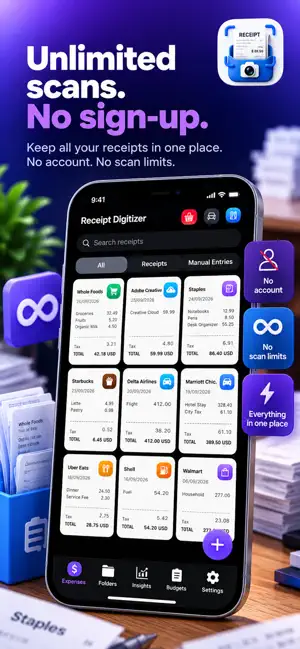
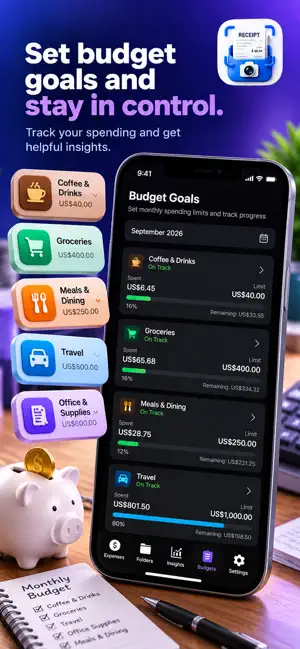
Scan receipts, track expenses, and stay ready for tax time. Receipt Digitizer turns paper receipts, digital receipts, invoices, screenshots, and expense records into organized, searchable records. Scan a receipt, let on-device OCR read the details, categorize the expense, and keep everything in one place. Built for freelancers, 1099 contractors, self-employed professionals, and small business owners who want organized expense records without complicated accounting software. TAX-READY ALL YEAR Mark any receipt or expense as Tax Deductible with one switch. • See deductible expenses by category • Track tax and VAT paid • Choose a calendar or fiscal tax year • Generate a Tax Report for your selected tax year • Export an accountant-ready PDF with receipt copies (Pro) • Export CSV for Excel, Numbers, Google Sheets, and accounting software (Pro) • Add your business name and logo to Tax Report PDFs (Pro) SCAN RECEIPTS IN SECONDS • Automatic document detection, edge detection, and cropping • Import receipt photos from your library • Share PDFs, email receipts, screenshots, and files directly into Receipt Digitizer • OCR reads merchant, date, total, and tax automatically • Supports 10 languages and 20+ currencies • Supports European, Japanese, Chinese, and Korean receipt formats • Add cash expenses manually UNLIMITED SCANNING. NO ACCOUNT. • Unlimited receipt scanning • No sign-up or account required • No monthly scan allowance • Works offline • Pro is optional PRIVATE BY DESIGN Receipt Digitizer uses on-device processing for receipt recognition. Your receipt images and financial information are not uploaded to our servers. Optional iCloud sync keeps your data available across your Apple devices using your own iCloud account. Protect the app with Face ID, Touch ID, or a passcode (Pro). ORGANIZE EVERY EXPENSE • Automatic receipt categorization • Custom categories • Folders for clients, projects, and trips • Search every word on your receipts • Duplicate receipt warnings • Notes and favorites • Manual expense entries TRACK YOUR SPENDING • Monthly budgets • Overspending alerts • Spending insights by category and merchant • Savings goals • Monthly spending trends IMPORT FROM ANYWHERE Capture a paper receipt, import an existing photo, or send a PDF, screenshot, email receipt, or file through the Share Sheet. FREE AND PRO Free includes unlimited scanning, automatic receipt recognition, expense tracking, categories, folders, receipt search, budgets, spending insights, the on-screen Tax Report, and standard PDF and CSV exports. Pro adds Tax Report PDF and CSV export, business branding, App Lock, unlimited photo-library imports, and no ads. Choose monthly, yearly, or lifetime access. 10 LANGUAGES English, Spanish, French, German, Italian, Portuguese, Arabic, Chinese, Japanese, and Korean. Switch languages anytime in Settings. WHO IS RECEIPT DIGITIZER FOR? • Freelancers • 1099 contractors • Self-employed professionals • Small business owners • Business travelers • People organizing expenses for reimbursement • Anyone tracking deductible expenses • Anyone preparing records for an accountant Receipt Digitizer is a record-keeping tool and does not provide tax advice. Check with your accountant or tax authority to determine which expenses are deductible. Subscriptions renew automatically unless cancelled at least 24 hours before the end of the current period. Manage or cancel them through your App Store account settings. Privacy Policy: https://khsalman.github.io/receipt-digitizer/privacy Terms of Use: https://khsalman.github.io/receipt-digitizer/terms Support: https://khsalman.github.io/receipt-digitizer/support
What’s new
Version 5.0 · Updated October 11, 2026
v5.0 includes the following: * Free tier receipt limit raised to 150 (was 100) * Performance improvements: faster budget calculations, reduced memory usage during exports and share inbox processing * Stability improvements throughout
App privacy
The developer, Khawaja Salman Nadeem, reported these privacy practices to Apple.
Data Used to Track You
The following data may be used to track you across apps and websites owned by other companies:
- Location: Coarse Location
- Identifiers: Device ID
- Usage Data: Advertising Data
Data Linked to You
The following data, which may be collected and linked to your identity, may be used for the following purposes:
- Identifiers: Device ID
- Usage Data: Advertising Data
- Purchases: Purchase History
Used for: Third-Party Advertising, Analytics, App Functionality
Data Not Linked to You
The following data, which may be collected but is not linked to your identity, may be used for the following purposes:
- Location: Coarse Location
- Usage Data: Product Interaction
- Diagnostics: Crash Data, Performance Data
Used for: Third-Party Advertising, Analytics, App Functionality
Alternatives to Receipt Digitizer: Scanner
Looking for apps like Receipt Digitizer: Scanner? Here are 6 similar apps on the App Store.
-
 Split It AI: Receipt Splitter
-
 Receipt Pro: Receipt Scanner
-
 Spezza: Receipt Split Scanner
-
 Scanbon
-
 Tally: Private Receipt Scanner
-
 ScanLedger: Receipt Scanner
| App | Rating | Price | Last updated | Compare |
|---|---|---|---|---|
| Receipt Digitizer: Scanner | 5.0 / 5 (2 ratings) | Free | October 11, 2026 | |
| Split It AI: Receipt Splitter | – | Free | Aug 14, 2026 | Compare |
| Receipt Pro: Receipt Scanner | – | Free | Jul 19, 2026 | Compare |
| Spezza: Receipt Split Scanner | – | Free | Aug 17, 2026 | Compare |
| Scanbon | – | Free | Oct 9, 2026 | Compare |
| Tally: Private Receipt Scanner | – | Free | Aug 11, 2026 | Compare |
| ScanLedger: Receipt Scanner | – | Free | Oct 12, 2026 | Compare |