

MyStudyDeck
Sai Sharan Bhonagiri Education iPhoneiPadiPod touch
MyStudyDeck is a free Education app for iPhone and iPad by Sai Sharan Bhonagiri. Requires iOS 17.4. Updated June 12, 2026.
- Price
- Free
- on the App Store
- Size
- 84 MB
- Age 4+
- Updated
- Jun 12
- 2026 · v1.0
Screenshots


About MyStudyDeck
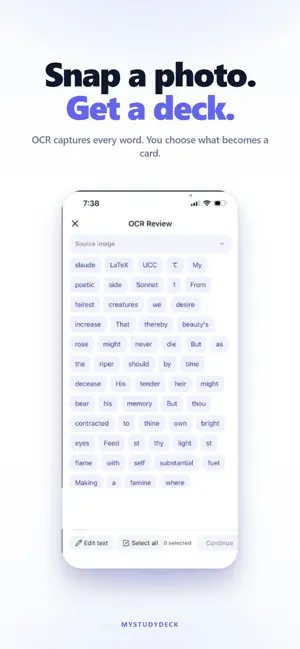
Turn any photo or PDF into Anki flashcards — then study them right in the app. No typing, no desktop, no account. Everything runs on your iPhone, fully offline. MyStudyDeck is the fastest way to go from study material to memorized. Scan a page, let on-device OCR and smart filtering pick out the words that matter, auto-translate the backs, study with a swipe — and export standard .apkg decks to Anki when you want. THREE TAPS. REAL CARDS. 1. Snap a photo (or import a PDF) of your study material 2. Tap the terms you want to learn 3. Study in-app — or export a complete .apkg deck to AnkiMobile No typing kanji on your phone. No copy-pasting between apps. No desktop required. STUDY MODE — RIGHT IN THE APP You no longer have to export to Anki just to review. • Full study screen with a 3D card-flip animation • Swipe right when you knew it, swipe left to review again • Streak meter tracks your consecutive correct answers • Self-assessment grading: "Didn't know" or "Knew it" • Shuffle mode to mix up your deck • Resume a session right where you left off (within 24h) • Works with all four card types: plain, image, cloze, and multi-field SMART CARD CREATION • On-device OCR extracts text from photos instantly — works offline • Smart word filtering uses Apple's NaturalLanguage engine to highlight the important words (nouns, verbs, adjectives, domain terms) and pre-select them • Function words (the, is, a) are hidden by default — tap "Show all words" to reveal everything • Per-word confidence indicators so you can trust the selection • Filtering supports English, Spanish, French, German, Italian, Portuguese, and Russian (other scripts use length-based filtering) • Apple Translation fills in card backs automatically • Edit any field before saving (front, back, reading, notes) IMPORT PDFs • Import PDFs directly from Files, iCloud Drive, or any document provider • Page viewer with thumbnails and range selection (All / This page / Range) • Multi-page extraction with a live progress indicator • Text flows straight into the same smart OCR review pipeline • Up to 50 pages per session ANKI-COMPATIBLE EXPORT • Generates standard .apkg files that import cleanly into Anki • Works with AnkiMobile, Anki Desktop, AnkiDroid, and AnkiWeb • Export via the iOS share sheet — AnkiMobile, Files, AirDrop, iCloud Drive, or email • Card images are embedded in the export BUILT FOR PRIVACY Your photos, cards, and study data never leave your device. The OCR and translation run on-device. No accounts. No cloud. No tracking. We never see your cards. ONE-TIME PURCHASE — NOT A SUBSCRIPTION Try MyStudyDeck free with up to 3 cards. Unlock unlimited cards, PDF import, study, and .apkg export with a single $14.99 purchase — yours forever. No subscription. No recurring charges. No surprise renewals. Built for self-taught language learners (Japanese, Korean, Chinese and more) and for students working from textbooks. MyStudyDeck solves the hardest part of mobile studying: turning real study material into cards you actually review — without a desktop.
App privacy
The developer, Sai Sharan Bhonagiri, reported these privacy practices to Apple.
Data Not Linked to You
The following data, which may be collected but is not linked to your identity, may be used for the following purposes:
- Usage Data: Product Interaction
- Diagnostics: Crash Data, Performance Data, Other Diagnostic Data
Used for: Analytics, App Functionality
Alternatives to MyStudyDeck
Looking for apps like MyStudyDeck? Here are 6 similar apps on the App Store.
-
 PicToCards: Camera Flashcards
-
 BlowWater - Chat in Japanese
-
 Worso: Learn Words From Books
-
 Lucideck
-
 Vokzi — Vocabulary Trainer
-
 Slovira
| App | Rating | Price | Last updated | Compare |
|---|---|---|---|---|
| MyStudyDeck | – | Free | June 12, 2026 | |
| PicToCards: Camera Flashcards | – | Free | Oct 12, 2026 | Compare |
| BlowWater - Chat in Japanese | – | Free | Sep 11, 2026 | Compare |
| Worso: Learn Words From Books | – | Free | Oct 19, 2026 | Compare |
| Lucideck | – | Free | Jun 10, 2026 | Compare |
| Vokzi — Vocabulary Trainer | – | Free | Jun 16, 2026 | Compare |
| Slovira | – | Free | Sep 7, 2026 | Compare |
Compare MyStudyDeck with the top alternatives: ratings, updates, ASO score and keyword gaps →