

Tasnif: Photo Storage
SAFOUAN ALIOUI Photo & Video iPhoneiPadiPod touch
Tasnif: Photo Storage is a free Photo & Video app for iPhone and iPad by SAFOUAN ALIOUI. Requires iOS 17.0. Updated October 6, 2026.
- Price
- Free
- on the App Store
- Size
- 14 MB
- Age 4+
- Updated
- Oct 6
- 2026 · v1.4
Screenshots
About Tasnif: Photo Storage
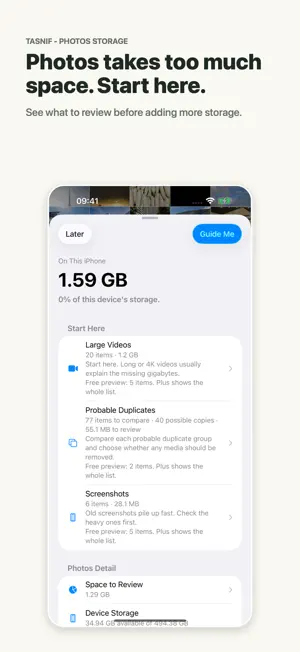
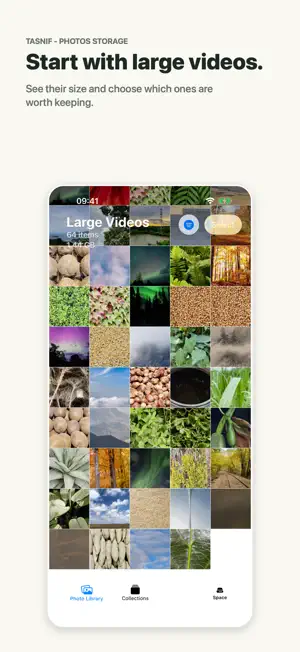
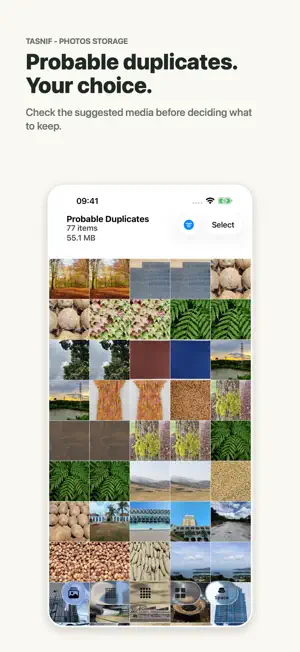
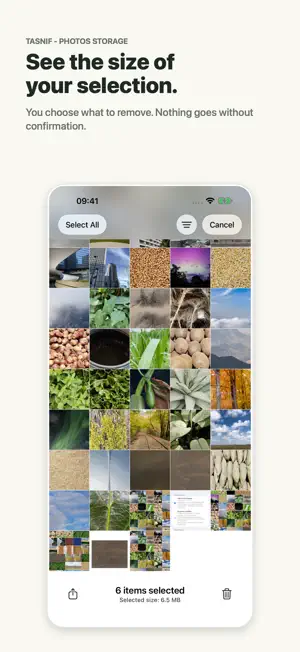
Photos takes up a lot of space. But which files should you look at first? Tasnif shows the size of your photos and videos so you can start with the largest files, instead of deleting at random. Before adding more storage, see what is already in your library. START WITH YOUR LARGEST VIDEOS Find large, long and 4K videos. Review screenshots, screen recordings, RAW files and older videos in dedicated lists. Check probable duplicates before deciding which ones to keep. REVIEW BEFORE YOU REMOVE Preview your media and see the known size of your selection. You decide what stays. Nothing is deleted automatically: Photos asks you to confirm. Deleted media follows the usual Recently Deleted behavior in Photos. TRY IT, THEN GO FURTHER The free version shows your storage overview and a limited preview of eligible reviews. Where available, you can choose to watch an ad to review a small additional set of media. Tasnif Plus unlocks complete review lists, advanced filters and guided reviews, saves your progress on your device and removes ads. Pick up your review where you left off. YOUR MEDIA STAYS ON YOUR DEVICE Tasnif does not send your photos, videos or photo-library information to a server or an advertising service. Optional ads may process device, consent and ad-interaction data as explained in the Privacy Policy. Available on iPhone and iPad. No weekly subscription. Monthly and annual plans renew automatically unless cancelled in your Apple account. Lifetime access is a one-time purchase. Privacy Policy: https://tasnif.app/privacy-policy.html Terms of Use (EULA): https://www.apple.com/legal/internet-services/itunes/dev/stdeula/
What’s new
Version 1.4 · Updated October 6, 2026
A clearer path from storage overview to the media worth reviewing. - Start with large videos and see what to check next. - With Tasnif Plus, save your review progress and continue later. - Clearer wording about media to review and the size of your selection. You stay in control: Photos still asks for confirmation before deletion.
App privacy
The developer, SAFOUAN ALIOUI, reported these privacy practices to Apple.
Data Linked to You
The following data, which may be collected and linked to your identity, may be used for the following purposes:
- Location: Coarse Location
- Identifiers: Device ID
- Usage Data: Product Interaction, Advertising Data
Used for: Third-Party Advertising, Developer’s Advertising or Marketing, Analytics, App Functionality
Data Not Linked to You
The following data, which may be collected but is not linked to your identity, may be used for the following purposes:
- Diagnostics: Performance Data, Other Diagnostic Data, Crash Data
Used for: Third-Party Advertising, Developer’s Advertising or Marketing, Analytics, App Functionality
Alternatives to Tasnif: Photo Storage
Looking for apps like Tasnif: Photo Storage? Here are 6 similar apps on the App Store. The highest rated is Photo Cleaner: Sift (5.0/5), and all 6 are free to download.
-
 FineView
-
 Photo Cleaner: Sift
5.0
Photo Cleaner: Sift
5.0
-
 Photo Cleaner: Storage Saver
-
 Pixcull: Camera Roll Cleaner
-
 Shadow Gallery: Photo Vault
-
 Uncluttr - Gallery Organizer
5.0
Uncluttr - Gallery Organizer
5.0
| App | Rating | Price | Last updated | Compare |
|---|---|---|---|---|
| Tasnif: Photo Storage | – | Free | October 6, 2026 | |
| FineView | – | Free | Nov 5, 2014 | Compare |
| Photo Cleaner: Sift | 5.0 / 5 (1) | Free | May 18, 2026 | Compare |
| Photo Cleaner: Storage Saver | – | Free | Jun 2, 2026 | Compare |
| Pixcull: Camera Roll Cleaner | – | Free | May 14, 2026 | Compare |
| Shadow Gallery: Photo Vault | – | Free | Jul 17, 2026 | Compare |
| Uncluttr - Gallery Organizer | 5.0 / 5 (1) | Free | Aug 30, 2026 | Compare |