

ScanBatch · QR Code Scanner
晶 黄 Utilities iPhoneiPadiPod touch
ScanBatch · QR Code Scanner is a free Utilities app for iPhone and iPad by 晶 黄. Rated 5.0/5 from 3 ratings. Requires iOS 15.0. Updated September 7, 2026.
- Rating
- 5.0
- 3 ratings
- Price
- Free
- on the App Store
- Size
- 54 MB
- Age 4+
- Updated
- Sep 7
- 2026 · v1.4
Screenshots
About ScanBatch · QR Code Scanner
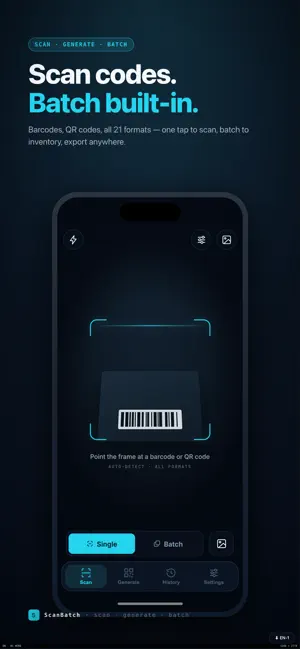
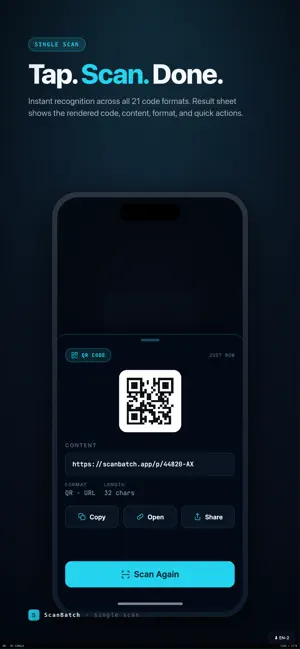
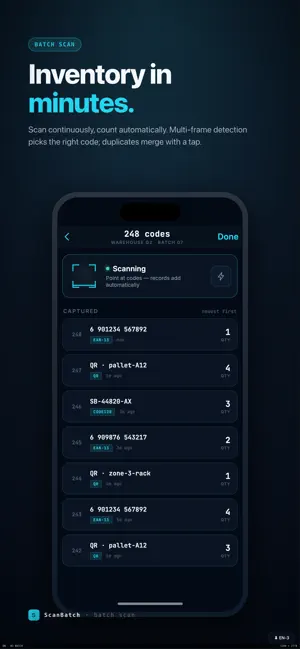
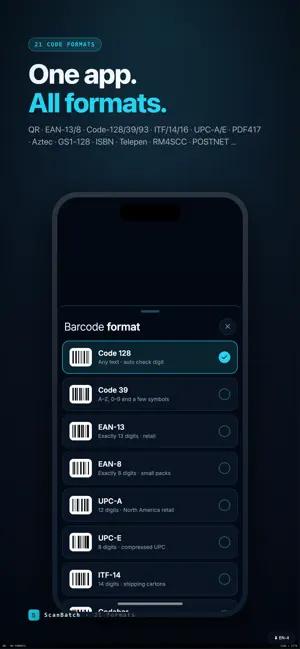
ScanBatch is a batch barcode and QR-code tool built for warehouse inventory, retail labels, event check-in and everyday code scanning. Single scan is free for everyone; upgrade to Pro to unlock batch scanning, batch generation, data import, label printing and full export. — Why ScanBatch — · 21 code formats: QR, Data Matrix, Aztec, PDF417, EAN-13/8, UPC-A/E, Code-128/39/93, Codabar, ITF, ITF-14, ITF-16, GS1-128, ISBN, EAN-5/2, Telepen, RM4SCC and POSTNET. · Inventory in minutes: continuous scanning with automatic deduplication and counting. Multi-frame detection picks the right code, and quantity is editable inline. · Multi-code in one frame: point the camera at a sheet of labels and tap the one you need — perfect for case-packs and pallet tags. · Photo scanning: pick a photo from the library when the code is far away or already captured. If a code can't be re-rendered, we show your original photo so you never lose context. · Take your data anywhere: export scan history to Excel, CSV or PDF; export generated codes as a PNG ZIP, print-ready PDF labels, or share to any app. · Spreadsheet-driven generation: map columns from Excel or CSV and batch-generate hundreds of codes onto print-ready label sheets. · QR beautification: colors, logos, dot styles, eye shapes — apply one of 21 preset templates or customize freely. · Local & offline: all data lives on your device. No account, no sign-in, no upload. — Built for — · Warehouse / inventory: monthly counts, receiving and outbound, SKU counting and reconciliation. · Retail / shops: batch price labels, brand-colored QR codes, label printing. · Events / ticketing: continuous ticket check-in, attendance export. · Publishing / logistics: real-world ISBN, GS1-128 and ITF-14 recognition and generation. · Personal: scan to open links, generate vCards, beautify and share QR codes. — Pro Subscription — · Four levels unlock the same Pro feature set: Weekly, Monthly, Yearly, and Lifetime as a one-time (limited time event) purchase. · Pricing, currency and trial eligibility are pulled live from the App Store and clearly shown on the subscription page. · Subscriptions auto-renew unless cancelled at least 24 hours before the trial ends. Manage or cancel anytime in your Apple ID account settings. · The one-time lifetime purchase unlocks every Pro feature permanently with no renewals. · See the Terms of Use and Privacy Policy linked at the bottom of the subscription page. — Privacy & Offline — · No accounts, no sign-in, no upload of scan content to any server. · Camera permission is used solely for live scanning; Photos permission only for image-based scanning and exports. · Purchase data is handled by RevenueCat and Apple — never touches our servers. — SUPPORT — Questions, bugs, feature requests: [email protected] Privacy policy: https://www.aivoxx.com/scan/privacy.html Terms of service: https://www.aivoxx.com/scan/terms.html
What’s new
Version 1.4 · Updated September 7, 2026
· Batch Continuation Scan: Completed batches can be scanned and records appended at any time, and batches can be switched with one click during the scanning process. · Automatic Assignment: Codes scanned can be automatically assigned to different batches based on prefixes, suffixes, or keywords, with up to 20 rules. · Merge and Export: Select multiple batches at once to export them into a single file, with options to include 'Batch' and 'Project' columns. · Camera Zoom: Added four levels: Off, Medium, Large, and Auto. The Auto level zooms in or out based on the size of the code within the frame in real time. · Scanning Scheme: Common scanning settings can be saved in multiple sets and switched at any time; with 'Quick Start' enabled, one click enters batch scanning. · Fixes: The 'Discard' button is restored on the batch review page; when discarding during continuation scanning, only the records added in the current session are reverted, while existing records are retained.
App privacy
The developer, 晶 黄, reported these privacy practices to Apple.
Data Not Collected
The developer does not collect any data from this app.
Alternatives to ScanBatch · QR Code Scanner
Looking for apps like ScanBatch · QR Code Scanner? Here are 6 similar apps on the App Store. The highest rated is Finger Chooser – OneChoose (5.0/5), and 2 of the 6 are free to download.
-
 Longing: Season Tracker
-
 StampOut: Photo Stamp Camera
4.0
StampOut: Photo Stamp Camera
4.0
-
 Finger Chooser – OneChoose
5.0
Finger Chooser – OneChoose
5.0
-
 PlateDetect
5.0
PlateDetect
5.0
-
 Boat Buddy - Nautical Guide
-
 Decibel Meter Plus Pro
3.7
Decibel Meter Plus Pro
3.7
| App | Rating | Price | Last updated | Compare |
|---|---|---|---|---|
| ScanBatch · QR Code Scanner | 5.0 / 5 (3 ratings) | Free | September 7, 2026 | |
| Longing: Season Tracker | – | 0.99 USD | Mar 19, 2026 | Compare |
| StampOut: Photo Stamp Camera | 4.0 / 5 (15) | Free | Aug 20, 2026 | Compare |
| Finger Chooser – OneChoose | 5.0 / 5 (3) | Free | Sep 6, 2026 | Compare |
| PlateDetect | 5.0 / 5 (1) | 1.99 USD | Oct 20, 2026 | Compare |
| Boat Buddy - Nautical Guide | – | 1 USD | Oct 14, 2026 | Compare |
| Decibel Meter Plus Pro | 3.7 / 5 (81) | 2.99 USD | Oct 16, 2026 | Compare |