

Trayzero — GTD Inbox & Tasks
Feipeng Liu Productivity iPhoneiPadiPod touch
Trayzero — GTD Inbox & Tasks is a free Productivity app for iPhone and iPad by Feipeng Liu. Rated 5.0/5 from 1 ratings. Requires iOS 15.0.
- Rating
- 5.0
- 1 ratings
- Price
- Free
- on the App Store
- Size
- 42 MB
- Age 4+
- Updated
- Nov 6
- 2026 · v1.0.8
Screenshots
Save to Pinterest


About Trayzero — GTD Inbox & Tasks
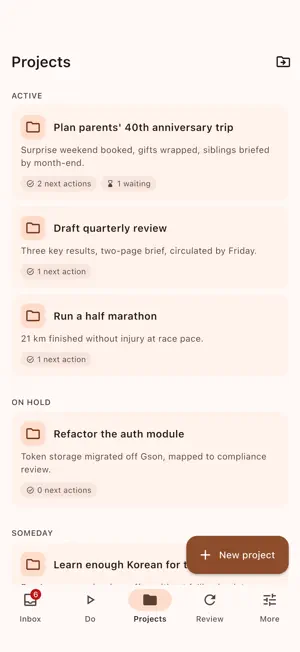
Get your in-tray to zero with Trayzero, a private, offline task manager built around the Getting Things Done (GTD) method. Capture loose thoughts, turn them into clear next actions, and choose what to do next. Your tasks, notes and attachments are stored on your device. No Trayzero account is required. Every feature is available without a purchase, and there are no ads. Capture what is on your mind Add tasks from anywhere in the app, share text and links into your inbox, or use the Home Screen widget. Dictate a thought with your device's speech recognizer, and attach photos or voice memos. Clarify your inbox Process Inbox guides you through each item: Is it actionable? Can you do it in two minutes? Is it a next action, a project, something to delegate, or something for later? Empty your inbox by deciding what each item means. Organize your commitments Keep Next Actions, Projects, Waiting For, Someday/Maybe, Calendar and Reference in dedicated lists. Give projects an outcome and see which ones need a next action. Use contexts, tags and Areas of Responsibility to organize work and life. Choose the next action Filter actions by context, available time and energy. Build a daily plan and find work that fits the moment, whether you have five minutes at home or an hour at your computer. Keep your system current A guided Weekly Review helps you capture loose ends, clear your inbox, and review actions, waiting items, projects, your calendar and Someday/Maybe. Save your progress and continue later. Remember what matters Set due dates, deferred actions, waiting-for follow-ups and repeating tasks. Reminder notifications offer actions such as Done and Snooze. Optional system-calendar integration works with the calendar you choose. Notification delivery depends on your device permissions and settings. Bring your tasks with you Import supported exports from Todoist, TickTick, Nirvana, Google Tasks, Things 3 and OmniFocus, or paste a plain-text list. On iPhone and iPad, import selected Apple Reminders lists, or connect to Microsoft To Do for a one-time import. Preview before importing and undo an import if needed. Export formats and supported fields vary by source. Own your backups Export and restore portable JSON backups, including attachments. Enable automatic backups to a folder you choose. Backups are unencrypted; if you choose a cloud-synced folder, its provider handles synchronization. Trayzero does not provide cross-device task sync. Privacy with clear choices Your task content is not sent to a Trayzero server. Optional Microsoft imports, system-calendar integration, speech recognition and shared backups use the services you choose. Store builds use RevenueCat for anonymous purchase checks and purchase/customer analytics; your tasks are not included. See the privacy policy for details. Free and open source Light and dark themes, adjustable appearance, and accessibility support are included. Optional tips and a supporter subscription help the independent developer; they do not unlock features. Explore the source at github.com/roman10/trayzero. Trayzero is an independent app, not affiliated with, endorsed by, or sponsored by the David Allen Company. "Getting Things Done" and "GTD" are trademarks of the David Allen Company. Terms of Use (EULA): https://trayzero.app/terms Privacy Policy: https://trayzero.app/privacy
What’s new
Version 1.0.8 · Updated November 6, 2026
Import your existing tasks, keep portable backups, and rely on clearer reminders. • Import supported app exports, Apple Reminders or Microsoft To Do, with preview and Undo. • Improved automatic folder backups and restore reliability. • Fixes for task editing, repeating actions and reminders. • Snoozed reminders stay snoozed when you reopen the app. • Accessibility and image contrast improvements. • Automatically update scheduled Trayzero items in a calendar you choose, with controls to pause or disconnect. • On iPhone Duo, unfold for side-by-side task workspaces that keep your place as you switch displays. • On iPad, work side by side in Inbox and use ⌘F to search or ⌘N to capture with a hardware keyboard.
App privacy
The developer, Feipeng Liu, reported these privacy practices to Apple.
Data Not Linked to You
The following data, which may be collected but is not linked to your identity, may be used for the following purposes:
- Purchases: Purchase History
Used for: Analytics, App Functionality
Alternatives to Trayzero — GTD Inbox & Tasks
Looking for apps like Trayzero — GTD Inbox & Tasks? Here are 6 similar apps on the App Store. The highest rated is My Notes & Cards (5.0/5), and 5 of the 6 are free to download.


| App | Rating | Price | Last updated | Compare |
|---|---|---|---|---|
| Trayzero — GTD Inbox & Tasks | 5.0 / 5 (1 rating) | Free | November 6, 2026 | |
| My Notes & Cards | 5.0 / 5 (1) | Free | Aug 21, 2026 | Compare |
| Inbox0 | – | Free | Sep 17, 2026 | Compare |
| Vantli | – | Free | Sep 1, 2026 | Compare |
| Hashy - AI Markdown Editor | – | 4.99 USD | Feb 20, 2026 | Compare |
| ThreeTasks | – | Free | Sep 24, 2025 | Compare |
| Done Daily - Task Tracker | – | Free | Jul 15, 2026 | Compare |