

Flyback Transformer Designer
建忠 徐 Utilities iPhoneiPadiPod touchMac
Flyback Transformer Designer is a free Utilities app for iPhone and iPad by 建忠 徐. Rated 5.0/5 from 1 ratings. Requires iOS 15.0. Updated September 14, 2026.
- Rating
- 5.0
- 1 ratings
- Price
- Free
- on the App Store
- Size
- 8 MB
- Age 4+
- Updated
- Sep 14
- 2026 · v2.1
Screenshots


About Flyback Transformer Designer
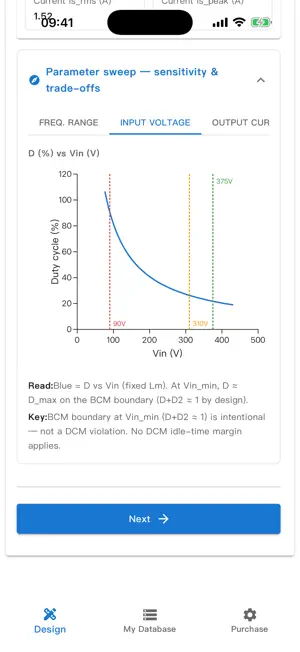
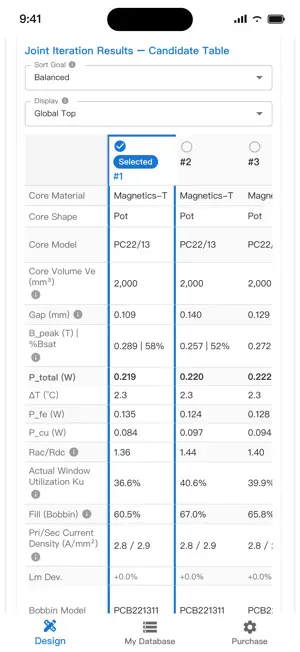
Flyback Transformer Designer turns your flyback power supply spec into a complete transformer design — core, gap, turns, wire gauge, and loss breakdown — all computed locally on your device, no internet required. Built for power-electronics engineers who need more than a spreadsheet. Covers all four operating modes: DCM, BCM, QR, and CCM. Supports multi-output secondaries with independent winding design, not a simplified single-output approximation. Three steps to a finished design: 1. Enter your spec — Vin range, output voltages, power, frequency, and design constraints. 2. Review the top 5 core candidates — gap, Lm, winding layout, wire selection, copper/core losses, and temperature-rise estimates; switch the ranking between balanced, high-reliability, or lowest-loss. 3. Export a professional summary report (PDF or JSON). Why you'll like it: - Full core × turns × wire-gauge iteration with built-in AP pre-screening — no more flipping through datasheets by hand. - Optional B_max design ceiling — leave it blank and the engine guards against saturation automatically using the material's Bsat×70% margin, so an overly conservative guess won't rule out viable designs; set your own ceiling anytime for an extra constraint. - Built-in ferrite core library (EE, RM, PQ, ETD, etc.) plus My Database for your own materials, cores, and bobbins. - Parameter sweep — explore f_sw, load, and Vin sensitivity curves before you wind a single turn. - 100% local computation; your data never leaves your device. - Native support for iPhone, iPad, and Mac (Apple silicon); switch between Chinese and English. 3-day full-feature trial from first launch — you are not charged when it ends. After the trial, a one-time App Store purchase unlocks steps 2–3, My Database editing, and export. This is not a subscription and does not auto-renew. Existing annual subscriptions remain valid until they expire. Privacy Policy: https://tobebetter2026.github.io/Public-documents-Flyback-Transformer-Designer/privacy-policy.html Terms of Use: https://www.apple.com/legal/internet-services/itunes/dev/stdeula/ (Apple Standard EULA)
What’s new
Version 2.1 · Updated September 14, 2026
Now a 3-day full-feature trial, then a one-time purchase. You are not charged when the trial ends; this is not a subscription. Existing annual subscriptions remain valid until they expire and can be restored with the same Apple ID.
App privacy
The developer, 建忠 徐, reported these privacy practices to Apple.
Data Not Collected
The developer does not collect any data from this app.
Alternatives to Flyback Transformer Designer
Looking for apps like Flyback Transformer Designer? Here are 6 similar apps on the App Store.
-
 elec tools
-
 Transformer Calculation Tool
-
 Transformer Calculator Pro
-
 VoltSize
-
 Coil Toolkit Pro
-
 PVE-Manager
| App | Rating | Price | Last updated | Compare |
|---|---|---|---|---|
| Flyback Transformer Designer | 5.0 / 5 (1 rating) | Free | September 14, 2026 | |
| elec tools | – | Free | Apr 4, 2026 | Compare |
| Transformer Calculation Tool | – | Free | Jun 20, 2026 | Compare |
| Transformer Calculator Pro | – | Free | Dec 29, 2025 | Compare |
| VoltSize | – | Free | Aug 4, 2026 | Compare |
| Coil Toolkit Pro | – | Free | Jun 16, 2026 | Compare |
| PVE-Manager | – | Free | Oct 24, 2026 | Compare |