

Take2 - AI Video Editor
KOEL STUDIO LIMITED Photo & Video iPhoneiPadiPod touch
Take2 - AI Video Editor is a free Photo & Video app for iPhone and iPad by KOEL STUDIO LIMITED. Requires iOS 17.0. Updated November 5, 2026.
- Price
- Free
- on the App Store
- Size
- 92 MB
- Age 17+
- Updated
- Nov 5
- 2026 · v0.4
Screenshots
About Take2 - AI Video Editor
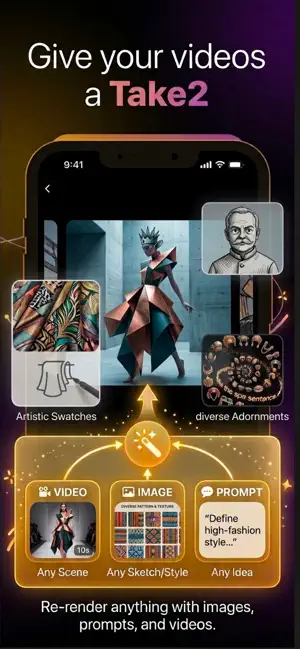
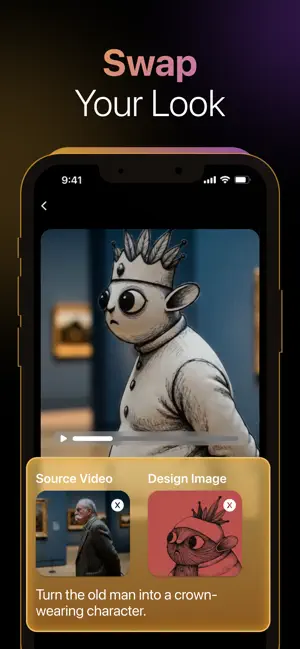
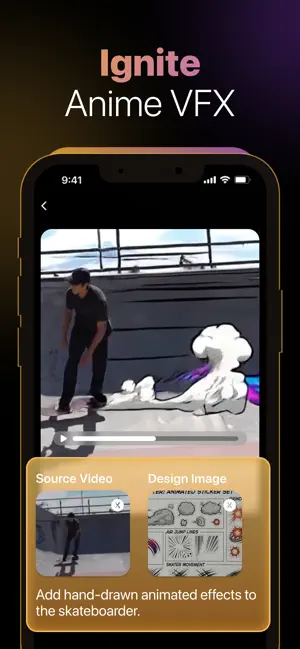
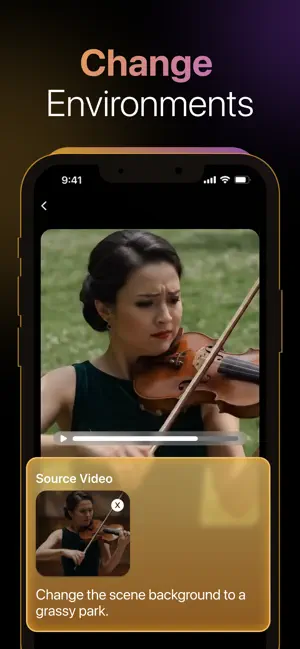
Ever wished you could change a scene after shooting it? Welcome to Take2, the revolutionary AI video editor that lets you modify anything inside your video using Text, Images, and AI Magic. Powered by next-gen multi-modal AI architectures (similar to the latest Gemini Omni tech), Take2 bridges the gap between video generation and precise video editing. No complex masks, no tedious keyframing—just tell the AI what to change, and watch the magic happen in seconds. Key Features Text + Image Video Editing: Combine video, photos, and text prompts to generate a brand-new cinematic shot. Modify Anything (Object & Character Swap): Effortlessly replace props, alter characters, or change clothing with flawless motion tracking. Instant Environment Changer: Swap out backgrounds for stunning AI landscapes while keeping your subject perfectly integrated. Next-Gen Dialogue Editing: Change what characters say without re-recording—AI perfectly aligns lip movements and facial expressions. No Pro Skills Required: Skip the complex VFX software—just tell the AI what to change and watch it happen. Stop compromising on your footage. Download Take2 today and give your videos the perfect second chance! Terms of Service: https://www.koelstudio.com/take2/terms-of-service Privacy Policy: https://www.koelstudio.com/take2/privacy-policy
What’s new
Version 0.4 · Updated November 5, 2026
- New Explore Ideas and Image Edit tools for stronger video references. - Smoother experience and bug fixes.
App privacy
The developer, KOEL STUDIO LIMITED, reported these privacy practices to Apple.
Data Used to Track You
The following data may be used to track you across apps and websites owned by other companies:
- Identifiers: Device ID
Data Not Linked to You
The following data, which may be collected but is not linked to your identity, may be used for the following purposes:
- Identifiers: Device ID, User ID
Used for: Third-Party Advertising, App Functionality
Alternatives to Take2 - AI Video Editor
Looking for apps like Take2 - AI Video Editor? Here are 6 similar apps on the App Store. The highest rated is BuzzReel - AI Video Generator (5.0/5), and all 6 are free to download.
-
 LuminoVid: AI Video Generator
4.4
-
 Latted AI Videos & Images
4.7
-
 BuzzReel - AI Video Generator
5.0
-
 Vixio AI: Video Generator
4.9
-
 AI Video Generator: Ginly AI
4.6
-
 Pixlore: AI Video Generator
4.2
| App | Rating | Price | Last updated | Compare |
|---|---|---|---|---|
| Take2 - AI Video Editor | – | Free | November 5, 2026 | |
| LuminoVid: AI Video Generator | 4.4 / 5 (38) | Free | Nov 5, 2026 | Compare |
| Latted AI Videos & Images | 4.7 / 5 (43) | Free | Jul 4, 2026 | Compare |
| BuzzReel - AI Video Generator | 5.0 / 5 (1) | Free | May 18, 2026 | Compare |
| Vixio AI: Video Generator | 4.9 / 5 (42) | Free | Aug 6, 2026 | Compare |
| AI Video Generator: Ginly AI | 4.6 / 5 (26) | Free | Oct 7, 2026 | Compare |
| Pixlore: AI Video Generator | 4.2 / 5 (5) | Free | Sep 23, 2026 | Compare |