

Brain Rot Control
Sergey FONOV Productivity iPhoneiPadiPod touch
Brain Rot Control is a free Productivity app for iPhone and iPad by Sergey FONOV. Rated 5.0/5 from 2 ratings. Requires iOS 17.0. Updated September 7, 2026.
- Rating
- 5.0
- 2 ratings
- Price
- Free
- on the App Store
- Size
- 38 MB
- Age 4+
- Updated
- Sep 7
- 2026 · v2.2
Screenshots

About Brain Rot Control
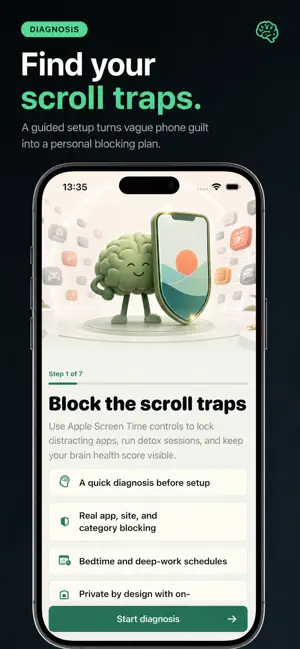
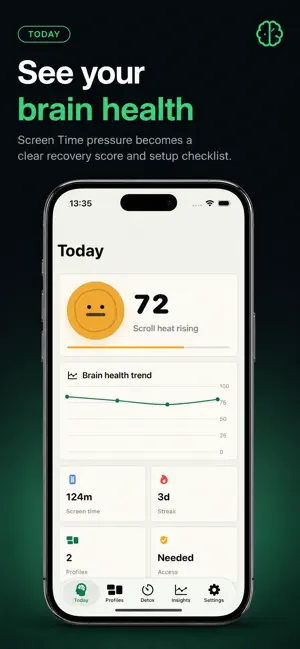
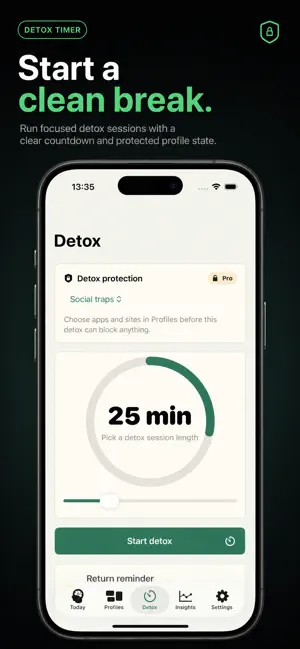
Brain Rot Control puts a pause between you and the apps you open without deciding to. When a protected app opens, a Screen Time shield lands first. You can stay out, or take a timed unlock — five, ten, or fifteen minutes that lock themselves back automatically. That single pause is the whole product. WHAT YOU GET - A shield before the app, not a report after it - Timed unlocks that re-lock on their own - Deep Detox: a stronger session for when you need the door shut - Bedtime, work, study, morning, and weekend windows with real hours and days - Brain Recovery: a score that moves when you stay out, finish a detox, or hold bedtime — never from a tap - A weekly recovery report: time reclaimed, opens prevented, longest detox, nights protected - Challenges built from what you actually did, not from streak theatre - Home Screen and Lock Screen widgets HOW IT WORKS Setup starts with a few questions about where your time goes, then builds a protection plan around them. After that you pick the real apps and sites with Apple's own picker, and the first rule goes live. You test it immediately: open one of the blocked apps and watch the shield appear. HONEST ABOUT THE LIMITS Screen Time settings always stay yours. Deep Detox makes leaving slow on purpose, but no app can stop you from changing Screen Time permissions in iOS Settings, and this one does not pretend otherwise. PRIVACY Your selected apps and recovery progress stay on your device. No account, no backend, no advertising, and no cross-app tracking. SUBSCRIPTION Yearly Pro includes a 3-day free trial. Monthly Pro is available without a trial. Everything above requires an active subscription. Payment is charged to your Apple ID account. Subscriptions auto-renew unless canceled at least 24 hours before the current period ends. You can manage or cancel your subscription in App Store account settings. Privacy Policy: https://fonovapplab.com/privacy Terms of Use: https://fonovapplab.com/terms
What’s new
Version 2.2 · Updated September 7, 2026
Brain Rot Control 2.0 — The Brain Reset Update - A pause before the app opens: stay out, or take a timed unlock that locks itself back - Deep Detox for the sessions that need the door shut - Protection windows for bedtime, work, study, mornings, and weekends, with real hours and days - Brain Recovery: a score that moves only when you actually stay out, finish a detox, or hold bedtime - Weekly recovery report with time reclaimed, opens prevented, and nights protected - Challenges scored from what you did, plus shareable progress cards - Lock Screen widgets and a redesigned app throughout
App privacy
The developer, Sergey FONOV, reported these privacy practices to Apple.
Data Not Collected
The developer does not collect any data from this app.
Alternatives to Brain Rot Control
Looking for apps like Brain Rot Control? Here are 6 similar apps on the App Store. The highest rated is App Blocker: Earn Brainrot (5.0/5), and all 6 are free to download.
-
 App Blocker: Earn Brainrot
5.0
App Blocker: Earn Brainrot
5.0
-
 reecalm.me: Screen Time Pause
-
 LockStack
-
 Daily Brain Training: Cognitta
5.0
Daily Brain Training: Cognitta
5.0
-
 Groggy: Stop Scrolling in Bed
-
 LingoLock: Earn Screen Time
5.0
LingoLock: Earn Screen Time
5.0
| App | Rating | Price | Last updated | Compare |
|---|---|---|---|---|
| Brain Rot Control | 5.0 / 5 (2 ratings) | Free | September 7, 2026 | |
| App Blocker: Earn Brainrot | 5.0 / 5 (4) | Free | May 17, 2026 | Compare |
| reecalm.me: Screen Time Pause | – | Free | Sep 12, 2026 | Compare |
| LockStack | – | Free | Jun 22, 2026 | Compare |
| Daily Brain Training: Cognitta | 5.0 / 5 (1) | Free | Sep 23, 2026 | Compare |
| Groggy: Stop Scrolling in Bed | – | Free | Sep 16, 2026 | Compare |
| LingoLock: Earn Screen Time | 5.0 / 5 (3) | Free | May 17, 2026 | Compare |
Compare Brain Rot Control with the top alternatives: ratings, updates, ASO score and keyword gaps →