

FastlyConvert: PDF to Word
TOTM TECH LTD Productivity iPhoneiPadiPod touch
FastlyConvert: PDF to Word is a free Productivity app for iPhone and iPad by TOTM TECH LTD. Requires iOS 17.0. Updated June 7, 2026.
- Price
- Free
- on the App Store
- Size
- 14 MB
- Age 4+
- Updated
- Jun 7
- 2026 · v1.2.0
Screenshots


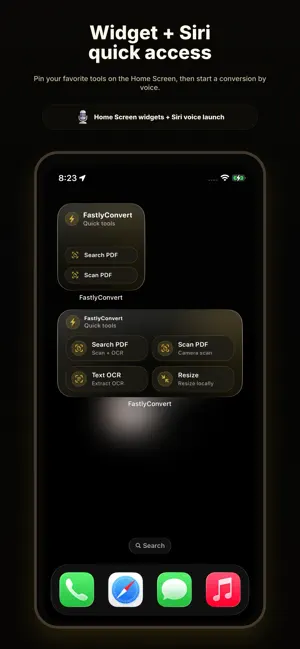
About FastlyConvert: PDF to Word
FastlyConvert is a lightweight file conversion tool for iPhone and iPad. Convert PDF to Word, use Advanced AI conversion, scan documents, run OCR, compress images, and switch between common image formats like HEIC, JPG, PNG, and WebP. Use it for work documents, study materials, contracts, notes, photos, files you need to share, social media posts, and email attachments. Open the app, choose a tool, add a file or scan with the camera, start the conversion, then save or share the result. 【PDF to Word】 Convert PDF files into Word documents you can reuse and continue editing. This version improves the PDF to Word experience and adds Advanced AI mode, useful for trying to process PDFs with complex tables or more complicated layouts. 【Scan to PDF】 Scan paper documents with the camera and create PDF files. Great for contracts, receipts, notes, forms, class materials, and everyday documents. 【Searchable PDF】 Scan documents and add an OCR text layer to create searchable PDFs, so you can find text inside the document more easily. 【Image to Text】 Extract text from images, screenshots, photos, scanned pages, and study materials. 【Compress Images】 Compress JPG, PNG, and WebP images to reduce file size. Useful for email, messaging, web uploads, social media, and saving storage space. 【Convert Image Formats】 Convert between common image formats including HEIC, JPG, PNG, and WebP. Turn iPhone photos into more compatible JPG files or prepare images for sharing, uploading, and saving. 【Image Resizer】 Resize images for uploads, sharing, saving, or social media content. 【Save and Share】 After conversion, preview the result, save it to Files or Photos, or send it to other apps using the system share sheet. 【History】 Completed conversions are saved in History. Find past results by filename, type, or date, then reopen, save, or share them when needed. 【Widgets and Shortcuts】 Use Home Screen widgets, Siri, or Shortcuts to quickly open scan, OCR, image resize, and compression tools. Terms of Use: https://www.fastlyconvert.com/terms Privacy Policy: https://www.fastlyconvert.com/privacy
What’s new
Version 1.2.0 · Updated June 7, 2026
This update brings major improvements to PDF to Word, scanning, and OCR: - Significantly improved PDF to Word experience - New Advanced AI mode for trying to process PDFs with complex tables or more complicated layouts - New document scanning with the camera to create PDFs - New searchable PDF scanning with OCR text - New Image to Text tool for extracting text from images - New Image Resizer tool - Quick access to common tools with widgets, Siri, and Shortcuts - Improved History, saving, and sharing experience - Bug fixes and stability improvements
App privacy
The developer, TOTM TECH LTD, reported these privacy practices to Apple.
Data Linked to You
The following data, which may be collected and linked to your identity, may be used for the following purposes:
- Usage Data: Advertising Data
Used for: Third-Party Advertising
Alternatives to FastlyConvert: PDF to Word
Looking for apps like FastlyConvert: PDF to Word? Here are 6 similar apps on the App Store. The highest rated is 嗒嗒 AI-最懂你的开会搭子 (5.0/5), and all 6 are free to download.
-
 LoPDF: PDF to Word
-
 Dairy Farm Management Pro
-
 PDF to Word: Converter & OCR
4.0
-
 JDVVNL DashBoard
-
 MediaSilo Go by Shift
3.4
-
 嗒嗒 AI-最懂你的开会搭子
5.0
| App | Rating | Price | Last updated | Compare |
|---|---|---|---|---|
| FastlyConvert: PDF to Word | – | Free | June 7, 2026 | |
| LoPDF: PDF to Word | – | Free | Jul 20, 2026 | Compare |
| Dairy Farm Management Pro | – | Free | Sep 23, 2026 | Compare |
| PDF to Word: Converter & OCR | 4.0 / 5 (1) | Free | Aug 18, 2026 | Compare |
| JDVVNL DashBoard | – | Free | Feb 29, 2024 | Compare |
| MediaSilo Go by Shift | 3.4 / 5 (20) | Free | Sep 1, 2026 | Compare |
| 嗒嗒 AI-最懂你的开会搭子 | 5.0 / 5 (4) | Free | Oct 23, 2026 | Compare |