

dayGLANCE
Jason Krellner Productivity iPhoneiPadiPod touchMac
dayGLANCE is a free Productivity app for iPhone and iPad by Jason Krellner. Rated 3.0/5 from 2 ratings. Requires iOS 16.0. Updated October 13, 2026.
- Rating
- 3.0
- 2 ratings
- Price
- Free
- on the App Store
- Size
- 18 MB
- Age 4+
- Updated
- Oct 13
- 2026 · v5.8.0
Screenshots


About dayGLANCE
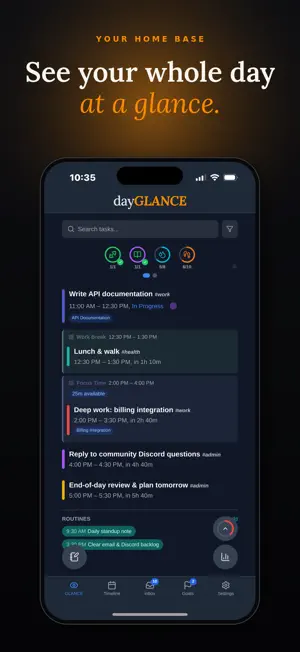
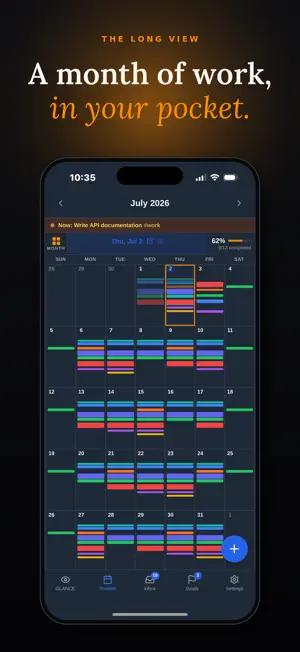
dayGLANCE is a privacy-first day planner for people who want a powerful planning tool without giving their data to someone else's server. Native on iPhone, iPad, and Mac. No accounts. No analytics. Your tasks, goals, and schedule stay on your device and only leave it when you choose. A 14-day free trial is included. After that, subscribe or buy a lifetime unlock. Cancel anytime in your App Store subscription settings. See your day clearly dayGLANCE gives you a clean, focused view of your day with a timeline that shows exactly what's ahead. Home Screen widgets keep it in view without opening the app, including the Day Dial, which draws your whole day as a ring and stays live to the minute. Control Center controls on iOS 18 add a task or start voice input from anywhere, and on Mac a menu-bar tray keeps dayGLANCE a click away with a live focus countdown. When it's time to execute, Focus Mode clears everything but the task in front of you. Built for your Apple devices Buy once, use everywhere: one purchase covers iPhone, iPad, and Mac through Universal Purchase. iCloud keeps your tasks, habits, and plans in sync automatically. Your tasks are indexed in Spotlight, and Quick Actions on the app icon add a scheduled or inbox task, start a focus session, or queue voice input in one gesture. Goals and projects, connected to your day Build goals, break them into projects, connect them to the tasks on your timeline. dayGLANCE bridges long-term planning and daily execution. Voice-powered task management Create, reschedule, and edit tasks by speaking. Voice input needs no AI provider: dayGLANCE uses Apple's speech recognition to turn what you say into a task, and reads the dates, times, and repeats out of it. No audio is sent to an AI provider. Add your own AI provider (bring your own API key) and it handles the looser phrasing instead. Either way, no AI backend is operated by dayGLANCE, all AI features are optional, and the app is fully functional without AI. Speech recognition availability depends on your language and region. Integrates with the tools you already use Apple Calendar: Your device calendars (iCloud, Google, Nextcloud/CalDAV) surface color-coded on your timeline Obsidian: Two-way task sync, an agenda sidebar inside your vault, tasks written into daily and project notes, folders and tags as task sources, and links between tasks and any note. Live two-way sync uses the free dayGLANCE Bridge plugin with a GLANCEvault account. Apple Health: Read steps and sleep to track habit progress automatically TRMNL: Display your day on an e-ink dashboard Cloud sync on your terms Optional cloud sync and remote backup keep your data under your control. GLANCEvault (a sync backend you can self-host for free) always encrypts your data client-side with AES-256-GCM (PBKDF2 key derivation) before it leaves your device, so the server stores only encrypted content. Prefer WebDAV? Bring your own server and turn on sync encryption for the same client-side protection, or leave it off if you wish. Or sync through iCloud Drive, kept in your personal iCloud account under Apple's encryption. Connects to other GLANCE apps dayGLANCE can talk to lastGLANCE (and other GLANCE apps as they ship) through GLANCEintents, a cross-app protocol that flows through your own WebDAV or GLANCEvault server, or iCloud Drive. Send a chore from lastGLANCE to your dayGLANCE timeline; complete it in dayGLANCE and lastGLANCE knows. Optional end-to-end encryption keyed to your sync passphrase. Off by default. Self-hostable and open dayGLANCE is open source and self-hostable via Docker. It can run entirely on your own infrastructure. Either way, your data stays yours.
What’s new
Version 5.8.0 · Updated October 13, 2026
This update fixes a problem in 5.7.0 that stopped sync on iPhone and iPad. Please update. • GLANCEvault, WebDAV, the Obsidian bridge and calendar subscriptions work again. In 5.7.0 their requests were blocked, and GLANCEvault could wrongly say the server needed an update. • Your GLANCEvault token is no longer written to the developer console when a request fails. • The Obsidian bridge only sends changes under a key it has checked against your GLANCEvault account. • The notes editor keeps a long note's height when you tap to edit, instead of shrinking to a small box.
App privacy
The developer, Jason Krellner, reported these privacy practices to Apple.
Data Not Linked to You
The following data, which may be collected but is not linked to your identity, may be used for the following purposes:
- Purchases: Purchase History
- Identifiers: Device ID
Used for: App Functionality
Alternatives to dayGLANCE
Looking for apps like dayGLANCE? Here are 6 similar apps on the App Store. The highest rated is Pin: Tasks in Sight (5.0/5), and 5 of the 6 are free to download.
-
 Consent MD Task Board App
-
 Pin: Tasks in Sight
5.0
Pin: Tasks in Sight
5.0
-
 Awaken
2.9
Awaken
2.9
-
 Agendara - Tasks take time
-
 Routune: Daily Routine Planner
-
 Lodestar - Goal & Life Tracker
5.0
Lodestar - Goal & Life Tracker
5.0
| App | Rating | Price | Last updated | Compare |
|---|---|---|---|---|
| dayGLANCE | 3.0 / 5 (2 ratings) | Free | October 13, 2026 | |
| Consent MD Task Board App | – | Free | Dec 24, 2025 | Compare |
| Pin: Tasks in Sight | 5.0 / 5 (1) | Free | Sep 14, 2026 | Compare |
| Awaken | 2.9 / 5 (21) | 2.99 USD | Jul 24, 2026 | Compare |
| Agendara - Tasks take time | – | Free | Sep 21, 2026 | Compare |
| Routune: Daily Routine Planner | – | Free | Aug 7, 2026 | Compare |
| Lodestar - Goal & Life Tracker | 5.0 / 5 (6) | Free | Jul 15, 2026 | Compare |
Compare dayGLANCE with the top alternatives: ratings, updates, ASO score and keyword gaps →