

Quick Notes: Ideas & Tags
Linh Phan Nhat Khanh Productivity iPhoneiPadiPod touch
Quick Notes: Ideas & Tags is a free Productivity app for iPhone and iPad by Linh Phan Nhat Khanh. Requires iOS 17.0. Updated September 26, 2026.
- Price
- Free
- on the App Store
- Size
- 3 MB
- Age 4+
- Updated
- Sep 26
- 2026 · v1.0.1
Screenshots

About Quick Notes: Ideas & Tags
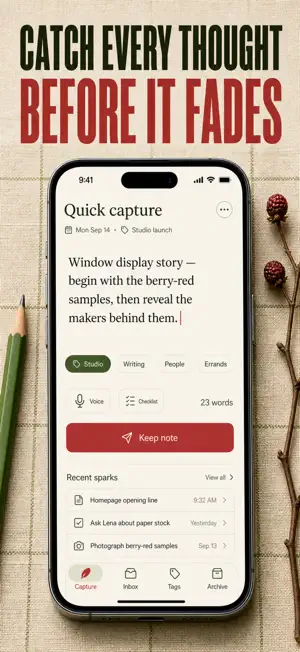
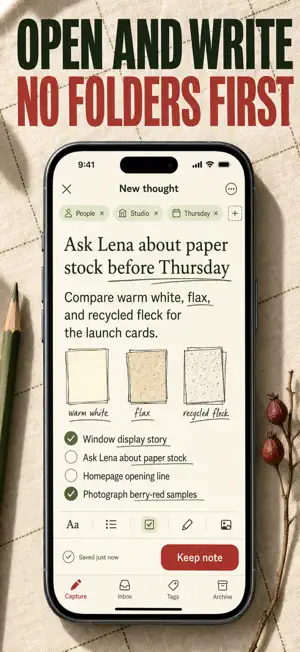
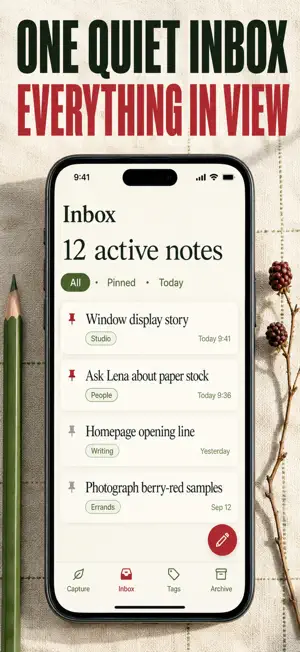
Bramble is a quiet inbox for the thoughts you would otherwise lose. Open it and the cursor is already in the editor, so the idea is on the page before it slips away. Everything you jot lands in one place, and anything you never come back to tidies itself away after thirty days. Most notes apps ask you to organize first and write second. Bramble flips that: capture now, decide later. Pin what matters, tag by color, search the rest, and let the archive quietly absorb whatever stopped being useful. Your inbox stays light without you lifting a finger. WHAT YOU GET • Never lose a passing thought: the editor is focused the instant the app opens • An inbox that cleans itself: unpinned notes drift to the Archive after a window you set • Keep the important things forever: pinned notes never expire • Find anything in seconds: full-text search across Inbox and Archive • Group by project, person or theme with color tags and one-tap filters • Nothing vanishes by surprise: a local reminder the day before a note auto-archives PERFECT FOR • Writers and makers who need a scratchpad that never nags • Busy people who jot reminders, then forget which app they used • Anyone whose notes app has become a graveyard of dead lists • Minimalists who want capture without folders, notebooks or setup WHY NOT JUST USE THE BUILT-IN NOTES APP? Built-in notes keep everything forever, so the pile only grows and the important line gets buried under a hundred stale ones. Bramble treats notes like an inbox rather than a filing cabinet: recent thoughts stay in view, pinned ones stay put, and the rest retires on its own. Sort by newest, oldest or longest, see live word and character counts, share a note with a tap, and restore anything from the Archive whenever you change your mind. PRIVATE BY DEFAULT Every note stays on this iPhone. No account, no sign-in, no cloud sync, no analytics tied to your writing. The archive reminders are scheduled on the device and never leave it. FULL ACCESS Bramble is a paid app. A subscription unlocks the full experience: unlimited notes, tags and pins, full-text search, custom auto-archive timing and archive reminders. Choose a weekly plan, a yearly plan or a one-time lifetime purchase. Subscriptions renew automatically unless cancelled at least 24 hours before the end of the current period, and are charged to your Apple ID account. Manage or cancel anytime in your App Store account settings. The exact price for your region is shown in the app before you confirm. Download Bramble, write the first thing on your mind, and let the inbox take care of the rest. Terms of Service: https://pnkl26.web.app/terms-of-service Privacy Policy: https://pnkl26.web.app/privacy-policy Support: [email protected]
What’s new
Version 1.0.1 · Updated September 26, 2026
First release of Bramble. • Capture screen with cursor-on-launch and color-coded tags • Inbox with pinning, tag filters, and full-text search • Auto-archive: unpinned notes older than thirty days move to Archive automatically • Swipe to archive from Inbox, swipe to restore from Archive • Local-only storage — no accounts, no tracking, no network calls
App privacy
The developer, Linh Phan Nhat Khanh, reported these privacy practices to Apple.
Data Not Collected
The developer does not collect any data from this app.
Alternatives to Quick Notes: Ideas & Tags
Looking for apps like Quick Notes: Ideas & Tags? Here are 6 similar apps on the App Store. The highest rated is Monodos (5.0/5), and all 6 are free to download.
-
 Brainstorm by Allinson
-
 InsightDay
-
 Monodos
5.0
Monodos
5.0
-
 TaskCanvas: TODO & Tasks
-
 Contextli: AI Voice Dictation
5.0
Contextli: AI Voice Dictation
5.0
-
 Draafts
| App | Rating | Price | Last updated | Compare |
|---|---|---|---|---|
| Quick Notes: Ideas & Tags | – | Free | September 26, 2026 | |
| Brainstorm by Allinson | – | Free | Jun 13, 2024 | Compare |
| InsightDay | – | Free | Dec 11, 2024 | Compare |
| Monodos | 5.0 / 5 (1) | Free | May 13, 2026 | Compare |
| TaskCanvas: TODO & Tasks | – | Free | May 6, 2026 | Compare |
| Contextli: AI Voice Dictation | 5.0 / 5 (1) | Free | Oct 27, 2026 | Compare |
| Draafts | – | Free | Oct 23, 2026 | Compare |