

WiFi Share: Password & QR Code
Brothapps, SL Utilities iPhoneiPadiPod touch
WiFi Share: Password & QR Code is a free Utilities app for iPhone and iPad by Brothapps, SL. Requires iOS 16.4. Updated October 26, 2026.
- Price
- Free
- on the App Store
- Size
- 64 MB
- Age 4+
- Updated
- Oct 26
- 2026 · v1.0.6
Screenshots


About WiFi Share: Password & QR Code
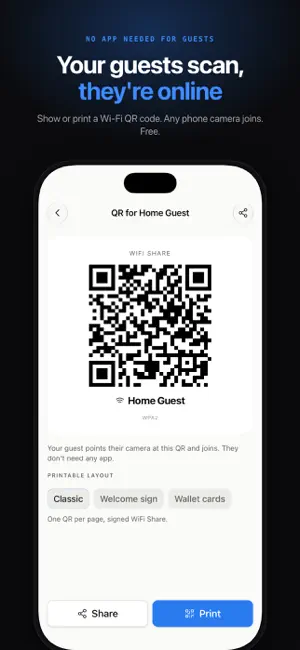
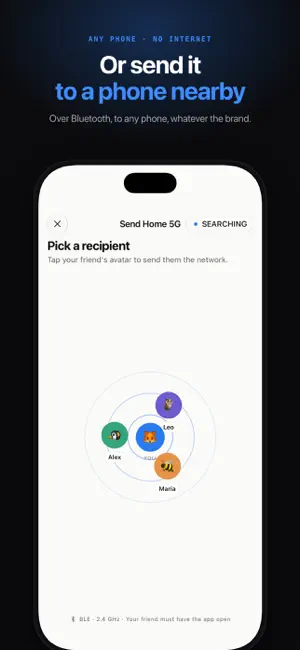
Share your Wi-Fi with a QR code your guests scan. They point their camera and join: no app to install, no password to type, any phone, even offline. No more dictating "uppercase B, lowercase 3, special character…". No more screenshots of the router sticker. HOW IT WORKS 1. Save a network: detect the one you're connected to, type it in, or scan its Wi-Fi QR code 2. Tap Share and choose "Show a QR code" or "Send to a nearby phone" 3. Your guest scans the QR with their camera, or accepts your send. They're online. WI-FI QR CODE FOR GUESTS (FREE) • Create a QR code for any saved network, free • Guests scan it with their phone's camera. They don't need any app, whatever the brand. • Show it on your screen, share it as an image, or print it • No internet needed to join: the QR holds the network name and password SEND OVER BLUETOOTH • Send a Wi-Fi password to a nearby phone, whatever the brand • Both phones need WiFi Share. No internet needed: the transfer goes straight from phone to phone • End-to-end encrypted and confirmed with a 4-digit code on both screens • Nobody on the radar? Show a QR code instead, in one tap • Choose when you're visible: always, only when receiving, or never WI-FI QR SCANNER • Scan the Wi-Fi QR code on a router, hotel card or café table (WPA, WPA2, WPA3, open networks) • Save the network and join without typing a single character KEEP YOUR NETWORKS ORGANIZED • Your saved Wi-Fi passwords in one place: home, office, family, holiday rentals • Folders for Home, Work, Travel and Family (Pro) • Share history, so you know who you sent what and when PRIVATE BY DESIGN Passwords are stored in your device's secure Keychain and only leave your phone when you share them. No account, no sign-up, no ads, no servers holding your networks. PERFECT FOR • Hosts and holiday rentals: a Wi-Fi sign by the door, ready for every guest • Cafés, offices, coworking spaces and hotels with a guest Wi-Fi • Families and friends tired of forwarding the password in the group chat • IT support, schools and anyone managing several networks FREE AND PRO Free: the Wi-Fi QR code, Bluetooth sending, the QR scanner, a classic printable QR sheet, up to 3 saved networks and 7 days of history. WiFi Share Pro is a one-time purchase, no subscription: • Unlimited saved networks • Folders and full history • Printable Wi-Fi signs: a Welcome sign with your own headline, QR and password, and Wallet cards (8 cut-out cards per page), with no WiFi Share branding • Custom themes and avatars Point, scan, connect.
What’s new
Version 1.0.6 · Updated October 26, 2026
Bug fixes and stability improvements.
Alternatives to WiFi Share: Password & QR Code
Looking for apps like WiFi Share: Password & QR Code? Here are 6 similar apps on the App Store. The highest rated is WiFi Tap Connect (5.0/5), and all 6 are free to download.
-
 QR WiFi Share
2.0
QR WiFi Share
2.0
-
 WiFi Tap Connect
5.0
WiFi Tap Connect
5.0
-
 NetShare - share file in local
5.0
NetShare - share file in local
5.0
-
 WifiLink: Share WiFi
3.2
WifiLink: Share WiFi
3.2
-
 WiFi Hotspot Manager
3.5
WiFi Hotspot Manager
3.5
-
 WiFi Radar+
3.7
WiFi Radar+
3.7
| App | Rating | Price | Last updated | Compare |
|---|---|---|---|---|
| WiFi Share: Password & QR Code | – | Free | October 26, 2026 | |
| QR WiFi Share | 2.0 / 5 (1) | Free | Feb 12, 2026 | Compare |
| WiFi Tap Connect | 5.0 / 5 (4) | Free | Jun 3, 2026 | Compare |
| NetShare - share file in local | 5.0 / 5 (1) | Free | Oct 24, 2026 | Compare |
| WifiLink: Share WiFi | 3.2 / 5 (25) | Free | Apr 14, 2025 | Compare |
| WiFi Hotspot Manager | 3.5 / 5 (24) | Free | Sep 9, 2026 | Compare |
| WiFi Radar+ | 3.7 / 5 (10) | Free | Oct 16, 2026 | Compare |