

Cuevello Remote Menu & Screen
HOsy - intelligent software. Developer Tools iPhoneiPadiPod touchApple Watch
Cuevello Remote Menu & Screen is a free Developer Tools app for iPhone and iPad by HOsy - intelligent software. Requires iOS 18.0. Updated October 16, 2026.
- Price
- Free
- on the App Store
- Size
- 46 MB
- Age 4+
- Updated
- Oct 16
- 2026 · v1.7
Screenshots



About Cuevello Remote Menu & Screen
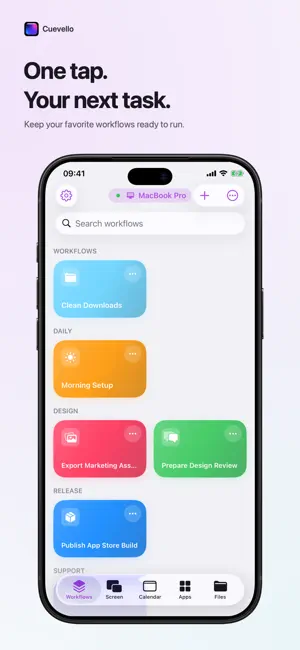
Cuevello turns your device into a fast local control surface for the Mac you already use. Pair your Mac locally, stream a monitor or app window, browse the menu of the active app, run menu commands, trigger keyboard shortcuts, open URLs, send text to the Mac clipboard, switch apps, and save repeatable routines as workflows. Cuevello is made for the small Mac actions that interrupt your flow: checking a build, watching the iOS Simulator from iPad, opening a project URL, exporting a file, pasting text into a Mac app, dismissing a blocking dialog, or starting a prepared automation from across the room. What Cuevello does: - Stream and control a paired Mac screen - View a monitor, app window, or selected app - Use fullscreen or Picture in Picture for live streams - Run Mac menu commands from your device - Browse the active app's menus and submenus - Trigger keyboard shortcuts from the app menu - Build workflows with screen streams, menu commands, app actions, URLs, dynamic menu choices, clipboard text, and prompts - Launch saved workflows from shortcuts and widgets - Sync workflows between your devices - Open URLs on the paired Mac - Send text to the Mac clipboard - Switch, open, or quit Mac apps - Keep separate setups for multiple Macs - Detect modal windows that block automation Cuevello works locally. The Mac app publishes a local service, and your device connects on the same local network or through your VPN. Use it for: - Following up after AI-assisted work - Checking local builds away from the desk - Running saved shortcuts and Cuevello widgets from your device - Sending text snippets to the macOS Clipboard before pasting - Sending files to the Mac or downloading local Mac files - Checking monitor screenshots before the next remote step - Driving demos without breaking presentation focus - Repeating export, share, archive, or render workflows - Controlling a desk Mac, build Mac, or media Mac from one device Requirements: - Cuevello Mac app running on the Mac - Device on the same local network as the Mac - Accessibility permission on macOS so Cuevello can read and trigger menu items - Local Network permission on the device for discovery and pairing - Secure pairing for end-to-end encrypted transfers between paired devices
What’s new
Version 1.7 · Updated October 16, 2026
Cuevello 1.7 brings Mac streaming to iPhone Duo. The interface adapts to how the device is folded: in partially folded portrait mode, the stream appears on the upper display while controls and an optional touchpad use the lower display. In landscape, the stream can use the entire screen. - On iPhone and iPad, showing the stream controls no longer shrinks the picture. They appear over the full-screen stream instead. - Switch more easily between Mac apps and monitors while streaming. On iPhone Duo, previews of other connected displays help you choose where to go next. - Workflows are easier to edit on wider layouts: keep the workflow in view while adding or editing individual steps alongside it. - The new Position and Resize Window action arranges the focused Mac window using presets or exact coordinates. You can add it to a workflow or ask the AI Assistant to create it. - First-time pairing, keyboard interaction, and the spacing of stream controls have been refined. Update Cuevello Server to version 1.8 to use the new Mac window action and more efficient monitor previews.
App privacy
The developer, HOsy - intelligent software., reported these privacy practices to Apple.
Data Not Linked to You
The following data, which may be collected but is not linked to your identity, may be used for the following purposes:
- Usage Data: Product Interaction, Advertising Data
Used for: Third-Party Advertising, Developer’s Advertising or Marketing, Analytics, App Functionality
Alternatives to Cuevello Remote Menu & Screen
Looking for apps like Cuevello Remote Menu & Screen? Here are 6 similar apps on the App Store.
-
 BirdyBeep
-
 Wolf Monitor
-
 farcrew: terminal for agents
-
 Githot - Trending Repos
-
 Xtend: Remote Dev
-
 REMOREMO
| App | Rating | Price | Last updated | Compare |
|---|---|---|---|---|
| Cuevello Remote Menu & Screen | – | Free | October 16, 2026 | |
| BirdyBeep | – | Free | Sep 30, 2026 | Compare |
| Wolf Monitor | – | Free | Jun 29, 2026 | Compare |
| farcrew: terminal for agents | – | Free | Sep 7, 2026 | Compare |
| Githot - Trending Repos | – | Free | Aug 11, 2026 | Compare |
| Xtend: Remote Dev | – | Free | Aug 18, 2026 | Compare |
| REMOREMO | – | Free | Sep 27, 2026 | Compare |